

Key takeaways
- Card sorting is a UX research method in which participants group labeled cards, so a team can build navigation that matches users' mental models.
- Open sorts are generative and find groupings; closed sorts are evaluative and check set categories; hybrid sorts mix both.
- Plan 30–50 cards per study, the range Nielsen Norman Group gives to avoid fatigue.
- Plan at least 15 participants per user group; at 15, Jakob Nielsen's data correlates 0.90 with a 168-user result.
- Read the similarity matrix and dendrogram next to participant comments, then tree test the new menu.
"Export billing history" is one card in an illustrative card sorting study for a software as a service (SaaS) project-management app, and participants file it in three piles: Billing, Reports and Account. Nobody filed it wrong. The split says the settings menu needs a cross-link or a clearer label, and finding such splits before anyone draws a wireframe is what the method is for.
Teams use this user experience (UX) research method when a menu must be built or rebuilt, and in our UX research services it runs as a card sort and tree test pair. Each decision gets a section, in the order you meet it: sort type, sample size, the run, analysis, a worked example (invented for teaching), tools and the tree test that follows.
What is card sorting in UX research?
Card sorting is a UX research method in which participants group labeled cards into categories, so a team can shape an information architecture (IA) that matches users' mental models.
Each card names one content item or feature, and in most sorts participants name each group. Information architecture is how a product's content is organized, labeled and connected into menus; mental models are users' expectations of where things live. Nielsen Norman Group (NN/g) defines the method by that act of placing labeled cards into groups, and in user interface (UI) and UX design its output feeds navigation labels.
Wikipedia's entry on the method describes it as a knowledge elicitation technique, used in cognitive psychology as well as UX design, and cites Donna Spencer's 2009 book, subtitled Designing Usable Categories. A card sorting exercise runs on paper with index cards or online. Our overview of where this method sits among UX research methods helps you confirm it fits your question.
Which card sorting does this guide cover?
This guide covers the UX research method for menus and site structure, not the other activities that share its name.
- Trading cards: collectors sort by set or value, by hand or with card sorter machines.
- Computer science: sorting algorithms put items in order.
- Neuropsychology: the Wisconsin Card Sorting Test measures how flexibly people switch sorting rules.
- Occupational therapy: in the Activity Card Sort, clients sort photo cards of everyday activities.
- Classrooms: students group words or concepts on cards.
If your question is where users expect a setting to live, read on.
When does a card sort help your information architecture?
A card sort helps when you must create or rebuild an information architecture and do not yet know how users group the content.
Run one for:
- A new product with no taxonomy, because users' groupings beat the org chart.
- Navigation never tested before a redesign, which we list as a reason to invest in UX research.
- Merging products, because each team's categories fit only its own product. When Mass Media Co. replaced several separate order-taking systems with one platform, the discovery workshop behind that merger covered information architecture alongside user flows.
- Audiences that group differently, such as admins and end users, where Wikipedia finds the method most useful.
- Internal jargon in menus, because an open sort surfaces users' words.
Skip it when:
- Users cannot find items in an existing menu: tree test the current structure first.
- The problem is a task flow or form: run usability testing, because a sort never shows a screen.
- You need to know why users need a feature: start with interviews or watching users work in their real setting.
The FAQs list the method's limits. If your redesign touches navigation, schedule the sort before the first wireframe.
Open, closed or hybrid card sorting, which fits your stage?
An open card sort lets participants create and name groups, a closed card sort gives them your categories, and a hybrid mixes both; pick by how much structure exists.
Optimal Workshop's Card Sorting 101 introduction defines the three sort types the same way.
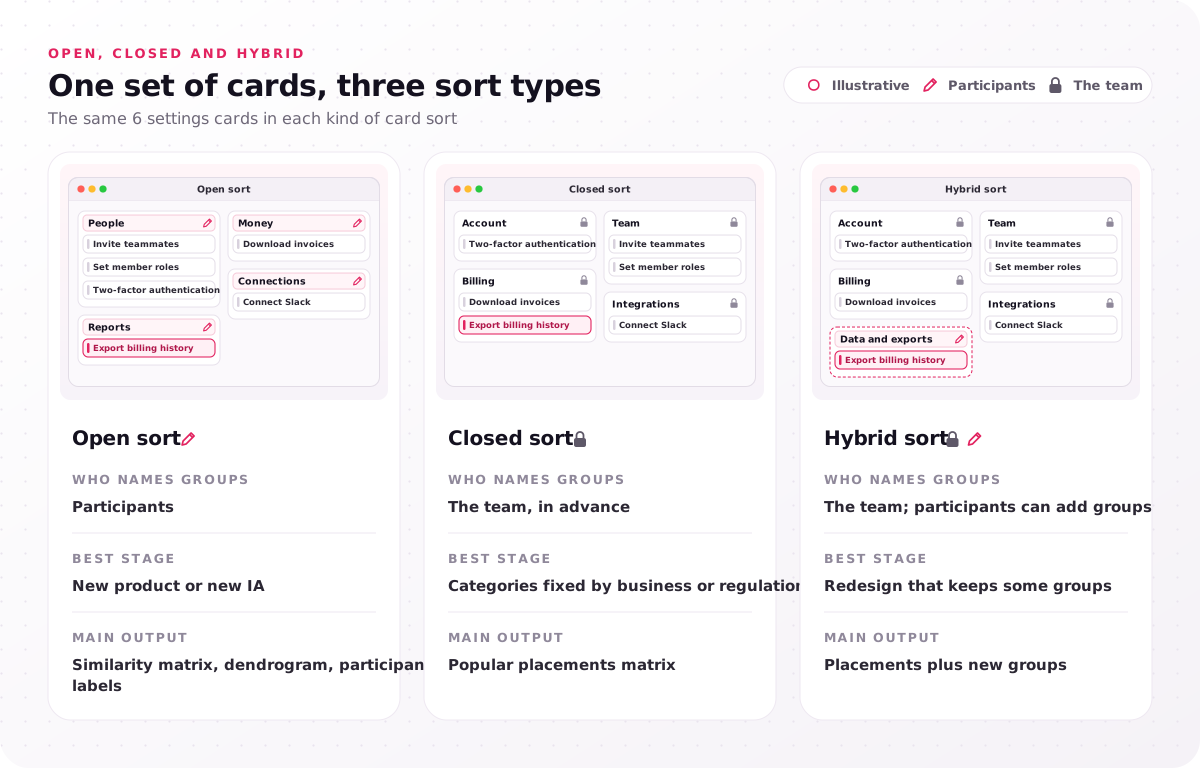
| Open sort | Closed sort | Hybrid sort | |
|---|---|---|---|
| Who names groups | Participants | The team, in advance | The team; participants can add groups |
| Best stage | New product or new IA | Categories fixed by business or regulation | Redesign that keeps some groups |
| Main output | Similarity matrix, dendrogram, participant labels | Popular placements matrix | Placements plus new groups |
Open card sorting
An open sort is the discovery format: participants invent the groups and label each one in their own words.
It uncovers mental models and users' own words. Wikipedia classes open sorts as generative, and NN/g calls them the most common type. Use one when you have content but no structure you trust.
Closed card sorting
A closed sort hands participants a fixed set of predefined categories, and every card must go into one of them.
It checks a set of groups, so Wikipedia classes it as evaluative; that generative versus evaluative split is the core difference. NN/g generally prefers a tree test for validating structure, because it shows whether people find items, not just where they file them. Use one when category names are fixed.
Hybrid card sorting
A hybrid sort fixes some categories and lets participants add their own, which suits redesigns that keep part of the menu.
NN/g generally advises against hybrids because the predefined categories bias participants toward similarly structured groups, so analyze participant-added groups apart from placements in your set groups.
In modified-Delphi card sorting, credited by Wikipedia to Celeste Paul, each participant refines the previous participant's structure. Reverse card sorting is another name for tree testing. Our program runs card sorts in its evaluative studies step, which follows generative fieldwork and checks the early information architecture.
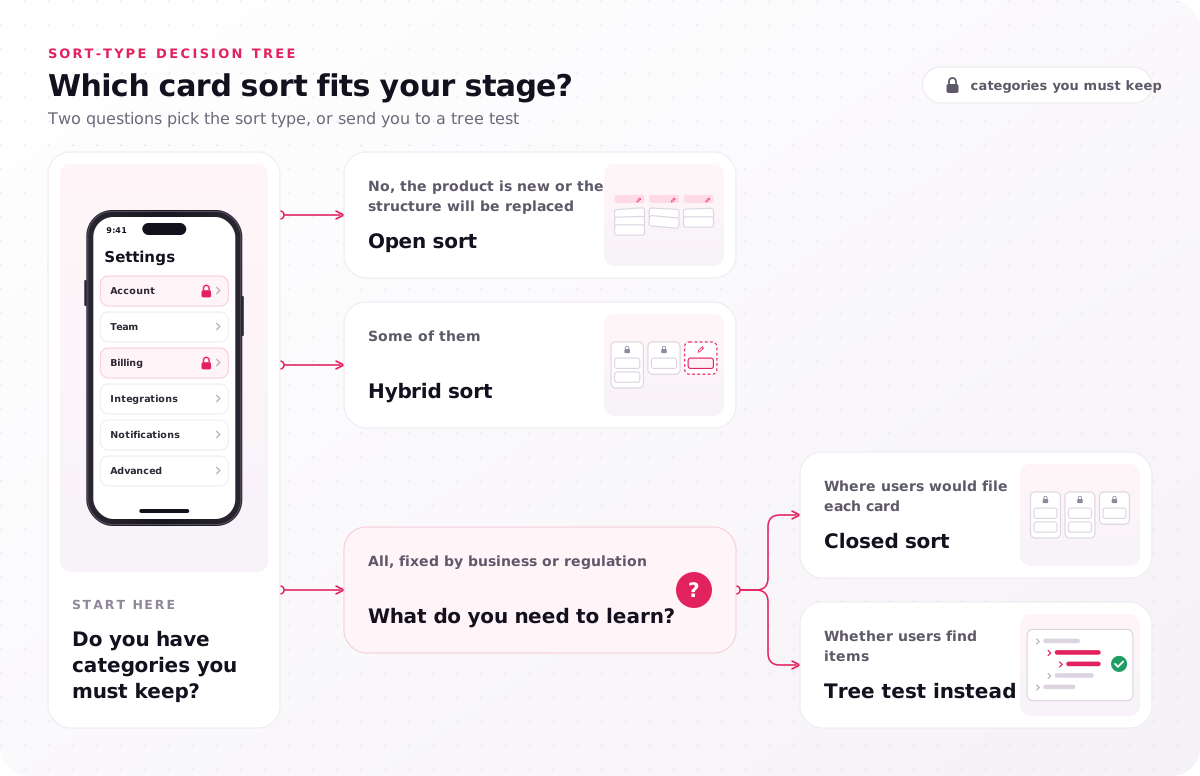
- Do you have categories you must keep?
- No, the product is new or the structure will be replaced: open sort.
- Some of them: hybrid sort.
- All, fixed by business or regulation: what do you need to learn?
- Where users would file each card: closed sort.
- Whether users find items: tree test instead.
When choosing between an open and a closed card sort, start from the sort-type decision tree's first question, not your tool's default.
How many cards and participants does a card sort need?
An open or closed card sort works best with 30–50 cards and at least 15 participants per user group, with more participants when you need comparable numbers.
Set the card count at 30–50 cards, NN/g's range for avoiding fatigue. Keep cards at one level of detail and never repeat a word across card labels, because participants then group by the shared word.
For the participant count, Jakob Nielsen's 2004 analysis compared smaller samples with a 168-user result and recommends 15. Generative work needs more people than a 5-user usability test, he explains, and he cites Tullis and Wood's suggestion of 20–30 users. The sample correlation rises fast up to 15, then slowly.
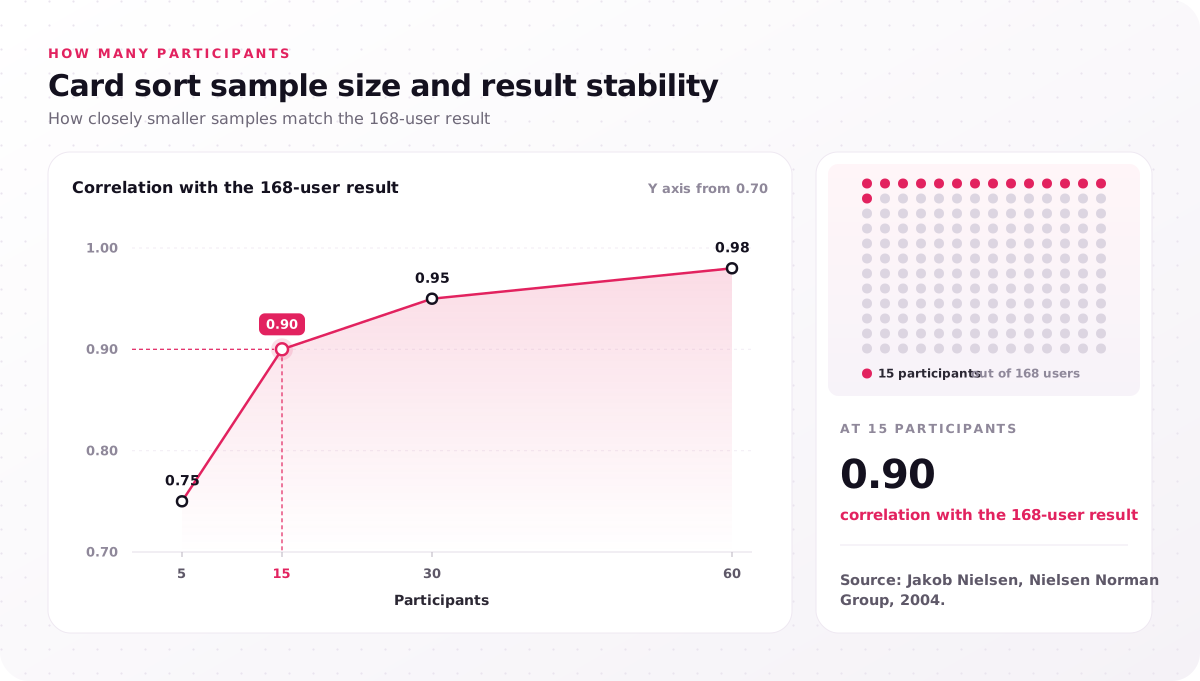
| Participants | Correlation with the 168-user result |
|---|---|
| 5 | 0.75 |
| 15 | 0.90 |
| 30 | 0.95 |
| 60 | 0.98 |
Source: Jakob Nielsen, Nielsen Norman Group, 2004.
For a quantitative study, NN/g's 2024 guide gives 30–50 participants, and our program runs its Optimal Workshop studies in that range. Count each user group separately, since admins and end users group cards differently. Finding that many matched people is the slow part of a card sort, and in our program participant recruitment runs 3–6 days ahead of the first session, so budget incentives per user group.
How to run a card sorting study, step by step
To run a card sort, list the content, write the cards, pick an open, closed or hybrid sort and its format, recruit, pilot, then run it with follow-up questions.
- Inventory the content and write one research question, because a sort with two questions answers neither.
- Write the cards to the rules above, and have an outsider read them for jargon.
- Choose the sort type and format from the sort-type decision tree and the table below.
- Recruit participants per user group, screening for people who use that part of the product.
- Pilot test with a small group of participants, as NN/g advises, and rewrite any card they hesitate over.
- Run the sort with follow-up questions: why a card went where it did, and which cards were hard.
In our program, the card sort and its tree test run inside the 4–8 day evaluative studies step, so the study duration fits that window. In-house, keep the order: recruit, pilot, launch.
Moderated or unmoderated, in person or remote?
Moderated sessions give the reasons behind each grouping, while unmoderated card sorting gives a large sample for the matrix; most studies need both.
The table compares formats by moderation mode, setup and best use.
| Format | How it runs | Best for |
|---|---|---|
| Moderated, in person | Index cards; the participant thinks aloud | Reasons, around 15 people |
| Moderated, remote | Video call with an online tool | Reasons, participants anywhere |
| Unmoderated, online | Participants sort alone | Similarity scores, 30–50 participants |
The FAQs give session lengths. Book moderated sessions first, so their comments shape the follow-up questions.
Best practices for a card sort
Good card sorts share five habits that protect the grouping data.
- One research question per sort, so groups answer one decision.
- Plain card labels, so the sort tests grouping, not vocabulary.
- A "not sure" pile, so nobody forces a card into a wrong group.
- A pilot, so a confusing card is fixed before the full sample sees it.
- Some moderated sessions, as NN/g recommends, so each cluster has a reason.
Copy these into your study plan.
How do you analyze card sorting results?
Analysis of a card sort reads card pairs in a similarity matrix, clusters in a dendrogram and participants' group names, then checks each pattern against comments before it shapes the menu.
Each similarity matrix cell shows the share of participants who put two cards together, the pair's similarity score or participant agreement; a card with no strong partner is one users cannot place. Hierarchical cluster analysis joins the closest pairs into a dendrogram, and where you cut it sets the number of top-level groups. Cut where groups make sense to users and the business.
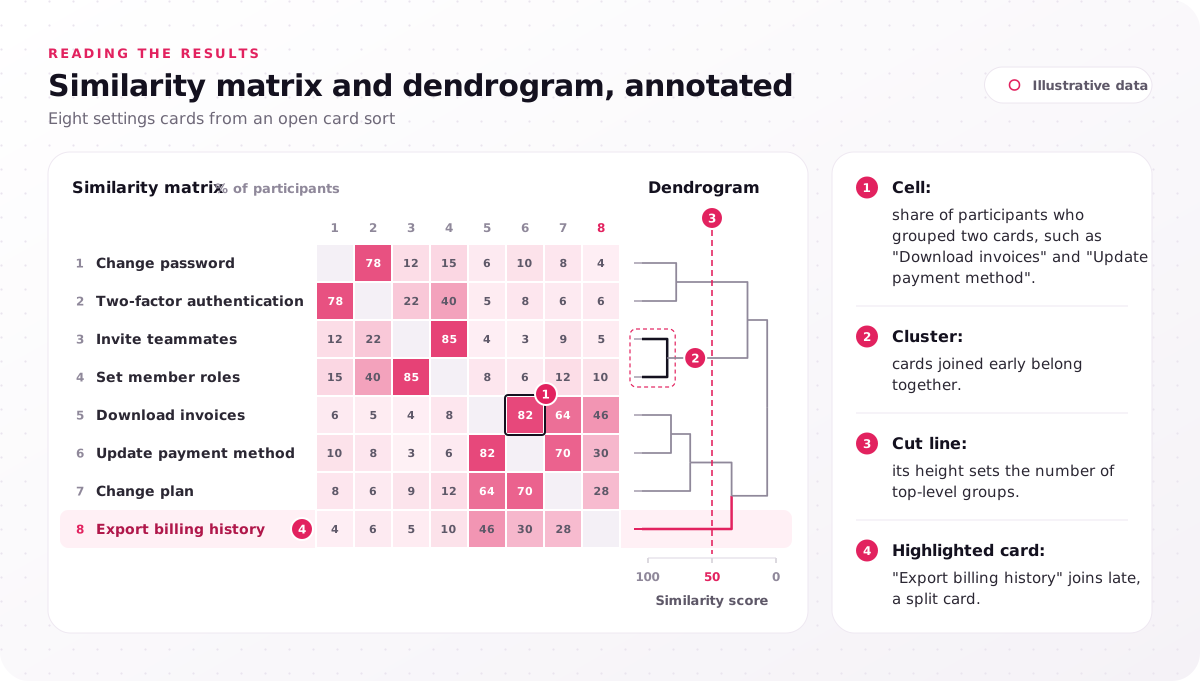
- Cell: share of participants who grouped two cards, such as "Download invoices" and "Update payment method".
- Cluster: cards joined early belong together.
- Cut line: its height sets the number of top-level groups.
- Highlighted card: "Export billing history" joins late, a split card.
Illustrative data.
Merge synonymous group names, such as "Billing" and "Payments", in a standardization grid; for closed sorts, a popular placements matrix shows which category won each card. A card split across groups needs a cross-link or a clearer label. Nielsen warns against building a structure from similarity scores alone, so weigh clusters against comments. Paper sorts need only a spreadsheet: one row per card, one column per group.
In our program, findings are tagged and presented in a 90-minute readout, the last of its five steps. Note why you cut where you did, because stakeholders will ask.
How is a card sort different from affinity mapping?
A card sort has participants group content items to shape navigation, while affinity mapping has researchers cluster their own notes during synthesis.
The sort shows users' mental models; affinity mapping organizes what the team learned. Use the sort for menus and affinity mapping for interview notes.
Card sorting example, regrouping a SaaS settings menu
This illustrative example sends 36 settings cards from a project-management app to an open card sort and turns 9 scattered menu groups into 5 that users recognize.
Every figure here is invented for teaching, not research data or a client result. The cards included Change password, Two-factor authentication, Invite teammates, Set member roles, Download invoices, Update payment method, Change plan, Export billing history and Connect Slack. Four clusters dominated (account, people, money and connections), and the matrix excerpt above shows the first three.
"Export billing history" landed in the three piles from the opening: Billing, Reports and Account. The "Reports" placements came from participants who read "export" as data work. "Two-factor authentication" split between account and team groups, because admins set it for everyone. That second split mirrors one we design for in SaaS UI UX design: each tenant holds its own users and roles, so screens separate account-level settings from personal settings.
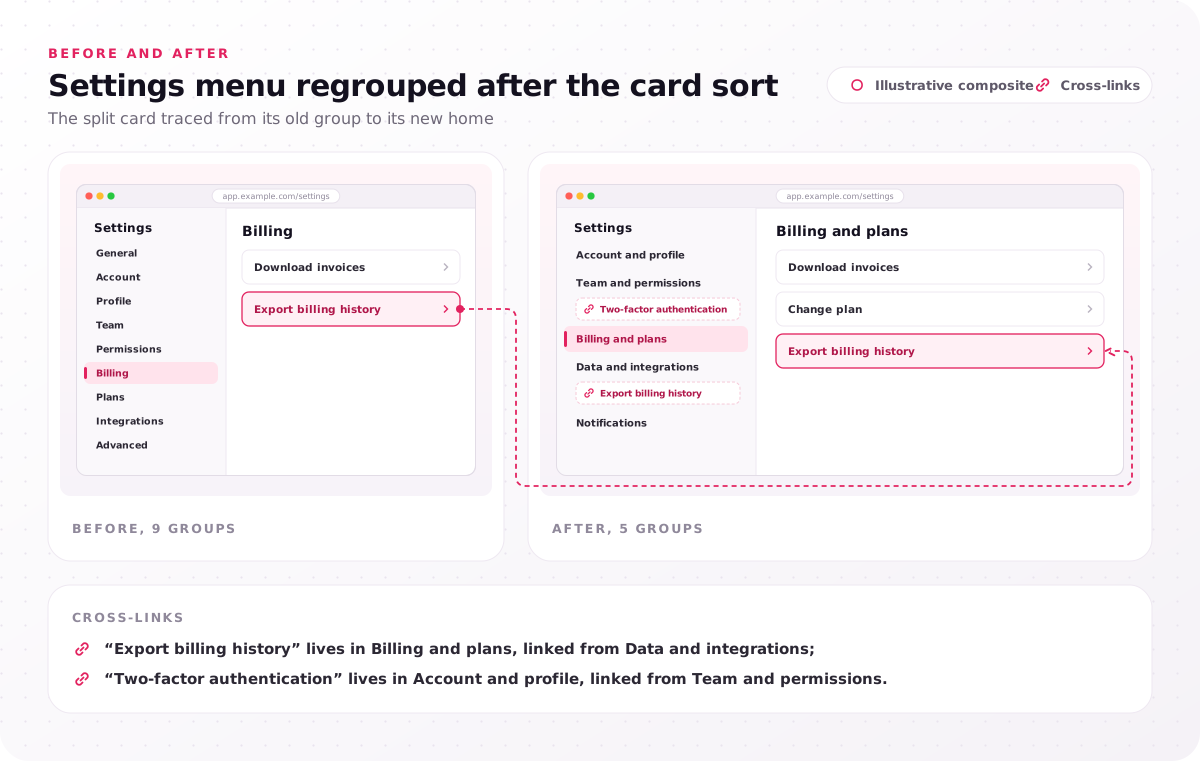
Before, 9 groups: General, Account, Profile, Team, Permissions, Billing, Plans, Integrations, Advanced.
After, 5 groups: Account and profile; Team and permissions; Billing and plans; Data and integrations; Notifications.
Cross-links: "Export billing history" lives in Billing and plans, linked from Data and integrations; "Two-factor authentication" lives in Account and profile, linked from Team and permissions.
The next check is a tree test task: "Where would you change who can see invoices?" The answer sits in Team and permissions, although the word "invoices" pulls people toward Billing and plans. Write one such task per split card.
Which card sorting tools fit open, closed and hybrid sorts?
Online tools for UX research such as Optimal Workshop, Maze and Lyssna run open and closed card sorts, while Miro boards and paper index cards suit small moderated sorts.
The table compares six options by sort types and best fit.
| Tool | Sort types | Best fit |
|---|---|---|
| Optimal Workshop | Open, closed, hybrid | Large unmoderated studies, built-in dendrogram |
| Maze | Open, closed | Teams already testing prototypes in Maze |
| Lyssna | Open, closed, hybrid | Sorts with follow-up questions |
| UXtweak | Open, closed, hybrid | Long card lists imported in bulk |
| Miro or FigJam | Any, by hand | Moderated remote sessions |
| Paper index cards | Open, closed or hybrid | In-person moderated sessions |
For a free tool, Lyssna's 2026 roundup of card sorting tools lists free plans for Lyssna (three seats) and UXtweak (15 responses a month, with card sorts capped at 20 cards on UXtweak's free plan), while Maze offers card sorting only on paid plans; index cards are free but manual. The best software fits your analysis output and participant panel; we use Optimal Workshop. Pilot in two tools before you pay.
Why tree testing comes after card sorting
A card sort proposes a menu from users' groupings, and tree testing then checks it by asking participants to find items in a text-only version of that menu.
So the card sorting vs tree testing question is about order, not choice. Samhita Tankala's February 2024 NN/g comparison describes the first as generating ideas for an information architecture and the second as evaluating one.
| Card sort | Tree test | |
|---|---|---|
| Participants | Group cards, often naming groups | Find items in a text-only menu |
| Method class | Open generative, closed evaluative | Evaluative |
| Output | Similarity matrix, dendrogram | Success and directness per task |
Optimal Workshop's 2016 post on which comes first sets the order: tree test the current menu, run the card sort, draft the structure, then tree test it with the same tasks. As a tree testing example, the invoice task above scores success (did people end in Team and permissions?) and directness (did they get there without backtracking?).
In our program, the card sort and tree test are one deliverable in Optimal Workshop, and our web app design services validate navigation with tree tests of, for example, 10–15 tasks. A full UX research program runs 4–8 weeks at a program price of $25,000–$60,000, and our pricing section explains what a UX research program with a card sort costs: a program with 1 user group, 10 user interviews and 1 card sort sits near $25,000.
One label in three piles looks small, yet it decides where a whole menu branch lives. Three choices protect that decision: the sort type from the sort-type decision tree, 15 or more participants per user group, and tree test tasks drafted alongside the cards. Your current menu or sitemap is the starting brief either way, so run the study in-house or send us that menu or sitemap and we will suggest the sort type and sample it needs. Every project begins with a free consultation and a fixed-scope proposal.
FAQs
Is card sorting qualitative or quantitative?
Both, depending on how you run it. Moderated sessions with around 15 participants give reasons, which is qualitative data, while unmoderated studies with 30–50 participants give comparable similarity scores.
How long does a card sort session take?
Session length for a card sort is about 5–30 minutes, depending on the number of cards and their complexity, per Dovetail's guide. dscout's guide tells researchers to plan for 60 minutes, which suits a moderated session where participants explain their choices.
Can you run a card sort remotely?
Yes. Remote card sorting runs unmoderated in online tools such as Optimal Workshop and moderated over video calls such as Zoom, as our program does. Remote sessions lose some in-person conversation, Wikipedia notes, so keep a few moderated ones.
What are the limits of a card sort?
A card sort shows how users group content, not whether they find it in a real interface. NN/g's limits include no site context, a grouping depth of one level, and fatigue past 50 cards, when a large Miscellaneous pile grows.
Should a card sort come before or after wireframes?
Before. The sort shapes the menu that wireframes lay out, and a tree test checks it before high-fidelity design. Moving the menu later means redrawing every screen with navigation.
How many card sorts does a redesign need?
Usually one per user group whose content differs, followed by a tree test. Run a second sort only when large split groups remain that comments cannot explain.