1–2 days
Kick-off and goals
We agree on the user flows, user groups and metrics in scope, and receive analytics access.

Our UX audit services, also booked as a UI/UX audit or user experience audit, review your website, software-as-a-service (SaaS) product or mobile app and deliver a prioritized fix list with effort estimates.





Get a free consultation
Free consultation · reply within one business day
In shortUX audit services review a website or app against usability heuristics, Web Content Accessibility Guidelines (WCAG) 2.2 criteria and product analytics. Our user experience (UX) audit takes 2–3 weeks, costs $5,000–$15,000, and ends with a prioritized fix roadmap ranked by impact and effort.
A UX audit is an expert evaluation of a website or app that finds usability issues, explains their cause and ranks each fix by impact and effort. Senior designers run the review against usability heuristics, WCAG 2.2 accessibility criteria and product analytics.
Teams also call it a user experience audit or a design audit of the product's usability. When the review covers the user interface (UI) too, buyers ask for a UI UX audit; ours covers both. Designers inspect the product instead of watching recruited users, which separates it from usability testing services. A website UX audit and an app UX audit follow the same method with different user flows, platform guidelines and data sources.
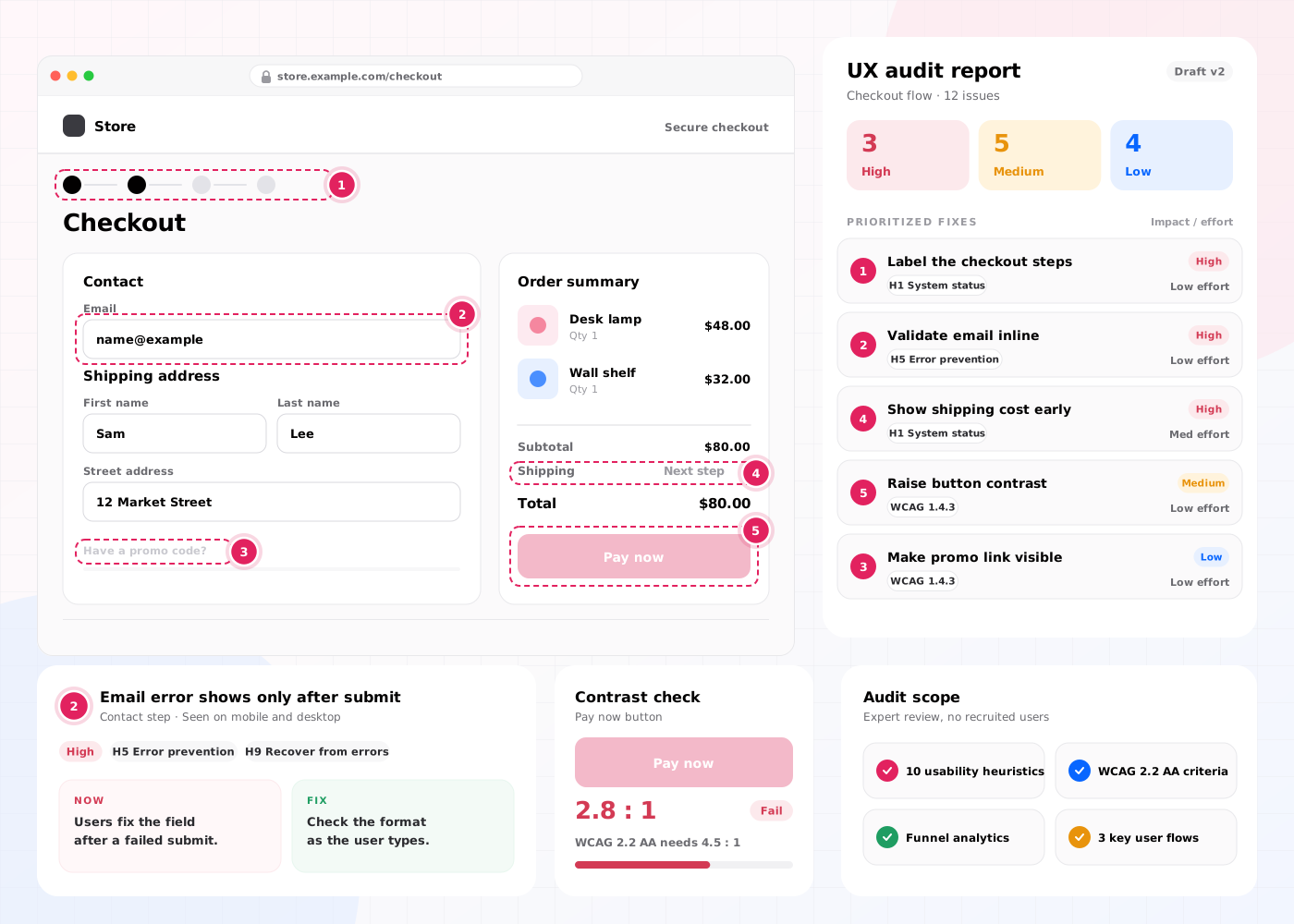
A UX audit checks 4 areas of a website or app: usability heuristics with UI consistency, accessibility, analytics and conversion, and information architecture with content.
Each area answers one question about your users: can they understand and use the interface, can everyone operate it, where do they drop off, and can they find what they came for? Findings from all 4 areas are merged into one UX audit report, so when a contrast failure explains a funnel drop-off on the same screen, the report gives one recommended fix instead of two separate tickets.
Designers score each key flow against Jakob Nielsen's 10 usability heuristics. The heuristic "consistency and standards" covers the UI audit side: three button styles for one action, mixed date formats or an icon that changes meaning between screens. Repeated inconsistencies point to design debt, which design system services fix at the component level.
Audited screens are checked against WCAG 2.2 level AA from the World Wide Web Consortium (W3C), including the criteria version 2.2 added, such as Target Size (Minimum) and Focus Not Obscured (Minimum). A WCAG 2.2 AA pass also meets WCAG 2.1 AA, the level the US Department of Justice's 2024 Americans with Disabilities Act (ADA) Title II rule adopts. The European standard EN 301 549 moved to WCAG 2.2 AA in version 4.1.1, published in September 2026.
Google Analytics 4 funnels show where users leave a sign-up, onboarding or checkout flow, and Hotjar or Microsoft Clarity recordings show what they did just before. Together they turn a drop-off number into a cause, for example a coupon field that sends shoppers off to search for codes. The cause, not the number, sets the conversion rate fix.
The review follows the navigation labels, menu depth and page hierarchy users rely on, and reads key copy such as plan names, error messages and button labels. These are scored under the heuristic "match between the system and the real world", so a menu item named after an internal project code is a typical information architecture finding.
Our UX audit services include 6 deliverables: a heuristic evaluation, an analytics review, a session-recording review, an accessibility check, a UX audit report and a prioritized fix roadmap.
Each key flow is scored with a UX audit checklist built on Jakob Nielsen's 10 usability heuristics, for example visibility of system status and error prevention.
Funnels in Google Analytics 4 show the drop-off points, for example the step where 40 of every 100 sign-ups stop.
Recordings and heatmaps in Hotjar or Microsoft Clarity show friction points, for example rage clicks and dead clicks.
Audited screens are checked against WCAG 2.2 level AA, for example color contrast of 4.5:1 for body text.
Every usability issue gets a screenshot, a severity rating from 1 to 4 and a recommended fix.
Fixes are ranked by impact and effort, with an effort estimate in design and development days.
Our user experience audit services cover 4 product types: a website UX audit, a SaaS or web app UX audit, a mobile app UX audit and an e-commerce UX audit.
The method stays the same for all 4 product types: heuristic evaluation, analytics review, accessibility check and a prioritized fix roadmap. What changes is the list of user flows, the platform guidelines and the data source. Kick-off therefore starts by naming the product type and its key flows, from 3–4 on a marketing website to 8–10 across a web app and mobile app.
A website UX audit follows visitors from landing pages to the form or demo request that counts as a conversion. A typical scope covers 3–4 flows, such as the home page to a contact form and the pricing page to a demo request, which keeps the audit near the $5,000 end of the price range.
A SaaS UX audit covers sign-up, onboarding and the core task flows for each user group, for example an admin who sets permissions and a member who does the daily work. Product analytics show where trial users stall before they reach value. Teams that redesign afterwards continue with SaaS UX design.
A mobile app UX audit adds Apple's Human Interface Guidelines (HIG) for iOS and Material Design 3 for Android to the usability heuristics. Typical checks are hit targets of 44×44 pt on iOS and 48×48 dp on Android, gestures that conflict with system navigation and permission prompts that appear before users see the app's value.
An e-commerce UX audit follows a shopper from site search and category pages to the product page, cart and guest checkout, and reads page speed from Core Web Vitals field data, Google's real-user metrics for loading, responsiveness and layout stability. Our e-commerce UX audit checklist lists each store check and the data that flags it.
The UX audit process takes 2–3 weeks (10–15 working days) and runs in 4 steps, from kick-off to the roadmap handover.
We agree on the user flows, user groups and metrics in scope, and receive analytics access.
1–2 designers run the heuristic evaluation, analytics review, session-recording review and accessibility check; on a two-designer audit, each reviewer works independently.
Findings are merged, evidenced with screenshots and given a severity rating and an effort estimate.
We present the UX audit report in a 60-minute session and hand over the prioritized fix roadmap.
A UX audit report turns each usability issue into one evidenced finding, then sorts the findings into a fix roadmap with quick wins first.
An illustrative finding from a sign-up flow: password rules appear only after an error. The finding shows the screenshot, the broken heuristic (error prevention), a severity rating of 3 out of 4, the recommended fix (show the rules beside the field) and an effort estimate of 1 development day. High-traffic fixes can go to A/B testing before a full release.
A UX audit has 4 benefits: it increases conversion rate, improves the user experience, reduces wasted development time and develops a shared backlog of evidence-based fixes.
Removing friction points in checkout, sign-up and onboarding flows increases the share of users who complete them.
Fixing usability issues and accessibility failures improves task success rate for every user group, including users with disabilities.
Effort estimates show which fixes cost 1 day and which cost 2 weeks, so developers start with the highest impact per day.
Product, design and engineering teams develop one prioritized list, built from evidence instead of opinion.
A UX audit is expert-led and covers the whole product in 2–3 weeks; usability testing is user-led and validates 3–5 tasks with real users. Most teams run the UX audit first, then test the riskiest flows.
| Criterion | UX audit | Usability testing |
|---|---|---|
| Who evaluates | 1–2 senior UX designers | 5–8 recruited users per round |
| Coverage | Every key user flow | 3–5 tasks per round |
| Main output | UX audit report and fix roadmap | Task success rate and observed failures |
| Timeline | 2–3 weeks | 1–3 weeks |
| Price on this site | $5,000–$15,000 | Part of a $25,000–$60,000 research sprint |
A UX audit costs $5,000–$15,000 and takes 2–3 weeks. The price depends on 4 factors: the number of user flows, the number of platforms, the number of user groups and the depth of the accessibility check.
A single-platform website UX audit with 3–4 flows sits near $5,000. A web app and mobile app audit with 8–10 flows, 2 user groups and a full WCAG 2.2 AA check sits near $15,000. Fixes that need designing continue in a design sprint, and a UX strategy beyond the fixes comes from UX consulting services. Comparing this with a freelancer's or an artificial intelligence (AI) tool's quote? Send each provider the six scope inputs that make UX audit quotes comparable.
A company should hire UX audit services in 5 situations:
Book a 45-minute UX audit session. We review your product and identify the top three friction points.
Book a UX auditWe design UI and UX for E-commerce, SaaS, EdTech, Media, Blockchain and Enterprise products.
Send us your project. A design lead reviews it and schedules a call within one business day. We sign an NDA before the first technical discussion if you prefer.
These 10 answers about UX audit services cover scope, accessibility, data access, reports, timing, entry price, UI vs UX audits, choosing a provider and consulting.
Still have a question?
A design lead answers every message within one business day.
Talk to a design leadYes. A website UX audit of 3–4 flows costs about $5,000 and shows the fixes with the highest impact per development day.
Yes. Every UX audit includes a WCAG 2.2 level AA check of the audited screens. A full-site accessibility audit is quoted separately.
No. A UX audit works without analytics, but Google Analytics 4 or Hotjar access adds drop-off data to the heuristic evaluation.
A UX audit report lists every usability issue with a screenshot, a severity rating from 1 to 4, a recommended fix and an effort estimate.
A UX audit takes 2–3 weeks, which equals 10–15 working days, from kick-off to the roadmap handover.
UX stands for user experience: how easily a person finds, understands and completes tasks in a website or app, and how that feels. A UX audit measures that ease: it finds where users of your website or app hesitate, make errors or give up, and explains why.
A UI audit reviews the visual layer: typography, color contrast, spacing and whether components look and behave the same on every screen. A UX audit reviews whether users complete their tasks, from navigation to error recovery. Our UI UX audit covers both, because the "consistency and standards" heuristic and the WCAG 2.2 contrast checks sit inside the same review.
Affordable UX audit services start with a narrow scope: a single-platform website UX audit of 3–4 user flows costs about $5,000, the price at which our engagements start, and still includes the accessibility check and the fix roadmap. For a first look before you commit, book a 45-minute UX audit session; we review your product and identify its top three friction points.
Compare UX auditing services on 3 points: the methods in the quote, how a finding is written and who reviews your product. A strong quote names the usability methods (heuristic evaluation, cognitive walkthrough, analytics review, competitive benchmarking or usability testing), shows findings with a severity rating and an effort estimate, and names senior designers. The same test applies to a UX audit agency, a product studio or a freelancer.
Yes. UI/UX consulting and audit work fit one sequence: start with the UX audit when the interface problem is already known, or with UX consulting when no UX plan exists. The audit's prioritized fix roadmap then gives the consulting work an evidence-based backlog for strategy, team process and design.