3–5 days
HIG review and goals
We review the app against Apple Human Interface Guidelines and agree the user flows and devices in scope.

Our iOS app design services build interfaces on Apple's Human Interface Guidelines, test them with real users and hand them to your developers ready to build.





Get a free consultation
Free consultation · reply within one business day
In shortiOS app design services create the user interface (UI) and user experience (UX) of iPhone and iPad apps that follow Apple Human Interface Guidelines (HIG), map to native SwiftUI views and include a design review of the first TestFlight build. Our iOS app design takes 4–8 weeks, costs $25,000–$60,000, and ends with SwiftUI-ready specs for developers.
iOS app design is the process of designing iPhone and iPad app interfaces that follow Apple Human Interface Guidelines and use native iOS components. Designers apply the SF Pro typeface, SF Symbols, Dynamic Type and a minimum hit target of 44×44 pt (about 7 mm).
iOS app design differs from mobile app UI UX design services in scope: iOS app design targets Apple devices only, so every screen uses native patterns, for example a tab bar, a navigation stack and sheets. iPhone app design and iPad app design share one component library and differ in layout.
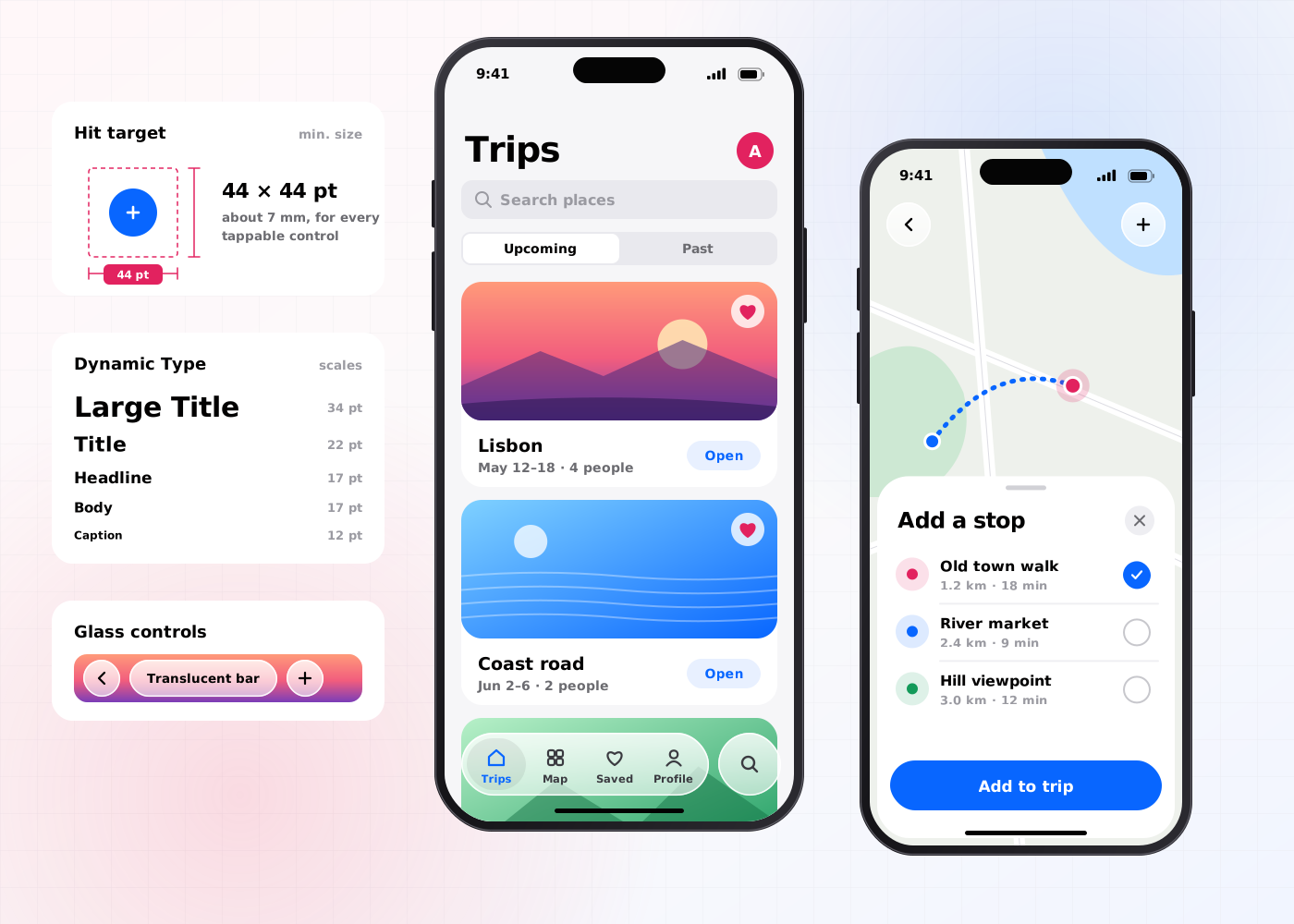
Our iOS app design services include 6 deliverables: a HIG review, user flows, an iPhone prototype, iPad and Apple Watch layouts, an accessibility spec and SwiftUI-ready specs.
The current app or concept is checked against Apple Human Interface Guidelines, for example navigation, modality and the 44×44 pt hit target. Our guide to iOS design guidelines explains what changed for iOS 27, Liquid Glass and iPhone Duo.
Diagrams of every path through the app, for example onboarding, Sign in with Apple and in-app purchase.
A clickable Figma prototype for iPhone screen sizes, for example the 4.7-inch and 6.9-inch displays.
Adapted layouts for iPadOS and watchOS, for example split view on iPad and a complication on Apple Watch.
Rules for Dynamic Type, VoiceOver labels and dark mode, for example body text that scales across every Dynamic Type size.
Annotated Figma files that map each component to SwiftUI views, for example List, NavigationStack and TabView.
The iOS app design process takes 4–8 weeks (20–40 working days) and runs in 5 steps, from HIG review to SwiftUI handoff.
We review the app against Apple Human Interface Guidelines and agree the user flows and devices in scope.
Designers map user flows and wireframe iPhone screens with native patterns, for example tab bars and sheets.
A clickable iPhone prototype is tested with 5 users per round in moderated sessions.
Designers apply SF Pro, SF Symbols and the brand colours, then adapt screens for iPadOS and watchOS.
We hand over SwiftUI-ready specs and review the first TestFlight build against the design.
iOS app design has 4 benefits: it increases retention, improves accessibility, reduces development time and develops an iOS component library.
Native navigation and short onboarding increase the share of users who open the app again after the first session.
Dynamic Type, VoiceOver labels and 4.5:1 text contrast improve the app for users with low vision.
SwiftUI-ready specs map each screen to native views, so developers write fewer custom components.
Each release adds SwiftUI-mapped components to one Figma library, so the iOS component library develops release by release.
iOS app design covers Apple devices in depth; mobile app UI UX design covers iOS and Android in one project. Teams that ship to the App Store only choose iOS app design.
| Criterion | iOS app design | Mobile app UI UX design |
|---|---|---|
| Platforms | iPhone, iPad and Apple Watch | iOS and Android phones |
| Guidelines | Apple HIG | Apple HIG and Material Design 3 |
| Handoff target | SwiftUI-ready specs | Specs for Swift, Kotlin, React Native or Flutter |
| Timeline | 4–8 weeks | 4–8 weeks |
| Price on this site | $25,000–$60,000 | $25,000–$60,000 |
Related:mobile app UI UX design servicesinteraction design agency
iOS app design costs $25,000–$60,000 and takes 4–8 weeks. The price depends on 4 factors: the number of user flows, the number of Apple devices, the number of test rounds and the depth of the accessibility spec.
An iPhone app design with 4–5 flows and 1 test round sits near $25,000. An iPhone, iPad and Apple Watch app with 12–15 flows, 3 test rounds and a full VoiceOver spec sits near $60,000. Apps that need a full component library continue with design system services.
An iPhone app team should hire iOS app design services in 5 situations:
Book a 45-minute UX audit session. We review your product and identify the top three friction points.
Book a UX auditWe design UI and UX for Startups and E-commerce products.
Send us your project. A design lead reviews it and schedules a call within one business day. We sign an NDA before the first technical discussion if you prefer.
These answers cover the 5 questions buyers ask most about iOS app design services.
Still have a question?
A design lead answers every message within one business day.
Talk to a design leadYes. Every iOS app design follows Apple Human Interface Guidelines for navigation, typography, hit targets and accessibility.
Yes. iPad app design reuses the iPhone component library and adds iPadOS layouts, for example split view and sidebar navigation.
No. iOS app designers deliver SwiftUI-ready specs that map each component to a SwiftUI view, and developers write the SwiftUI code.
Yes. iOS app design follows Apple HIG and Android app design follows Material Design 3, so navigation, controls and typography differ.
iOS app design takes 4–8 weeks, which equals 20–40 working days, from HIG review to SwiftUI handoff.