Key takeaways
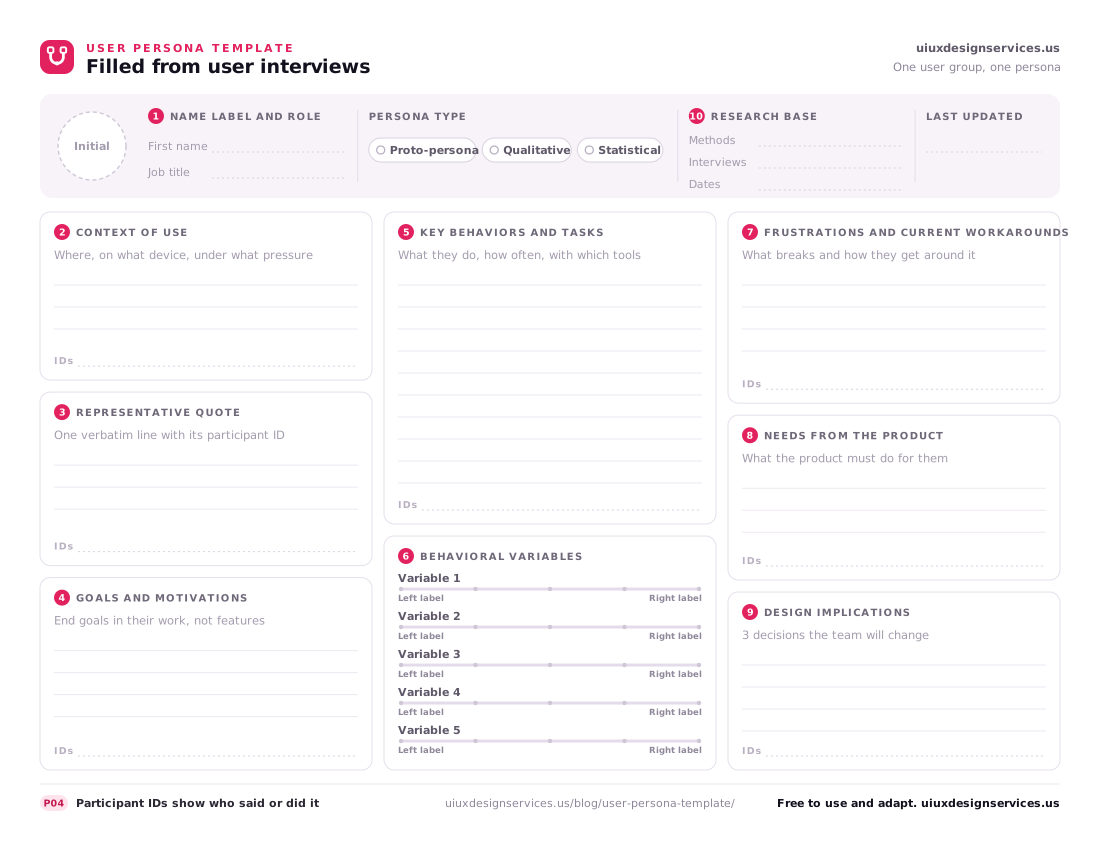
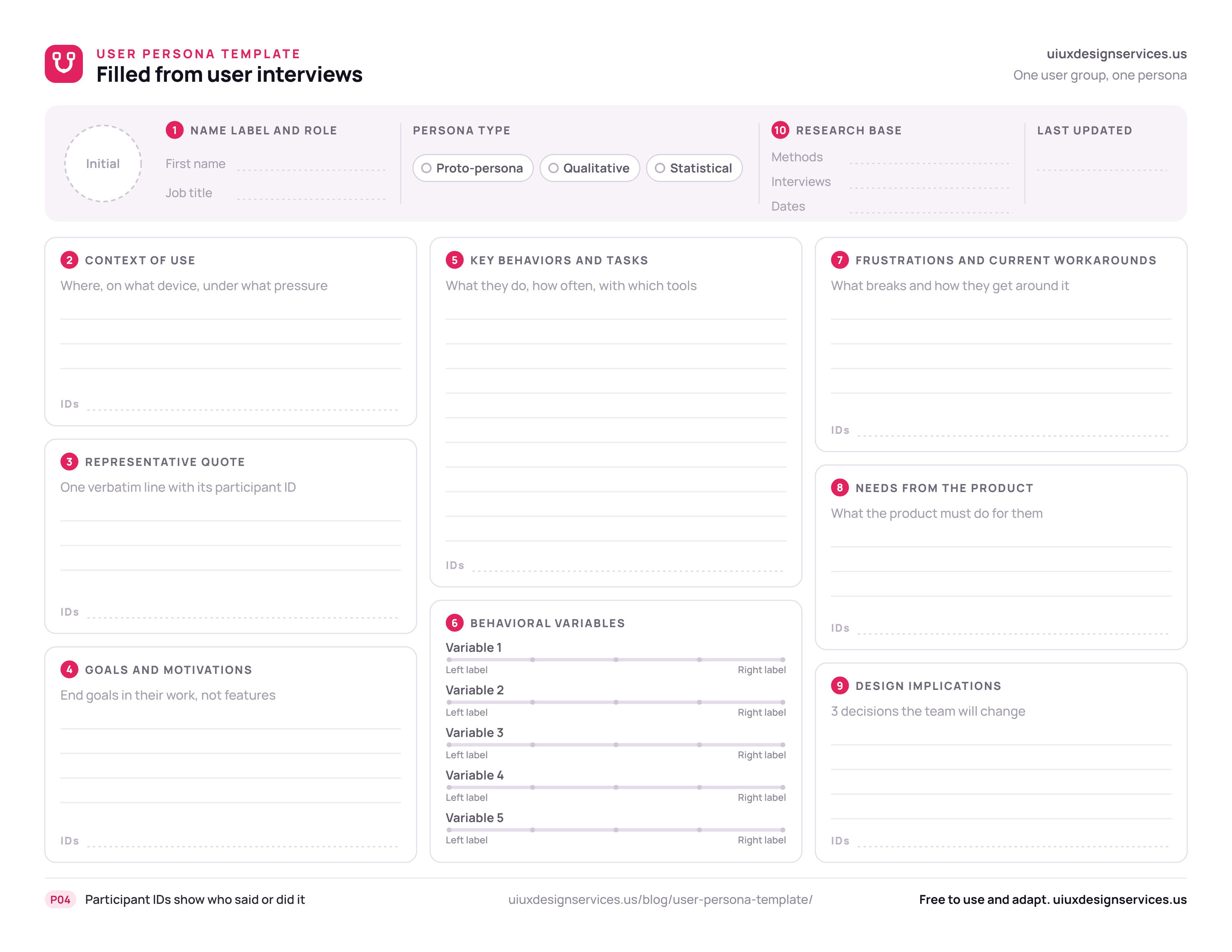
- A user persona template is a one-page layout of 10 fields and 5 behavioral variable sliders, filled from user interviews.
- Plan 10–15 interviews per user group, and stop a group once new interviews add no new goals or frustrations.
- Personas come from clusters: place every participant on every behavioral variable and name the groups that move together.
- Every evidence field should change a design decision and name the participants whose words or actions back it.
- Our template is free with no form: a print file, an editable vector, a slide image, a spreadsheet worksheet and an illustrative example.
Twelve accounts payable clerks, placed as dots on one slider from "batches invoices weekly" to "clears each invoice on arrival", fall into two clumps, and those clumps, not a brainstorm, are what belong in a user persona template. Seven dots gather at the batching end and five at the other, so one averaged persona would fit nobody. The clerks and their invoice approval app are illustrative.
Sorting people by what they do, rather than by age or job title, is the synthesis step of user experience (UX) research that our UX research services use to build personas, so each field of this template leaves room for the participant IDs behind it.
Download the user persona template below as a print-ready page, an editable vector or a slide image, with a variable worksheet and a filled example; all five files are free to use and adapt, with no form.
- One-page Portable Document Format (PDF) to print, US Letter in landscape
- Scalable Vector Graphics (SVG) file to edit in Figma, or in PowerPoint on Windows
- Portable Network Graphics (PNG) image sized for slides, 3300 × 2550 px
- Behavioral variable worksheet, comma-separated values (CSV), 5 slider columns
- Filled example, Priya the batch processor (illustrative PDF)
What is a user persona template, and what goes in it?
A user persona template is a one-page layout that a team fills with user interviews to describe one user group as a single research-based persona.
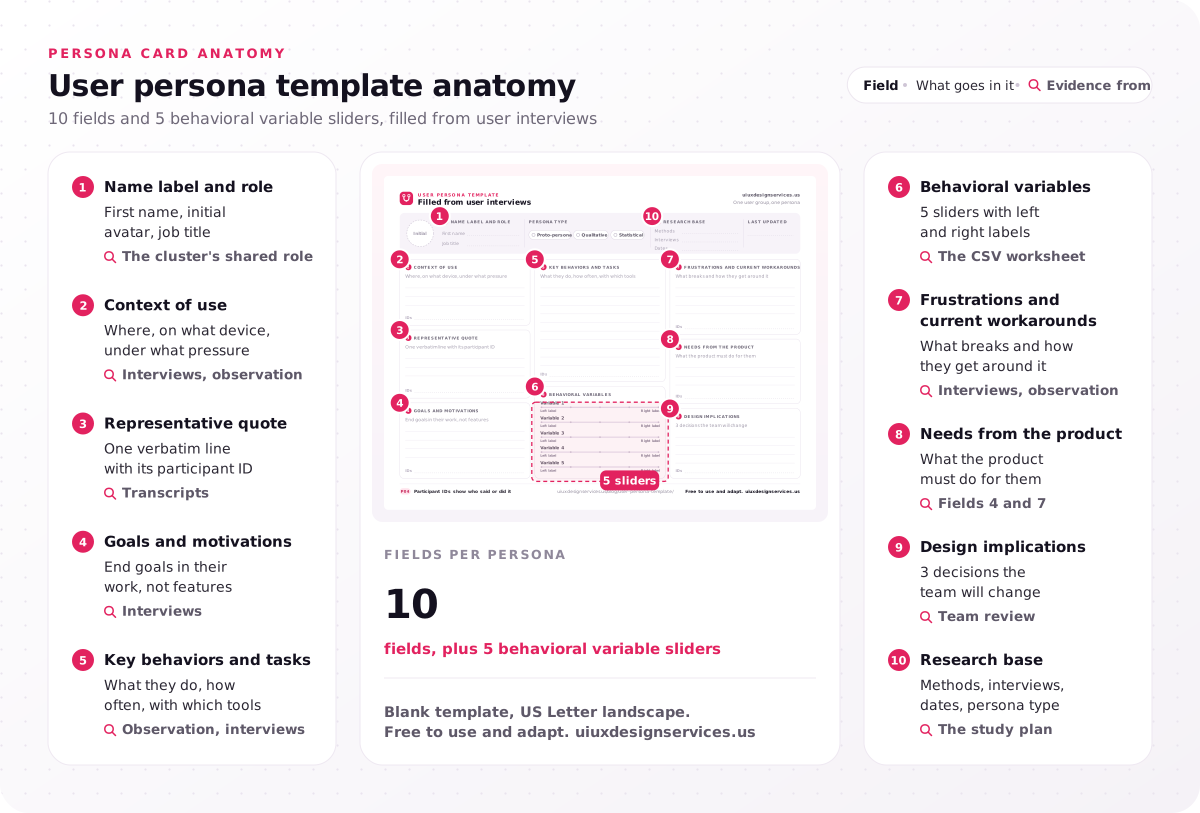
Ours has a field count of 10, including context of use, goals and motivations, and frustrations and workarounds, and a slider count of 5, one per behavioral variable, plus a research base line for methods, number of interviews and dates. The download comes in four file formats: PDF, SVG, PNG and a CSV worksheet. Each evidence field, 2 to 5 and 7 to 9, has an IDs line for a participant tally, the identifiers (IDs) of everyone who said or did what it states, such as P04 beside the representative quote. A persona template without a research base line is a form, not a finding.
The table lists the 10 fields, what goes in each and where its evidence comes from.
| Field | What goes in it | Evidence from |
|---|---|---|
| 1. Name label and role | First name, initial avatar, job title | The cluster's shared role |
| 2. Context of use | Where, on what device, under what pressure | Interviews, observation |
| 3. Representative quote | One verbatim line with its participant ID | Transcripts |
| 4. Goals and motivations | End goals in their work, not features | Interviews |
| 5. Key behaviors and tasks | What they do, how often, with which tools | Observation, interviews |
| 6. Behavioral variables | 5 sliders with left and right labels | The CSV worksheet |
| 7. Frustrations and current workarounds | What breaks and how they get around it | Interviews, observation |
| 8. Needs from the product | What the product must do for them | Fields 4 and 7 |
| 9. Design implications | 3 decisions the team will change | Team review |
| 10. Research base | Methods, interviews, dates, persona type | The study plan |
Most other user persona templates sit inside a tool: board templates in Miro and in Lucidspark, the whiteboard from Lucidchart's maker, need an account, Xtensio's online persona editor needs a free account to save your work, and HubSpot Make My Persona builds marketing buyer personas from a form or an AI prompt. Ours is a plain file, so print the PDF and fill the research base line before any other field.
What is a user persona in UX?
A user persona is a fictional but evidence-based profile that stands for one group of real users who share goals and behaviors in their work.
Think of it as a profile snapshot, a fictional representation of a user group built from research, not a target audience description for ads. Alan Cooper introduced personas as an interaction design tool in the late 1990s, in his book The Inmates Are Running the Asylum. Design teams also call the layout a UX persona template, and the fields stay the same under either name.
Which type of user persona does your team need?
Most product teams need a qualitative user persona built from 10–15 user interviews per user group, not an assumption-based proto-persona or a survey-heavy statistical one.
Nielsen Norman Group (NN/g) groups personas into three persona types by the research behind them, and its article on lightweight, qualitative and statistical persona types names qualitative personas as the right balance of effort and value for most teams.
- Proto-persona: written from what the team already believes, with no new research. It helps a team agree on whom to study, but every field stays a hypothesis until interviews back it.
- Qualitative persona: built from a small set of interviews or field studies per user group, so each field traces to named participants.
- Statistical persona: adds a large survey and cluster analysis on top of interviews, which pays off when you must size each group.
Our template prints the persona type as a header tag, so nobody mistakes a proto-persona for a finding.
How is a user persona different from a buyer persona?
A user persona describes the person who uses the product and guides design, while a buyer persona describes the person who decides or pays and guides marketing.
In the illustrative invoice approval app, the finance controller who signs the contract is the buyer persona, and the clerk who clears invoices all week is the user persona. The user persona vs buyer persona question settles itself once you ask whose screen you are designing: design for the clerk, and give the controller a report.
How do personas relate to Jobs to be Done and empathy maps?
A persona says who acts and why, a jobs statement says which job they need done in which situation, and an empathy map captures one user type's state of mind.
The table compares four research artifacts by the question each answers and what each is built from.
| Artifact | Question it answers | Built from |
|---|---|---|
| User persona | Who acts, and what drives them? | Clustered interviews and observation |
| Jobs to be Done (JTBD) statement | Which job, in which situation? | Interviews about recent tasks and switches |
| Empathy map | What is this user saying, thinking, doing and feeling? | Notes from one study, in four quadrants |
| Customer journey map | How does one persona move through one scenario? | Interviews, observation and analytics |
Our research program pairs personas with a JTBD opportunity map that ranks user jobs by importance and current satisfaction. If your question fits none of these artifacts, start from which UX research method answers your question.
How many interviews and personas do you need?
A research-based persona needs 10–15 user interviews per user group, and interviewing stops once new sessions add no goals or frustrations you have not already heard.
That stopping point is data saturation: a further interview only repeats patterns you already hold. We set the interview count at 10–15 one-hour sessions per user group. The persona count we deliver per research program is 2–4, all from interview data, so a fifth cluster is a prompt to check whether two of them are really one.
Recruit on behavior, not demographics. A screener that asks how often people process invoices and who approves their work finds people who will split into clusters; one that asks age and company size does not. Write those behavior questions into the screener; in our program, participants are screened and scheduled in participant recruitment, a 3–6 day step of our 4–8 week program.
The primary persona is the one each main screen is designed for first; secondary personas must be served without breaking it. A negative persona is the user you deliberately leave out, such as an external auditor who opens the app once a year. Give each user group its own interview budget before you name a primary persona.
How do you turn interview notes into a user persona?
Turn interview notes into a user persona in six steps: tag, cluster, list behavioral variables, place each participant, name the clusters, then write and check every field.
Knowing how to create a user persona from interviews comes down to six steps of user research synthesis.
- Tag every transcript. Mark each goal, behavior, frustration and workaround with the speaker's participant ID; our program does this in Dovetail.
- Cluster the tags. Affinity mapping groups related notes on a board until themes appear.
- List the behavioral variables. A behavioral variable is a range on which participants differ, such as "batches weekly" to "clears on arrival"; list every one your transcripts show, drawn from activities, attitudes, aptitudes, motivations and skills, and put the 5 that split participants most on the card's sliders.
- Place each participant on each slider. Enter positions from 1 to 5 by participant ID in the CSV worksheet.
- Name the clusters. Participants who sit together on 3 or more sliders form one persona, named after the role they share.
- Write and check the fields. Fill each field of the user persona template from the cluster's evidence, add participant IDs, cut anything nobody said or did, then walk the team through the card.
The five variable categories in step 3 come from About Face, the interaction design book by Alan Cooper and his co-authors; the 3-of-5 clustering rule in step 5 is this template's own rule, not the book's. Step 4 is where the intro's two clumps appear: batch processors and exception chasers separate on four of the five sliders.
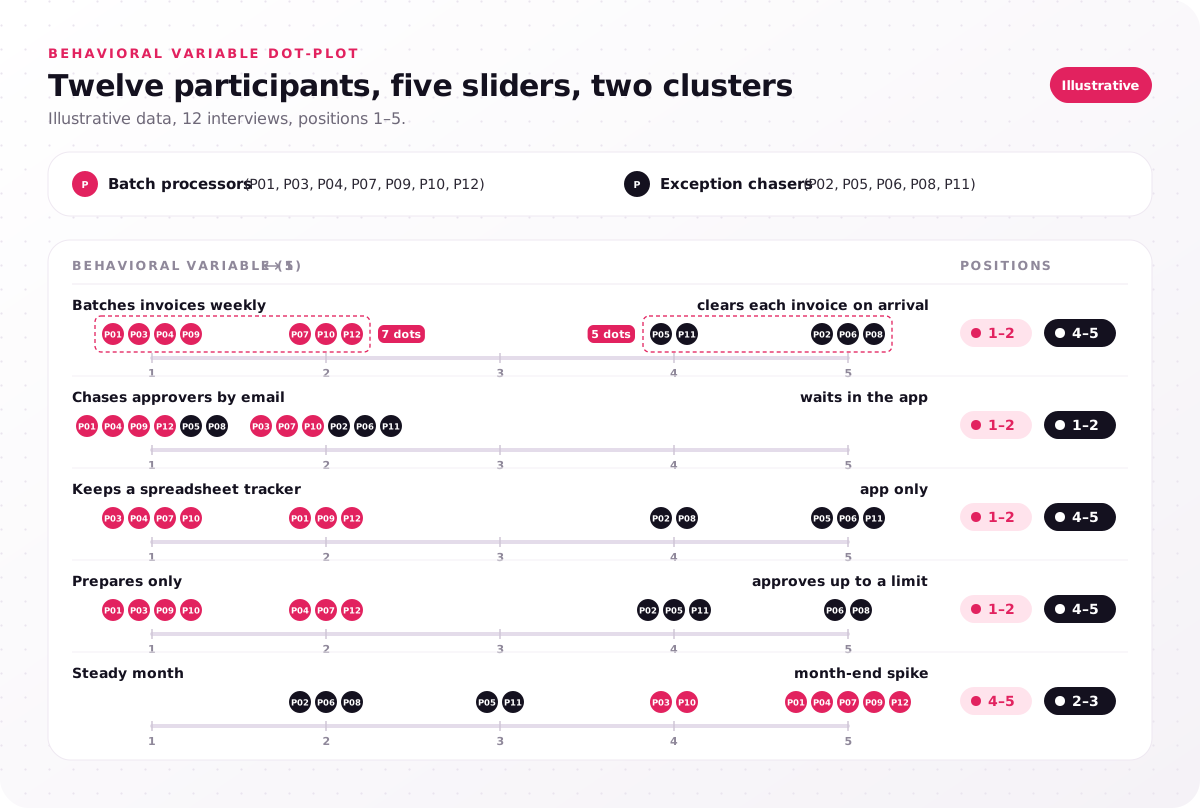
Illustrative data, 12 interviews, positions 1–5.
| Behavioral variable (1 ↔ 5) | Batch processors (P01, P03, P04, P07, P09, P10, P12) | Exception chasers (P02, P05, P06, P08, P11) |
|---|---|---|
| Batches invoices weekly ↔ clears each invoice on arrival | 1–2 | 4–5 |
| Chases approvers by email ↔ waits in the app | 1–2 | 1–2 |
| Keeps a spreadsheet tracker ↔ app only | 1–2 | 4–5 |
| Prepares only ↔ approves up to a limit | 1–2 | 4–5 |
| Steady month ↔ month-end spike | 4–5 | 2–3 |
The email slider splits nobody: both groups chase approvers outside the app, so that frustration belongs on both cards. These steps sit inside the synthesis and readout step (4–7 days), the last of the 5 steps in our UX research process, and the research timeline for the full program runs 4–8 weeks.
Interviews capture what people say they do, so the key behaviors and tasks field gains most from watching people do the work in context, where our researchers observe 4–6 users in the real work setting. Open the worksheet and enter your first five participants before you name any cluster.
What does a finished user persona look like?
A finished user persona fits on one page and traces every line to user interviews, as this illustrative card for an invoice approval app shows.
Here is the same user persona template, filled in from 12 illustrative interviews with accounts payable clerks at mid-size companies. This user persona example is illustrative: the company, the people and the numbers are invented to show the method. The interviews produced two personas, Priya the batch processor (7 participants) and Marcus the exception chaser (5).
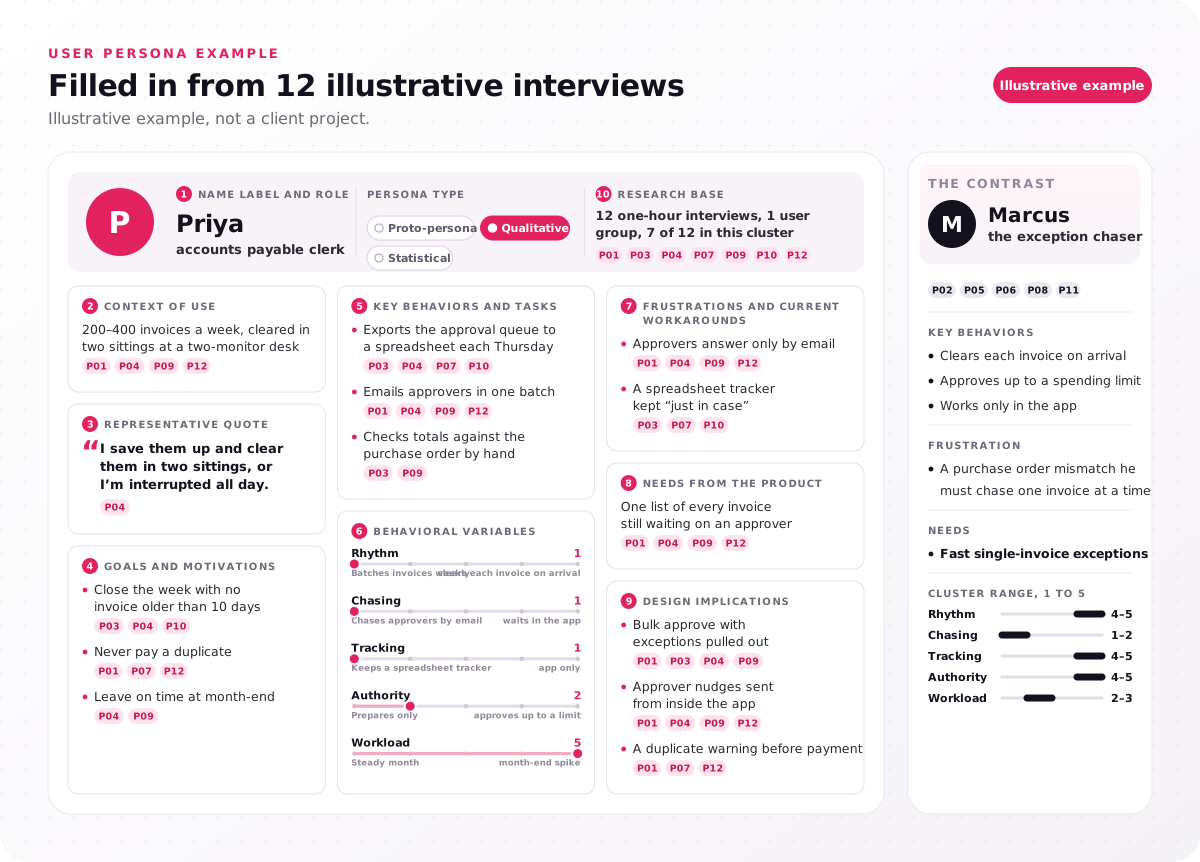
Illustrative example, not a client project.
| Field | Priya, the batch processor |
|---|---|
| Name label and role | Priya, accounts payable clerk; persona type: qualitative |
| Context of use | 200–400 invoices a week, cleared in two sittings at a two-monitor desk (P01, P04, P09, P12) |
| Representative quote | "I save them up and clear them in two sittings, or I'm interrupted all day." (P04) |
| Goals and motivations | Close the week with no invoice older than 10 days (P03, P04, P10); never pay a duplicate (P01, P07, P12); leave on time at month-end (P04, P09) |
| Key behaviors and tasks | Exports the approval queue to a spreadsheet each Thursday (P03, P04, P07, P10); emails approvers in one batch (P01, P04, P09, P12); checks totals against the purchase order by hand (P03, P09) |
| Behavioral variables | Rhythm 1, chasing 1, tracking 1, authority 2, workload 5 |
| Frustrations and current workarounds | Approvers answer only by email (P01, P04, P09, P12); a spreadsheet tracker kept "just in case" (P03, P07, P10) |
| Needs from the product | One list of every invoice still waiting on an approver (P01, P04, P09, P12) |
| Design implications | Bulk approve with exceptions pulled out (P01, P03, P04, P09); approver nudges sent from inside the app (P01, P04, P09, P12); a duplicate warning before payment (P01, P07, P12) |
| Research base | 12 one-hour interviews, 1 user group, 7 of 12 in this cluster |
Marcus is the contrast. He clears each invoice on arrival, approves up to a spending limit and works only in the app; his frustration is a purchase order mismatch he must chase one invoice at a time. Side by side, the design implications split plainly: Priya needs bulk actions, Marcus needs fast single-invoice exceptions. Hold your own first draft against Priya's card and strike any line that no participant said or did.
Which persona fields drive design, and which are decoration?
An evidence field on a user persona template stays only if it changes a design decision; goals, context and frustrations from user interviews pass, while age and hobbies rarely do.
The test is one question per field: if this line changed, would a screen, a flow or a priority change? Psychographics, meaning values and attitudes, pass only when they shift behavior, for example a clerk who distrusts automatic matching and rechecks every total. Tech comfort passes when it varies as widely as it did for the Parents Connect community platform, which had to bridge the digital divide for parents with different levels of digital experience. The research base line is exempt, because it sources the card rather than describing the user, and a name passes when it is a first name the team can say; photos get their own answer in the FAQs.
The table sorts common persona fields by when to keep them and when to cut them.
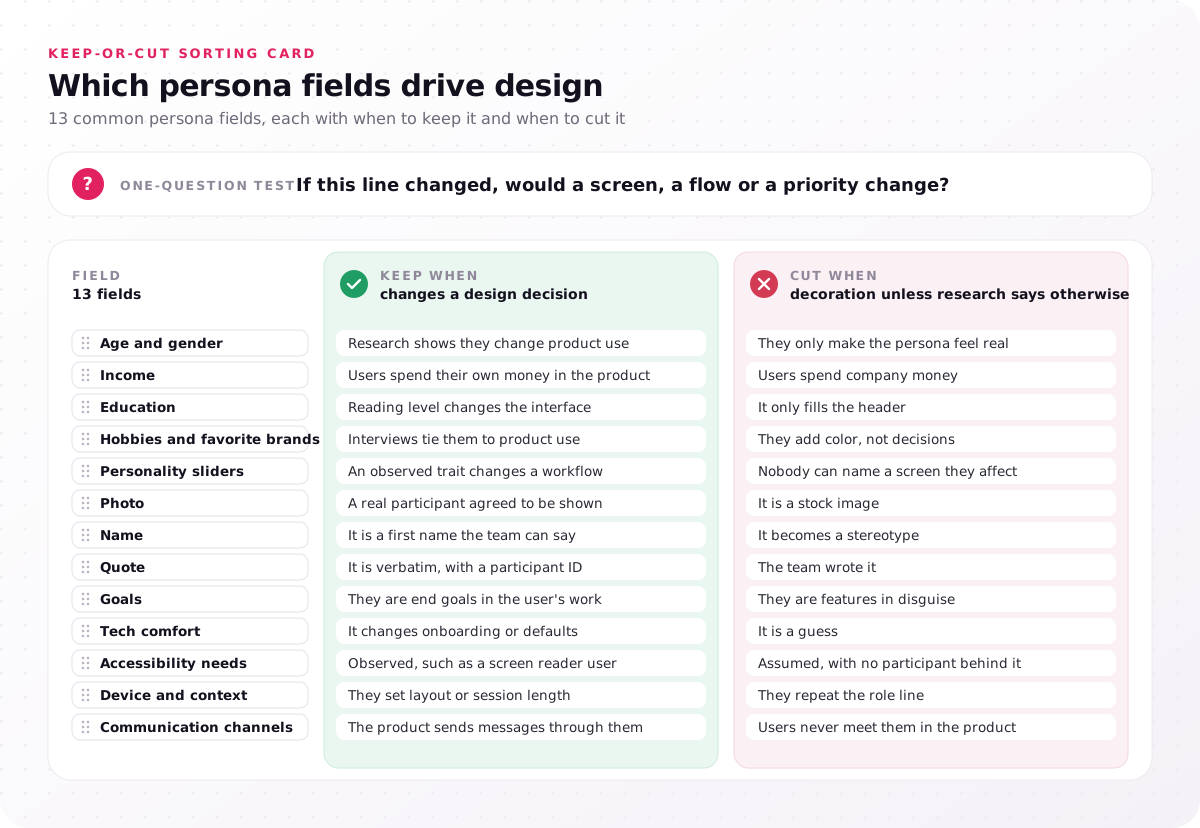
| Field | Keep when | Cut when |
|---|---|---|
| Age and gender | Research shows they change product use | They only make the persona feel real |
| Income | Users spend their own money in the product | Users spend company money |
| Education | Reading level changes the interface | It only fills the header |
| Hobbies and favorite brands | Interviews tie them to product use | They add color, not decisions |
| Personality sliders | An observed trait changes a workflow | Nobody can name a screen they affect |
| Photo | A real participant agreed to be shown | It is a stock image |
| Name | It is a first name the team can say | It becomes a stereotype |
| Quote | It is verbatim, with a participant ID | The team wrote it |
| Goals | They are end goals in the user's work | They are features in disguise |
| Tech comfort | It changes onboarding or defaults | It is a guess |
| Accessibility needs | Observed, such as a screen reader user | Assumed, with no participant behind it |
| Device and context | They set layout or session length | They repeat the role line |
| Communication channels | The product sends messages through them | Users never meet them in the product |
Run the test on the personas you have now and strike every field that fails it before the next design review.
How do user personas feed journey maps and design reviews?
User personas feed design when each persona gets its own customer journey map, a named seat in design reviews and a ranked list of frustrations from user interviews.
Our research program pairs every persona with its own map, and our customer journey map template shows the lanes that persona fields flow into.
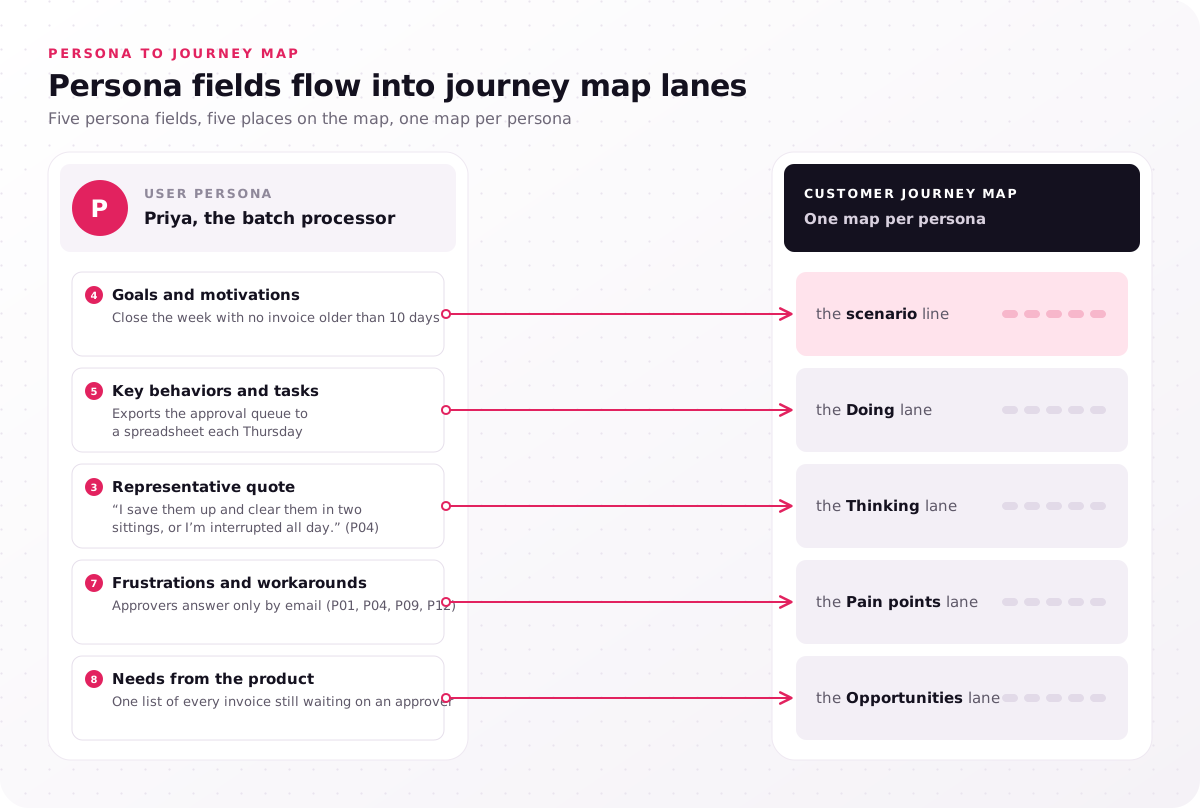
- Goals and motivations → the scenario line
- Key behaviors and tasks → the Doing lane
- Representative quote → the Thinking lane
- Frustrations and workarounds → the Pain points lane
- Needs from the product → the Opportunities lane
In design critiques, name the primary persona out loud: "would Priya bulk-approve this on a Thursday?" settles more than "would users like this?" For roadmaps, rank frustrations by participant tally first, so a problem heard from 6 of 12 participants outranks one heard from 2, then by the job's importance on the JTBD opportunity map. Roadmap advisors ask for the same cards: our UX consulting services page tells buyers to expect early requests for existing personas, journey maps and other past user research, since a consultant without user evidence can only guess.
A persona nobody cites cannot end a backlog fight, and leads who disagree about priorities with no shared personas are a signal to commission a UX research study. Add the primary persona's name to your design review agenda this week.
Why do teams stop using their user personas?
Teams drop user personas that never came from user interviews, blend two clusters, carry decorative fields or go stale, and each failure has a fix in the template.
- Assumptions shown as research. A proto-persona presented as a finding loses trust at the first question, so print the persona type tag.
- Averaged personas. A card that blends Priya and Marcus describes nobody, so split on the sliders in step 5.
- Too many personas. Seven cards hide which one is primary, so merge clusters back to 2–4.
- Demographics instead of behavior. Age and income give designers nothing to act on, so run the keep-or-cut test.
- No owner. A persona outside the review agenda turns into a poster, so give it a named owner.
- Stale personas. Old interviews describe old workflows, so refresh on a trigger, not a calendar.
Set the refresh trigger as a new user group, a new market or a new study, for example a product entering a market where users follow different workflows. Our startups industry page shows the trigger at an early stage: when a startup pivots from small businesses to mid-market buyers, its persona and onboarding both change, and designs stay low fidelity until interviews confirm who the new user is.
A user persona template is only as honest as the interviews behind each field, so check every card before it leaves your team.
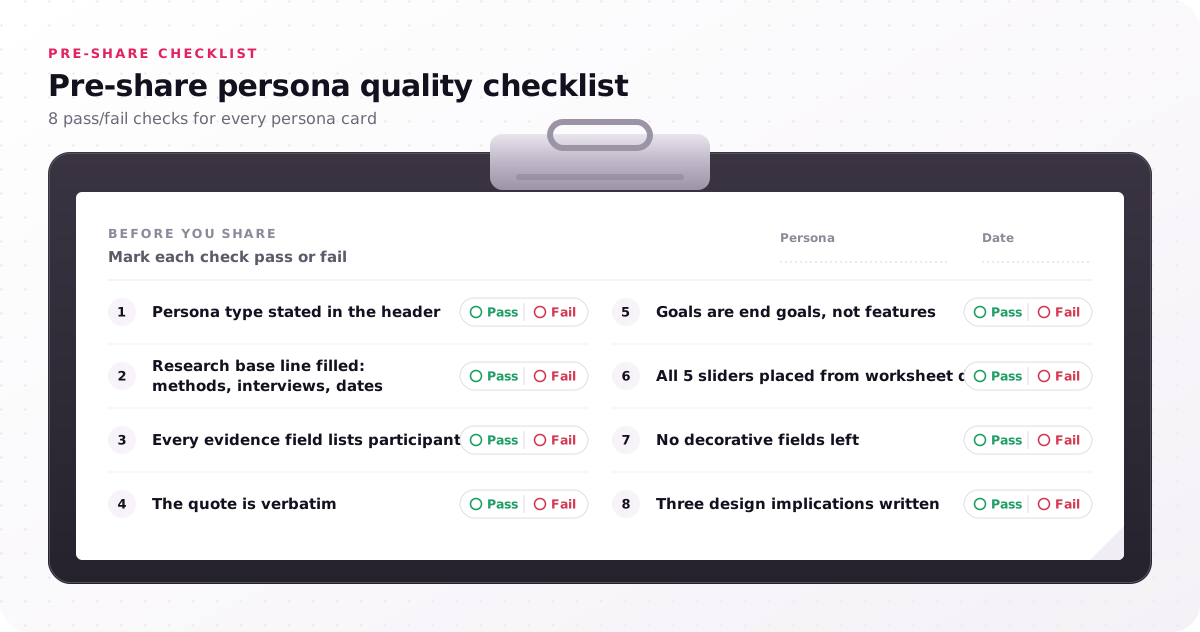
- Persona type stated in the header
- Research base line filled: methods, interviews, dates
- Every evidence field lists participant IDs
- The quote is verbatim
- Goals are end goals, not features
- All 5 sliders placed from worksheet data
- No decorative fields left
- Three design implications written
Who should build user personas, your team or a partner?
Your team can build a user persona from user interviews it already holds; bring in a research partner when nobody has run 10–15 interviews per user group.
With recent interview recordings, use the template, the CSV worksheet and the six steps. With none, start with a proto-persona, label it as one, and plan interviews from its weakest fields.
A partner also earns its fee when the personas will decide a roadmap dispute, because the people plotting the dots should not be the people who wrote the roadmap, and when your interviews cover one user group but the product serves three.
When we run the study, the handoff includes 2–4 personas built from interview data, synthesized in Dovetail and walked through at a 90-minute readout, with 1 journey map per persona and a JTBD opportunity map. Budgets run $25,000–$60,000, and how the 4–8 week program is priced explains where a study lands in that range.
Start your first user persona template from the disagreements your team already has, because each argument about who the user is hides a behavioral variable nobody has measured. List each contested type as a proto-persona, and if your team cannot spare the hours for 10–15 interviews per group, send us the user types your team argues about. Every project begins with a free consultation and a fixed-scope proposal.
FAQs
Can AI create a user persona?
Yes, as a draft only. Artificial intelligence (AI) can fill the fields, but an AI persona generator or chatbot writes a proto-persona from text it has read, not from your users. NN/g researchers Maria Rosala and Kate Moran, in their 2024 piece on synthetic users, class such output as material for hypotheses, not final decisions. Mark every AI-written field unconfirmed until interviews back it.
How many user personas should a product have?
As many as your interviews show distinct behavior clusters, and our research program delivers 2–4. Give each main interface one primary persona, and merge any two personas whose sliders sit in the same places.
How do you make a user persona in Figma or PowerPoint?
Drag our SVG file onto a Figma canvas to get editable vector layers, or insert it in PowerPoint for Microsoft 365 on Windows and use Convert to Shape to edit each field box; on a Mac, the SVG inserts as a picture. Google Slides takes the PNG as a background, with text boxes typed on top, and the user persona template keeps its 10 fields and 5 sliders in every tool.
Should a user persona have a photo and a name?
Yes for a name, no for a stock photo. A first name lets the team talk about the persona in reviews, while a stock photo pulls attention to looks and invites stereotypes, which is why our template uses an initial avatar.
How often should you update user personas?
Update them when a new user group, market or study changes what you know, not on a fixed date. Keep the research base dates on the card, so a persona built on two-year-old interviews shows its age.
Is a user persona the same as a user profile?
No. In a product, a user profile usually means one real person's record, such as an account or a customer relationship management (CRM) entry, while a user persona is a composite of real users who behave alike. Never paste one participant's profile into the template as a persona.