Key takeaways
- Build the scope around a role × workflow grid, because workflows and user roles are two of the four factors our web app design price depends on.
- Scope screen states, not only screens: populated, empty, loading, error, no-permission and worst-case data for every table in scope.
- Promise research access in writing: users per role, who recruits them and how many usability test rounds you fund.
- Write accessibility and handoff as pass/fail acceptance lines that name the standard, the breakpoints and the exact files you accept.
- Publish a budget band and weighted evaluation criteria, and ask for case studies instead of free mockups.
A web app design RFP is the request for proposal (RFP) you send design agencies when the workflows, user roles and screens of a logged-in application need designing, and its scope section decides whether the quotes that come back can be compared at all. Below is a fill-in template of nine sections built around the units a design agency prices: the same workflows, roles and test rounds that help set the fee for our web app design services. Each section gives the field, what to write and a sample line.
When do you need a web app design RFP?
You need a formal RFP when procurement rules or a public-sector buyer require written proposals, or when three or more bidding agencies must be compared line by line.
Below that bar, a short brief and a few calls decide faster. Formal requests come from procurement departments, regulated buyers and teams replacing a portal or internal tool.
They are buying the design layer of a web application: workflow research, information architecture (IA), wireframes, a clickable prototype, a user interface (UI) kit and a design handoff package. Code and hosting belong to a development RFP; if one document covers both, see the FAQs.
Teams that build a new product from zero compare scope with digital product design; everyone else can start with the section map below.
Which 9 sections does the RFP need?
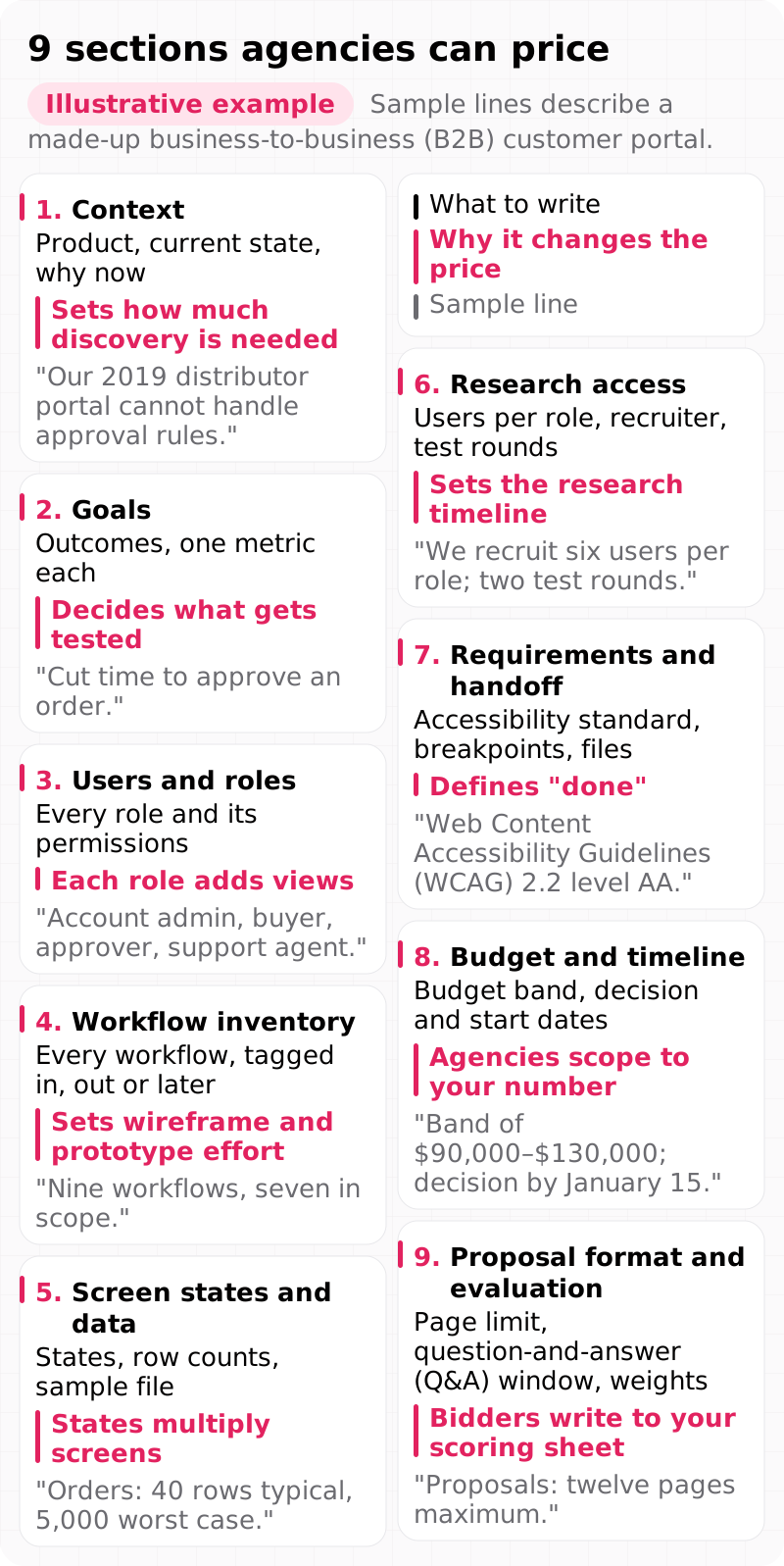
The RFP needs nine sections: context, goals, users and roles, workflow inventory, screen states and data, research access, requirements and handoff, budget and timeline, and proposal format and evaluation.
After context and goals, the order runs from who uses the product and what they do to the evidence and files you expect back. The same nine sections work for a user experience (UX) design RFP or any RFP for UI UX design services.
Show as text
Sample lines describe a made-up business-to-business (B2B) customer portal.
| Section | What to write | Why it changes the price | Sample line |
|---|---|---|---|
| 1. Context | Product, current state, why now | Sets how much discovery is needed | "Our 2019 distributor portal cannot handle approval rules." |
| 2. Goals | Outcomes, one metric each | Decides what gets tested | "Cut time to approve an order." |
| 3. Users and roles | Every role and its permissions | Each role adds views | "Account admin, buyer, approver, support agent." |
| 4. Workflow inventory | Every workflow, tagged in, out or later | Sets wireframe and prototype effort | "Nine workflows, seven in scope." |
| 5. Screen states and data | States, row counts, sample file | States multiply screens | "Orders: 40 rows typical, 5,000 worst case." |
| 6. Research access | Users per role, recruiter, test rounds | Sets the research timeline | "We recruit six users per role; two test rounds." |
| 7. Requirements and handoff | Accessibility standard, breakpoints, files | Defines "done" | "Web Content Accessibility Guidelines (WCAG) 2.2 level AA." |
| 8. Budget and timeline | Budget band, decision and start dates | Agencies scope to your number | "Band of $90,000–$130,000; decision by January 15." |
| 9. Proposal format and evaluation | Page limit, question-and-answer (Q&A) window, weights | Bidders write to your scoring sheet | "Proposals: twelve pages maximum." |
Keep the main document short and move the bulky material into attachments (the FAQs give our length guideline). Fill the web app design RFP template in this order; the next section shows how to build the role and workflow grid behind sections 3 and 4.
How do you list user roles and workflows?
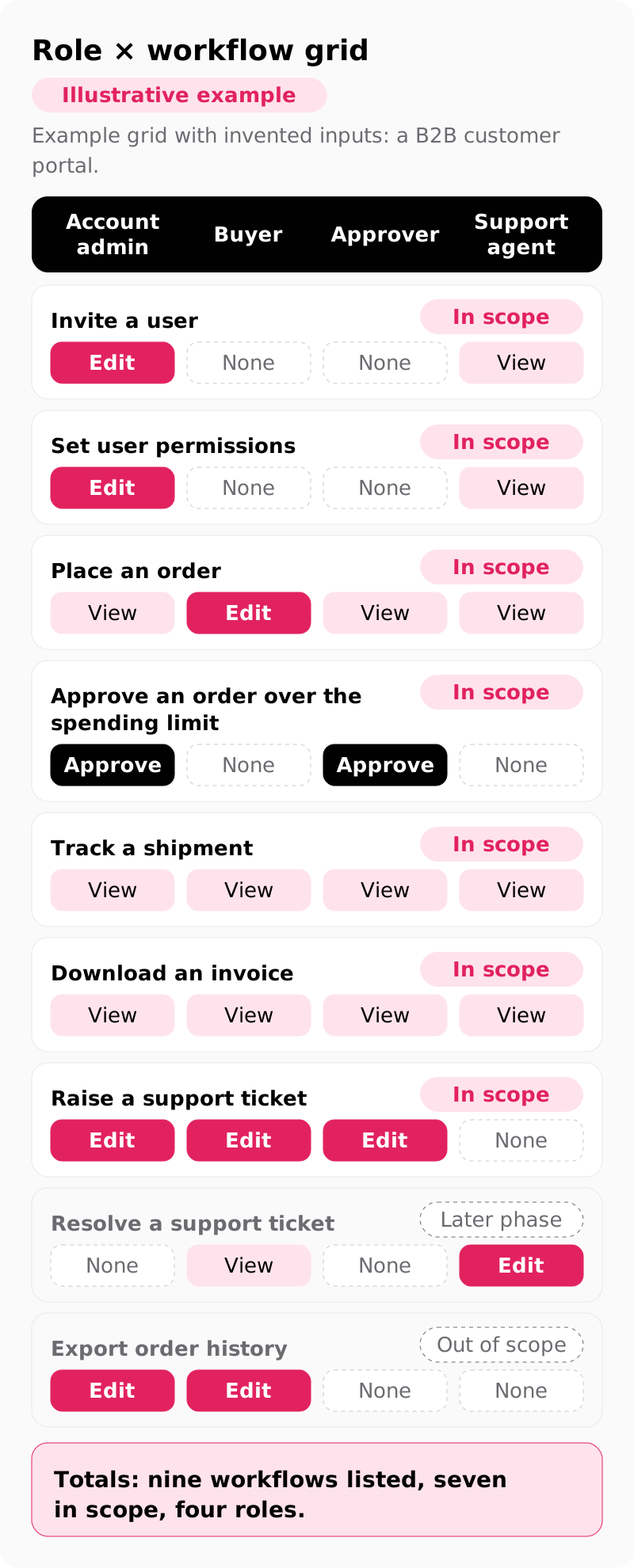
Put every user role and workflow in one grid, mark each role's permission per workflow, and tag each workflow in scope, out of scope or later phase.
Both totals feed the quote: workflows and user roles are two of the four factors our web app design price depends on. Permissions matter as much, because an approver who can see an order but not edit it needs a read-only state that the buyer's edit screen does not cover.
Show as text
Example grid with invented inputs: a B2B customer portal.
| Workflow | Account admin | Buyer | Approver | Support agent | Scope |
|---|---|---|---|---|---|
| Invite a user | Edit | None | None | View | In scope |
| Set user permissions | Edit | None | None | View | In scope |
| Place an order | View | Edit | View | View | In scope |
| Approve an order over the spending limit | Approve | None | Approve | None | In scope |
| Track a shipment | View | View | View | View | In scope |
| Download an invoice | View | View | View | View | In scope |
| Raise a support ticket | Edit | Edit | Edit | None | In scope |
| Resolve a support ticket | None | View | None | Edit | Later phase |
| Export order history | Edit | Edit | None | None | Out of scope |
Totals: nine workflows listed, seven in scope, four roles.
Name each workflow as a user goal with a verb. "Orders page" hides how many steps live behind it, so bidders guess differently; "Approve an order over the account's spending limit" says who acts and which permission applies.
Drafts often stall here, because no single team holds the full workflow list. If your draft stalls, bring the half-filled grid to a first call with us, and list any workflow nobody can confirm as an open question for bidders in the question-and-answer (Q&A) window.
Which screen states and data belong in scope?
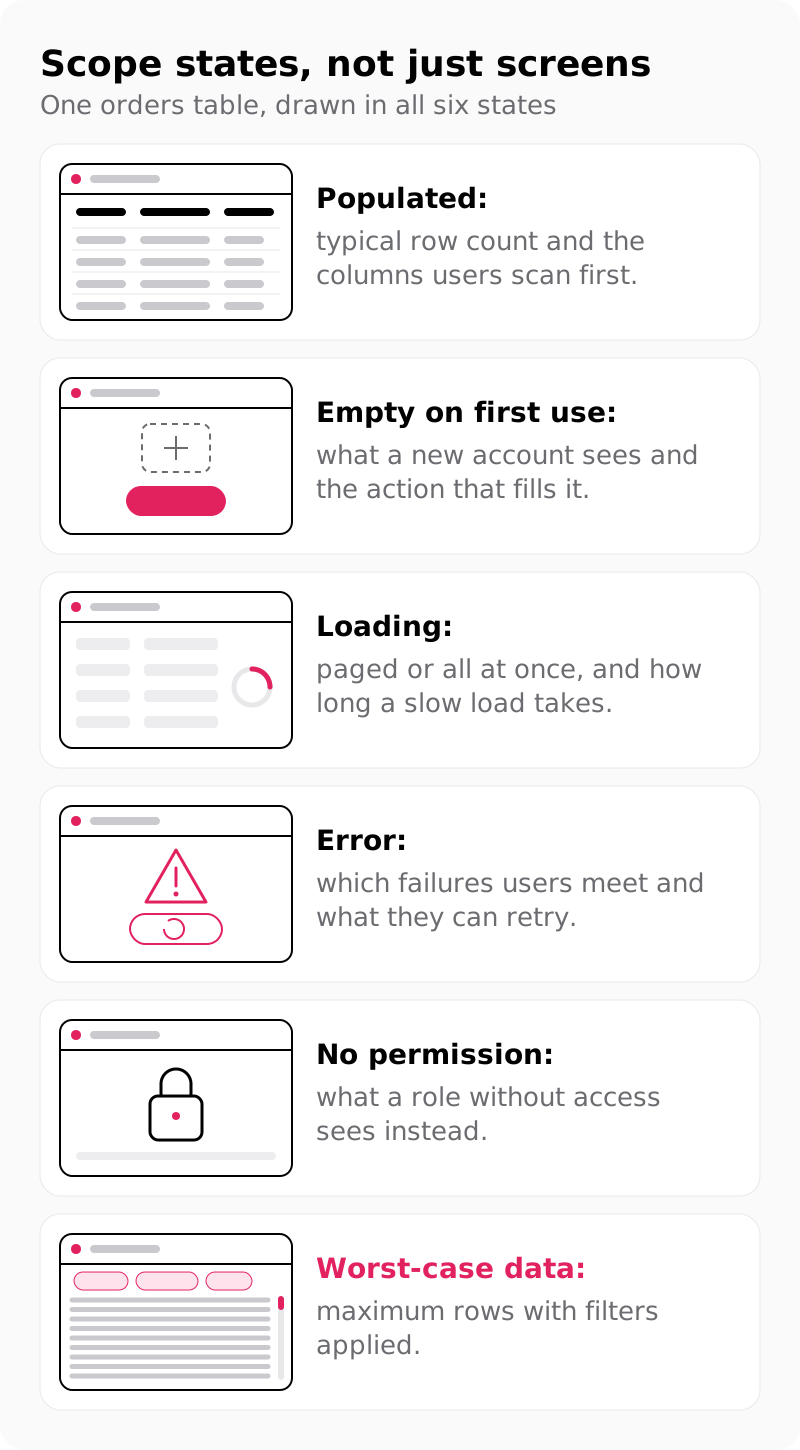
Scope states, not just screens: populated, empty, loading, error, no-permission and worst-case data for every table and form in scope.
A data table that looks tidy with a dozen rows can break at several thousand, when columns truncate and bulk actions need confirmation. Listing states per component lets every agency price the same design, not the happy path alone.
Show as text
- Populated: typical row count and the columns users scan first.
- Empty on first use: what a new account sees and the action that fills it.
- Loading: paged or all at once, and how long a slow load takes.
- Error: which failures users meet and what they can retry.
- No permission: what a role without access sees instead.
- Worst-case data: maximum rows with filters applied.
Add data volume fields for each table in scope:
- Rows per table, typical and worst case, so pagination or summaries are designed for the real load.
- Longest realistic values, such as company names and order IDs, so column widths survive real content.
- Columns users sort or filter, so the design does not hide fields people use daily.
- Bulk actions, saved filters and keyboard use, because filters and bulk actions are components of a web app UI kit, and each of the three adds design time.
Attach sample data, never production records: mask names, emails and account IDs, keep realistic lengths, and state in one line how you masked the file.
What research access should you promise?
Promise named access: how many users per role the agency can interview, who recruits them, and how many usability test rounds you will fund.
Missing access delays the whole plan, because interviews and tests cannot start until participants are booked. For sizing, our typical 6-step web app design process interviews 5–8 users per role and tests the prototype with 5 users per round, scored with the System Usability Scale (SUS). That is our practice, not a universal rule.
Write these lines into the research access section:
- Who recruits (you, the agency or a paid panel) and who pays incentives, because outside recruiting adds lead time and cost.
- Internal users: whether employees can join interviews during work hours, so the plan does not depend on evenings.
- Non-disclosure agreements (NDAs): which forms participants sign, so legal review does not stall the first week.
- Evidence to attach: analytics, support ticket themes, past research and screenshots, so discovery starts from what you know.
- Methods, not vendors: ask for a tree test of the navigation and a prototype test; name a tool only when security requires it.
How do you write acceptance criteria?
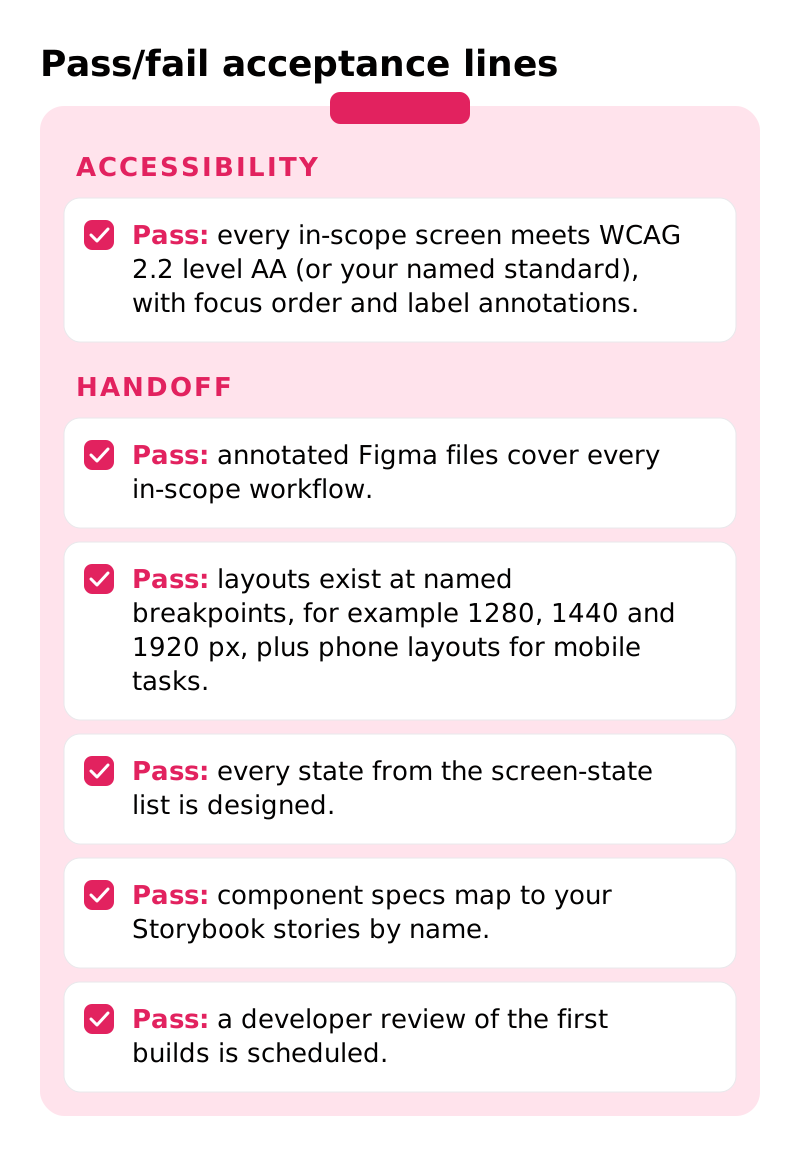
Write them as pass/fail lines that name the accessibility standard and level, the breakpoints, and the exact handoff files you will accept.
For a commercial web app, name Web Content Accessibility Guidelines (WCAG) 2.2 level AA, the current World Wide Web Consortium (W3C) Recommendation. Federal buyers can start from the contract language on section508.gov, which ties deliverables to the Revised 508 Standards; those incorporate WCAG 2.0 Level A and AA by reference. If you target WCAG 2.2 as well, name both versions in one line.
Show as text
- Pass: every in-scope screen meets WCAG 2.2 level AA (or your named standard), with focus order and label annotations.
- Pass: annotated Figma files cover every in-scope workflow.
- Pass: layouts exist at named breakpoints, for example 1280, 1440 and 1920 px, plus phone layouts for mobile tasks.
- Pass: every state from the screen-state list is designed.
- Pass: component specs map to your Storybook stories by name.
- Pass: a developer review of the first builds is scheduled.
Each handoff line removes a guess. Our design handoff uses three desktop breakpoints, for example 1280, 1440 and 1920 px, plus mobile layouts for tasks users complete on a phone; naming your own widths lets every bidder price the same layouts. Mapping specs to Storybook stories by name lets engineers match designs to components already in code. Make the developer review of first builds an accepted deliverable, because that review catches gaps between design and code.
Ask your own counsel for one line on who owns the Figma files and when rights transfer.
What should the RFP leave out?
Leave out requests for free design samples, finished screens you want copied and long feature specifications; ask for outcomes, evidence and process instead.
AIGA, the professional association for design, holds that spec work "precludes the most important element of most design projects—the research, thoughtful consideration of alternatives, and development and testing of prototype designs." A mockup made without them shows the least useful version of an agency, so ask for two relevant case studies instead.
Prescribed solutions such as "add a dashboard with 12 charts" fix the answer before anyone studies the workflow, so state the problem and the metric. For custom software, the General Services Administration's (GSA) former 18F team recommended a statement of objectives for performance-based services instead of long requirement lists. Federal rules define performance-based acquisition as one structured around the results to be achieved rather than the manner in which the work is performed.
Show as text
| Weak line | Priceable line |
|---|---|
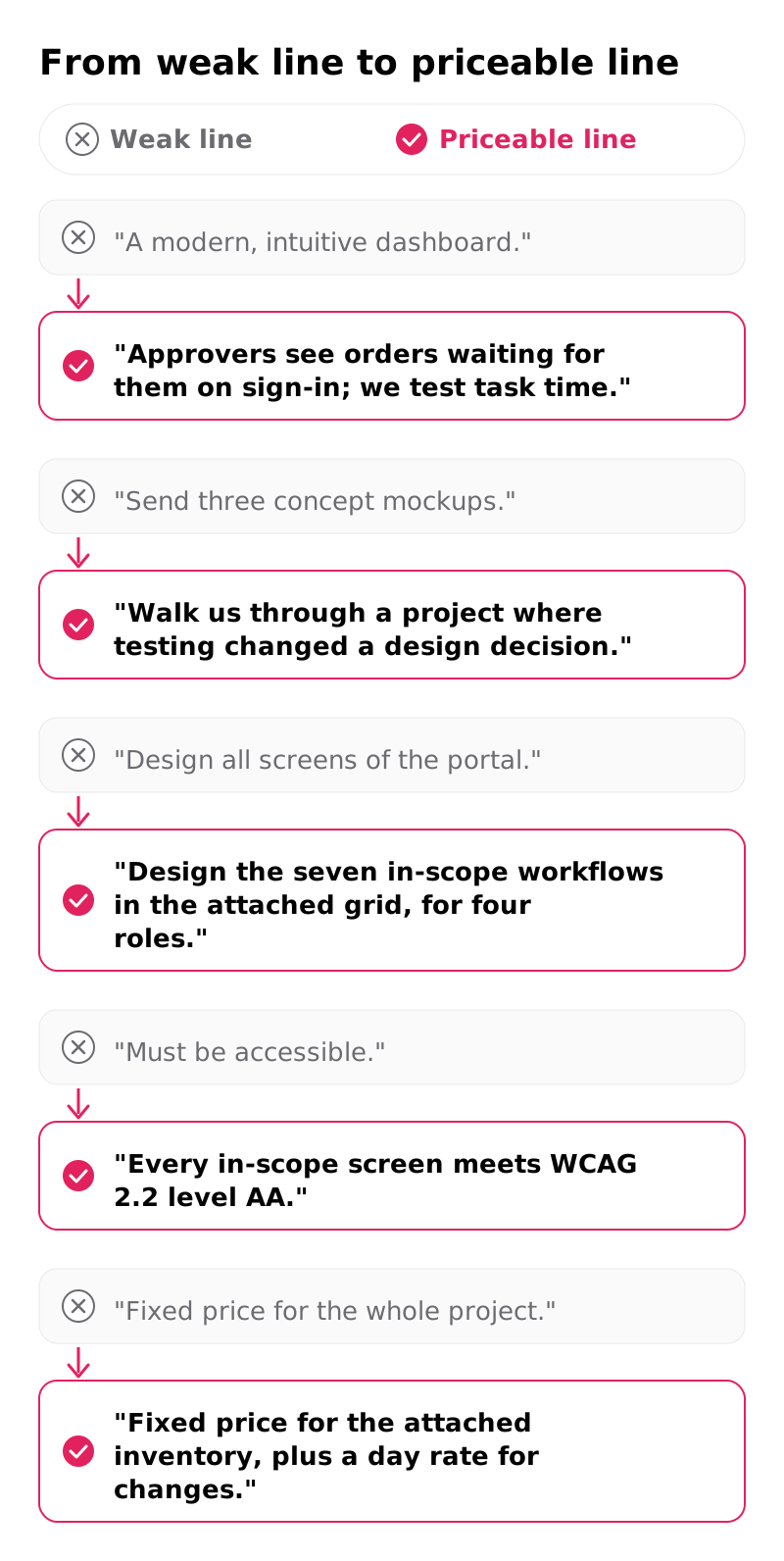
| "A modern, intuitive dashboard." | "Approvers see orders waiting for them on sign-in; we test task time." |
| "Send three concept mockups." | "Walk us through a project where testing changed a design decision." |
| "Design all screens of the portal." | "Design the seven in-scope workflows in the attached grid, for four roles." |
| "Must be accessible." | "Every in-scope screen meets WCAG 2.2 level AA." |
| "Fixed price for the whole project." | "Fixed price for the attached inventory, plus a day rate for changes." |
Watch the last row: a fixed price on an unknown scope gets padded for risk, while one on a written inventory stays comparable. Check your draft against these rewrites.
How do you state budget, timeline and weights?
Include a budget band, a decision date and weighted evaluation criteria in the RFP itself, so agencies scope to your number and every proposal is scored the same way.
Without a band, one agency quotes two test rounds and another a single pass. For calibration, our published web app design range is $60,000–$180,000 over 8–16 weeks, and the price depends on the number of workflows, user roles and test rounds and the size of the component library. A web app design RFP that states its band lets each bidder say early whether your scope fits it.
List the dates in one line: proposal deadline, Q&A window, interviews, decision and project start. Section 9 sets the proposal format: a page limit (for example twelve pages) and sections in the order of your evaluation criteria, so evaluators score like with like. State that questions come in writing during the Q&A window, so no bidder gets a private answer.
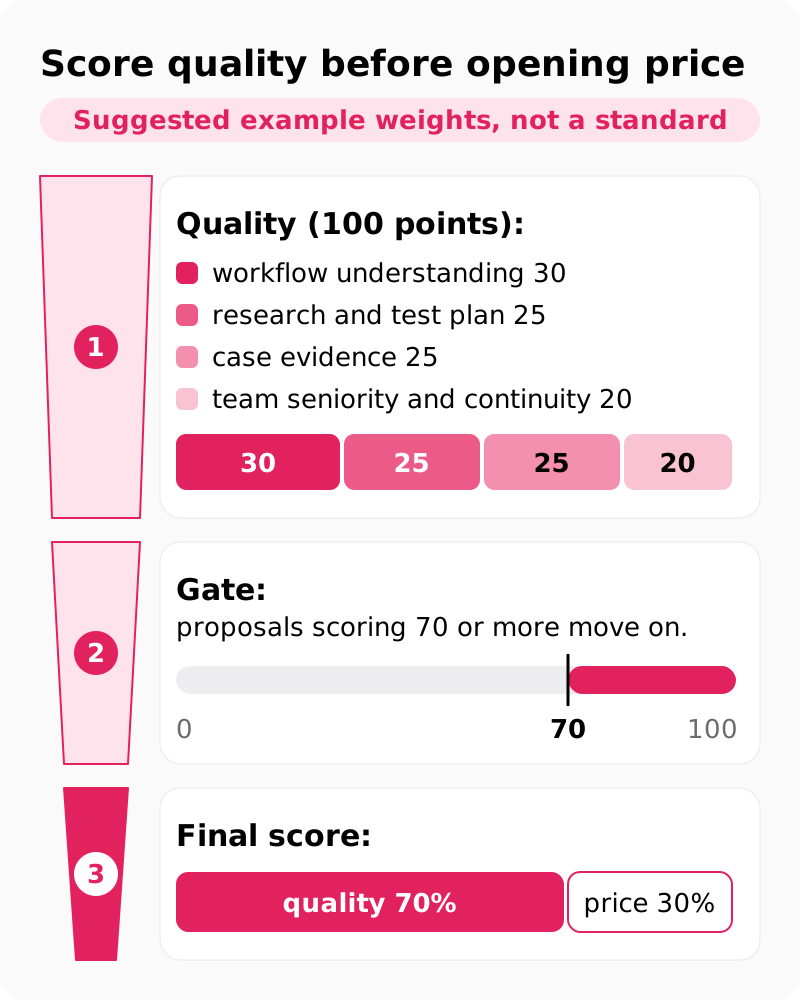
Publish the design agency RFP evaluation criteria and weights before proposals arrive, and score quality before opening price. GSA's former 18F team advised reviewing each proposal's strengths, weaknesses and risks, then inviting the most highly rated firms to a verbal interview. The same team advised against scoring proposals with a point system, so treat the weights below as our suggestion, not 18F's method.
Show as text
Suggested example weights, not a standard:
- Quality (100 points): workflow understanding 30, research and test plan 25, case evidence 25, team seniority and continuity 20.
- Gate: proposals scoring 70 or more move on.
- Final score: quality 70%, price 30%.
What happens after you send the RFP?
Answer questions in writing to every bidder, shortlist on the published criteria, interview two or three teams, then attach the agreed inventory to the contract.
A fixed sequence keeps proposals comparable; set the placeholder durations below yourself.
- Q&A window (about 1 week): publish every answer to all bidders.
- Proposals due (2–3 weeks after release): check the page limit and format.
- Shortlist (about 1 week): score quality, then open price for those that pass.
- Interviews (about 1 week): each team walks through one workflow and how they would test it.
- Contract: attach the final inventory as the scope in the statement of work (SOW).
The interview replaces spec work: the questions to ask in a design RFP interview should test method ("how would you test the approval flow?"), not finished screens. Attaching the inventory turns the web application design scope of work into a list you can measure change requests against.
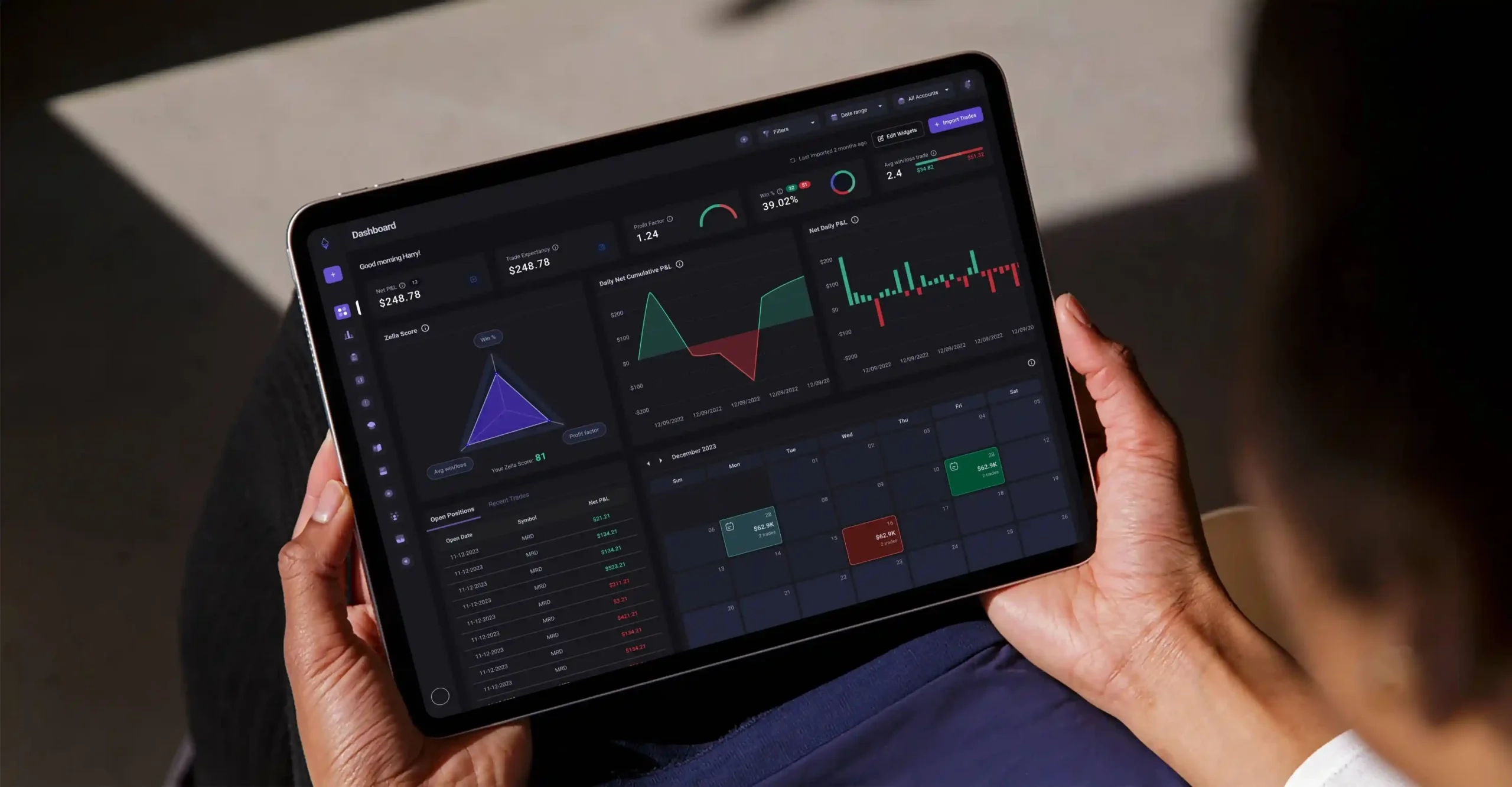
For the design work behind a scope like this, our TradeZella dashboard revamp covered discovery, stakeholder interviews and web and mobile app design for a trading journal, with "40% more user interaction after a dashboard revamp".
Your web app design RFP now describes the work in units any bidder can price, ours included: a grid, a state list and acceptance lines. Adding us to the bidder list takes one email: send us your RFP. Every project begins with a free consultation and a fixed-scope proposal, and you can set ours beside the other bids and the published web app design price range.
FAQs
Can one RFP cover web app design and development?
Yes. Ask for separate price lines and timelines for design and for build, so design-only studios and full-service firms are compared on the same inventory. The handoff checklist marks the boundary: build pricing starts where the accepted design files end.
How long should a web app design RFP be?
Short enough to read in one sitting. We recommend a main document of roughly 6–10 pages, with the role × workflow grid, sample data and screenshots attached, because bidders price from the attachments.
Is it fair to ask agencies for free mockups in an RFP?
No. Free mockups are spec work, produced before any research or testing, so they show taste rather than process. Ask for case studies and a walkthrough of how the team would approach one workflow from your inventory instead.
Should you share your budget in a web app design RFP?
Yes. A band, for example $90,000–$130,000, lets agencies scope to your number and tell you early what fits. Without one, proposals differ in scope as much as in price, and your scoring sheet cannot separate the two.
How many agencies should receive the RFP?
Three to five is our recommendation. That allows a real comparison of price and approach while evaluators can still read every proposal with care.