
Key takeaways
- A website redesign affects SEO when it changes the URLs, content, internal links, rendering or speed of pages that already rank.
- Build the keep list of ranking pages from Search Console clicks, impressions and backlinks before anyone draws the new sitemap.
- Send each changed URL to its closest new page with one permanent redirect, and keep redirects generally at least a year, as Google advises.
- Content parity in the wireframes and template speed are website redesign SEO decisions, so the design team checks them before developers build.
- Redirects, robots.txt, canonical tags and the sitemap file belong to developers and the SEO lead, not to the design team.
Website redesign SEO comes down to what survives the new layout, and a diff of one page shows the search engine optimization (SEO) risk. In this illustrative pricing page, the old version has a hero, a plan table, six frequently asked questions (FAQs) such as "Can I switch plans mid-year?" and three in-body links. The new wireframe keeps the hero and the plan table, adds a signup button, and drops the FAQ block, the part searchers arrived for. Nobody decided to cut what ranked; it simply never made the new template.
So yes, a redesign changes rankings when it changes the web addresses (URLs), content, internal links, rendering or speed of pages that already earn organic traffic. The fix is to treat those pages as fixed requirements of the new site, from the first sitemap to the launch-day crawl. The sitemap and templates, like the wireframes, are decided in the user interface (UI) and user experience (UX) phase of a UI UX web design project, long before a developer sets up a single permanent (301) redirect.
Does a website redesign affect SEO?
Yes. A website redesign affects SEO whenever it changes the URLs, content, internal links, rendering or speed of ranking pages, while a refresh of colors and type rarely moves rankings.
A structural redesign touches every input search engines rank a page on at once, and the overview marks the five places where rankings leak.
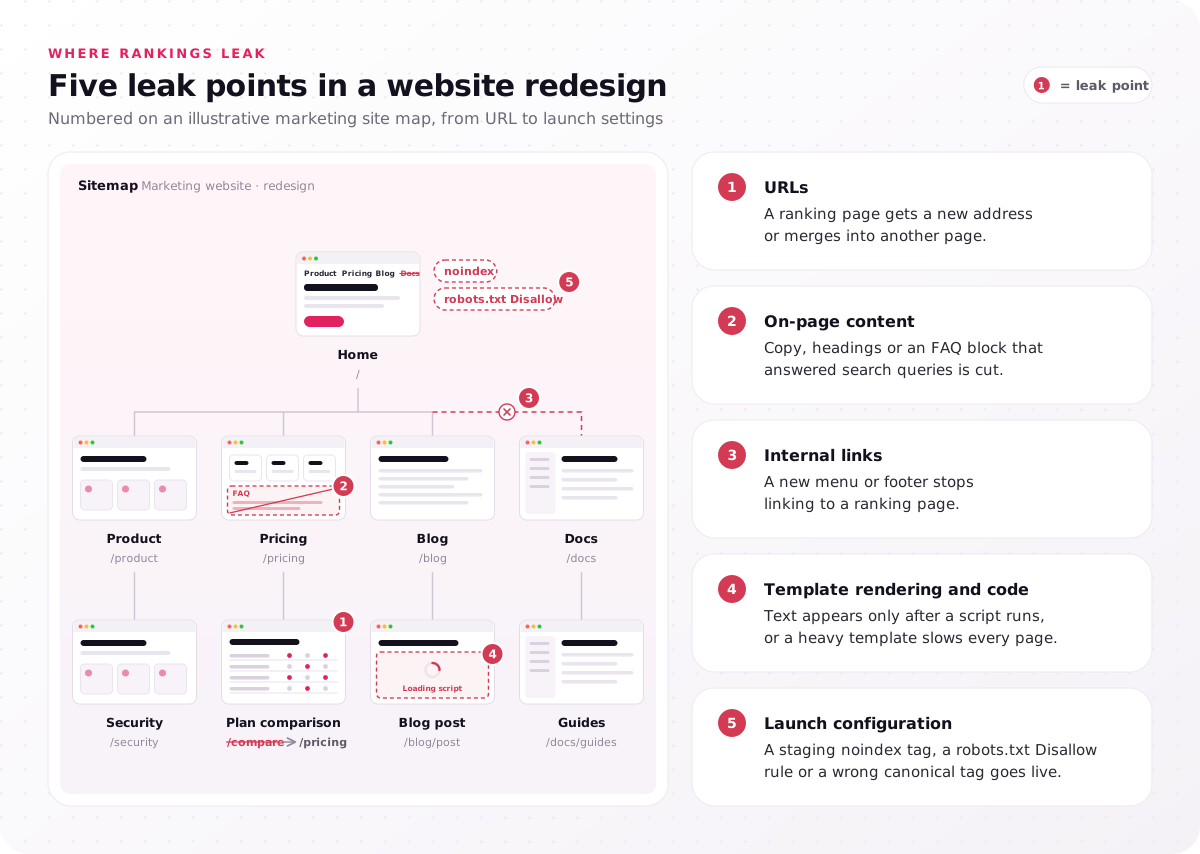
- URLs: a ranking page gets a new address or merges into another page.
- On-page content: copy, headings or an FAQ block that answered search queries is cut.
- Internal links: a new menu or footer stops linking to a ranking page.
- Template rendering and code: text appears only after a script runs, or a heavy template slows every page.
- Launch configuration: a staging noindex tag, a robots.txt Disallow rule or a wrong canonical tag goes live.
Google's guide to site moves with URL changes tells site owners to expect temporary fluctuation in rankings during the move. A site migration (a domain or platform move), such as WordPress to Webflow, changes URLs or rendering by definition, and a same-domain redesign carries the same risk once its URLs, content or rendering change. Mark the leak points your project touches, because each one needs an owner.
What is website redesign SEO, and who owns which part?
Website redesign SEO keeps ranking pages, their URLs, content and links intact through a redesign, and the work splits across designers, developers, the SEO lead and content writers.
An SEO website redesign plan names one owner per task, because gaps open at hand-offs, where each role assumes another checked the keep list. The matrix shows each owner and who feeds them.
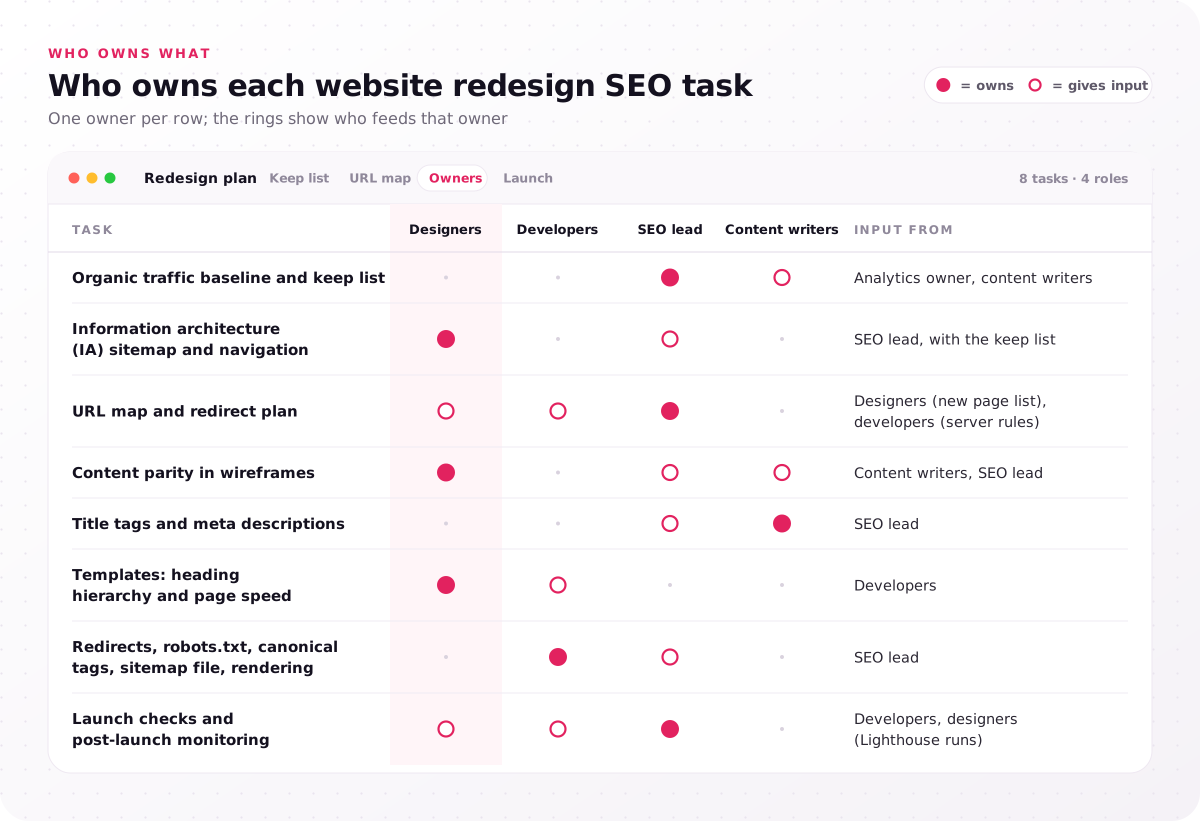
| Task | Owner | Input from |
|---|---|---|
| Organic traffic baseline and keep list | SEO lead | Analytics owner, content writers |
| Information architecture (IA) sitemap and navigation | Designers | SEO lead, with the keep list |
| URL map and redirect plan | SEO lead | Designers (new page list), developers (server rules) |
| Content parity in wireframes | Designers | Content writers, SEO lead |
| Title tags and meta descriptions | Content writers | SEO lead |
| Templates: heading hierarchy and page speed | Designers | Developers |
| Redirects, robots.txt, canonical tags, sitemap file, rendering | Developers | SEO lead |
| Launch checks and post-launch monitoring | SEO lead | Developers, designers (Lighthouse runs) |
Designers shape the inputs search engines read, such as page structure, heading hierarchy and template speed, while content writing and backlinks sit outside a UI UX web design engagement. SEO for a website redesign stays split this way on a team of any size: one person can hold two roles, but every row needs a name.
What is SEO in web development?
SEO in web development is the technical layer developers build: redirects, rendered pages, robots.txt rules, canonical tags, the sitemap file and server speed.
Rendered pages are the HyperText Markup Language (HTML) a crawler receives after scripts run, and the sitemap file, written in Extensible Markup Language (XML), is the XML sitemap of live URLs. Page design decides what each page holds; development decides whether crawlers can read it.
How do you redesign a website?
Redesign a website in five steps: a website UX audit with goals, information architecture, messaging wireframes, responsive UI design, then content management system (CMS) handoff and launch quality assurance (QA).
Our 5-step website design process takes 4–8 weeks, ending in launch QA. For search, steps two to five carry the risk, because they set the sitemap, each template's content, its responsive layouts and visual weight, and the speed checks. Put an owner's name on each matrix row before the project kicks off.
Which pages must a website redesign SEO plan protect first?
A website redesign SEO plan protects ranking pages first: URLs with backlinks, demo requests, or clicks or impressions above your team's threshold go on a keep list before sitemap work.
The keep list of ranking pages starts from the organic traffic baseline, the before-launch benchmarks every later comparison needs. Export 12–16 months of pages and queries from the Performance report in Google Search Console, pull demo requests per landing page from Google Analytics 4, and crawl the old site with Screaming Frog to list every URL, title tag, heading and status code.
Backlinks change the call: a page other sites link to stays on the list even with little traffic, since a redirect to its closest new page carries that link equity forward. The 80/20 rule in the FAQs tells you which of those URLs to check first. The decision tree sorts every old URL into keep, merge or retire, with thresholds your team sets.
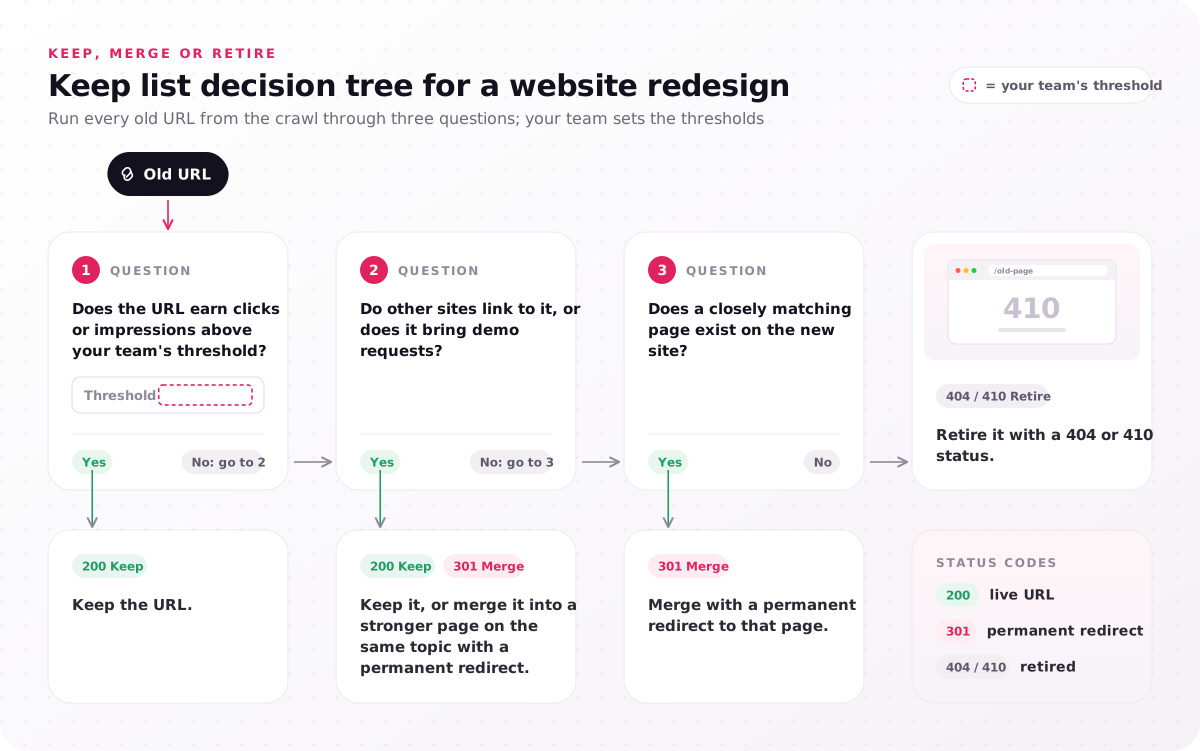
- Does the URL earn clicks or impressions above your team's threshold? Yes: keep the URL. No: go to 2.
- Do other sites link to it, or does it bring demo requests? Yes: keep it, or merge it into a stronger page on the same topic with a permanent redirect. No: go to 3.
- Does a closely matching page exist on the new site? Yes: merge with a permanent redirect to that page. No: retire it with a 404 or 410 status.
Freeze the keep list before the first sitemap review, and treat any page added to it later as a scope change.
How do sitemap and URL decisions change rankings?
In a website redesign, every ranking page that moves, merges or drops out of the sitemap loses its signals unless a permanent redirect and internal links carry them over.
URL structure is the first of the website redesign SEO considerations the sitemap settles: keep the URL of every keep-list page, and change one only when its old path no longer fits the new information architecture. Menu labels can still change without touching URLs: when a tree test in Optimal Workshop shows that a navigation label confuses visitors, the menu item gets a new name while the URL behind it stays put.
When a URL must change, URL mapping records it as one row of a redirect map: old URL, new URL, redirect type and owner. That URL map sits best beside the information architecture (IA) sitemap, so every merge shows its redirect on the same screen. Your developers then build the redirect plan, one hop from each old URL to its closest equivalent page. Google's site-move guide recommends server-side permanent redirects such as 301 redirects or 308 redirects, kept as long as possible, generally at least 1 year.
Redirect relevance decides how much carries over: sending retired pages to the home page wastes their link equity, and a redirect chain adds a hop to every crawl. That one-year redirect retention period belongs in the project plan as a dated review.
Launch timing matters too. Google's site-move guidance favors making big changes one after the other, so a redesign, a CMS switch and a domain change in one weekend leave nobody able to say which caused a traffic drop. Only a move to a new domain or subdomain uses Search Console's Change of Address tool; a redesign that keeps its URLs on the same domain does not. Review the redirect map beside the sitemap at every IA review, so no merge leaves the meeting without its row.
What must the new wireframes keep from each ranking page?
In a website redesign, wireframes must keep each ranking page's content parity: its main heading, the copy and FAQs answering its queries, and the internal links pointing to it.
Content parity in wireframes is the cheapest SEO check of the project, because a block restored in a wireframe costs minutes and one restored after launch costs a new build and a recrawl. Run it page by page in the messaging wireframes step, 4–8 days in our process, with the old page's crawl row beside each wireframe. Watch four blocks in particular: FAQ sections, comparison tables, long copy folded into tabs, and text turned into images.
The website UX audit adds the other half: Hotjar scroll heatmaps show whether visitors reach a block (the built-in Google Analytics 4 scroll event records only a 90% page depth), while Search Console shows the queries searchers arrive with, so a block with low scroll depth can still be why a page ranks.
Internal link structure needs the same review, because a new mega-menu or a slimmer footer can remove many links to ranking pages in one decision. Carry over each ranking page's title tag and meta description unless a change is deliberate and logged. The before/after view returns to the opening's pricing page.
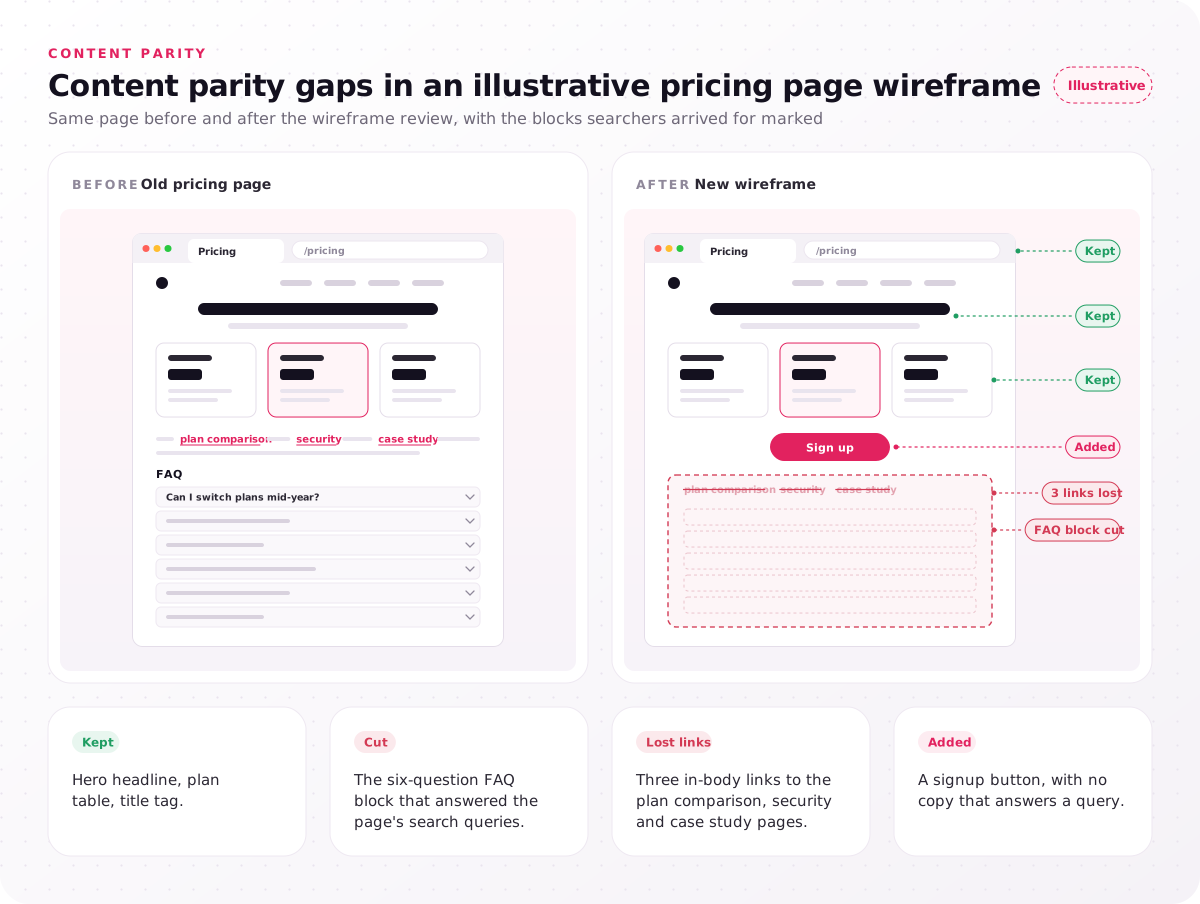
- Kept: hero headline, plan table, title tag.
- Cut: the six-question FAQ block that answered the page's search queries.
- Lost links: three in-body links to the plan comparison, security and case study pages.
- Added: a signup button, with no copy that answers a query.
Losses like this one start in the sitemap and wireframes, not in the redirect file, and our UI UX web design engagements settle the IA and the messaging wireframes before visual design starts. Bring your keep list to every wireframe review and sign off each ranking page against it.
How do page templates affect Core Web Vitals and crawling?
In a website redesign, page templates set the Core Web Vitals and crawlability of every page built from them, so one heavy hero repeats across all ranking pages.
Core Web Vitals are Google's three metrics for loading, responsiveness and visual stability, and their page speed thresholds are Largest Contentful Paint under 2.5 seconds, Interaction to Next Paint under 200 milliseconds and Cumulative Layout Shift under 0.1. Interaction to Next Paint replaced First Input Delay as a Core Web Vital in 2024. Template performance turns on design choices: a hero video or carousel delays the largest element, web fonts without a fallback shift text, and images without reserved space push content down.
Heading hierarchy belongs in the template too: one top-level heading (H1) per page and second-level headings (H2s) in order. Crawlability depends on rendering: an accordion is fine when its text is in the HTML on page load, but a block fetched only after a click never reaches the crawler. Keep the same structured data (schema markup) types, such as Product or BreadcrumbList, on the new templates.
Responsive layouts at 375, 768 and 1,440 px matter for search, because Google uses the mobile version of a page for indexing, so copy missing from the mobile layout is missing from the search index. Ask for a Google Lighthouse run on every template in staging, not only on the home page.
Website redesign SEO checklist for launch day
The website redesign SEO checklist for launch day confirms that redirects, indexability and the new templates work on the live domain before search traffic arrives.
Run it as a pre-launch checklist on staging, then again on the live domain, grouped by owner.
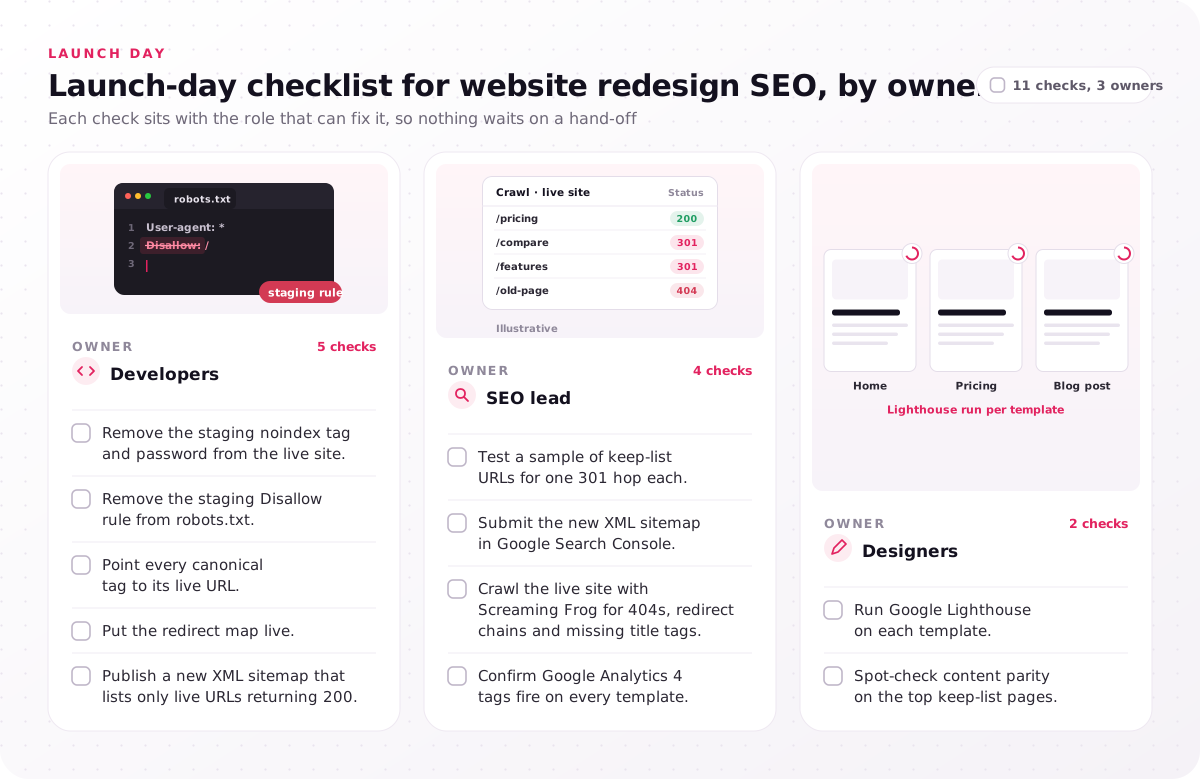
Developers
- Remove the staging noindex tag and password from the live site.
- Remove the staging Disallow rule from robots.txt.
- Point every canonical tag to its live URL.
- Put the redirect map live.
- Publish a new XML sitemap that lists only live URLs returning 200.
SEO lead
- Test a sample of keep-list URLs for one 301 hop each.
- Submit the new XML sitemap in Google Search Console.
- Crawl the live site with Screaming Frog for 404s, redirect chains and missing title tags.
- Confirm Google Analytics 4 tags fire on every template.
Designers
- Run Google Lighthouse on each template.
- Spot-check content parity on the top keep-list pages.
The staging lines lead because indexability can fail sitewide: a staging site stays out of the search index behind a noindex tag or a password, and a noindex tag copied to the live domain tells Google to drop every page carrying it. The redirect test looks for a 301 redirect, not a 302 (temporary) one. To redesign without losing SEO, these launch checks only confirm what the keep list, URL map, wireframes and templates already settled. Book the Screaming Frog crawl for the first hour after the switch.
What should you monitor after launch, and for how long?
After a website redesign, track ranking pages and crawl errors in Google Search Console against the organic traffic baseline, daily in week one, then weekly, until clicks settle.
Website relaunch SEO does not end on launch day. In post-launch monitoring, the page indexing report in Search Console lists 404s and dropped pages, and each missing redirect there gets fixed first. Compare clicks per keep-list URL with the baseline page by page, because a sitewide total can hide one lost pricing page behind a growing blog.
Google's site-move guide treats a temporary ranking dip as expected; the warning sign is a page that has not recovered once the others have. The Core Web Vitals report uses field data from real Chrome users, so it lags the launch. Retest structured data, then run a post-launch audit: a technical SEO crawl, or site audit, of the live site against the pre-launch crawl.
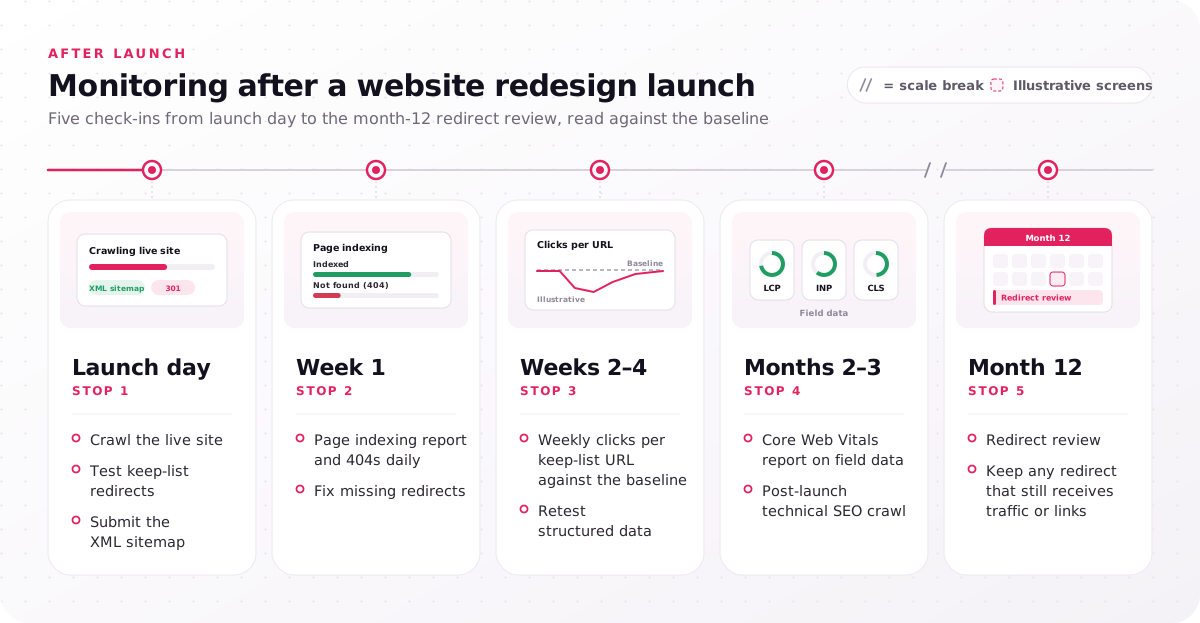
- Launch day: crawl the live site, test keep-list redirects, submit the XML sitemap.
- Week 1: page indexing report and 404s daily; fix missing redirects.
- Weeks 2–4: weekly clicks per keep-list URL against the baseline; retest structured data.
- Months 2–3: Core Web Vitals report on field data; post-launch technical SEO crawl.
- Month 12: redirect review; keep any redirect that still receives traffic or links.
Put the week-1, month-3 and month-12 checks in the calendar on launch day, with a named owner for each.
Which redesign work calls for a UI UX web design partner?
A website redesign needs a UI UX web design partner when the sitemap, wireframes and templates are changing, because those design calls decide whether ranking pages survive.
That kind of change follows flat demo requests despite growing traffic, a rebrand, navigation that grew without a plan, failing Core Web Vitals, or a CMS with no reusable sections.
Our UI UX web design engagement takes 4–8 weeks, costs $25,000–$60,000 and covers design only. The service page lists the sitemap, wireframes and CMS components we hand over, from a navigation model tested in Optimal Workshop to a component set for Webflow, WordPress or Contentful, and the engagement ends with a Google Lighthouse check of the built pages. Redirects, code, content writing and the redirect map sign-off stay with your developers, writers and SEO lead.
The Digno marketing website, designed alongside its web app, explains how Digno works and invites teams to start a free trial. The Nitro League racing game's website, part of our game UI/UX design services, explains the roadmap, the whitepaper and the tokenomics and leads players and investors into the marketplace. Neither case study reports search results, so read them as examples of the page sets this work covers, not of rankings. For a design-only budget range, try the website design cost calculator.
Website redesign SEO costs least while the sitemap is still a draft, because moving a ranking page then changes one row in a spreadsheet, not a built template. Book a first call about your relaunch before that draft is signed off, and open it with your Search Console export, sorted by clicks, so the pages your new sitemap has to keep come first. Every project begins with a free consultation and a fixed-scope proposal.
FAQs
How do you redesign a website without losing SEO?
Redesign a website without losing SEO by treating the pages that already earn traffic as fixed requirements. List them in a keep list, redirect each changed URL to its closest new page, keep their content and internal links in the wireframes, build templates that pass Core Web Vitals, and watch Search Console after launch.
How much should a website redesign cost?
Design work alone for a marketing website redesign costs $25,000–$60,000 over 4–8 weeks in our UI UX web design engagement; development, SEO migration work and content writing need their own budgets. The number of page templates and landing pages, the depth of the IA work and the CMS platform set where a project lands in that range, and online stores with category, product and checkout pages follow e-commerce UX design services instead.
What is the 80/20 rule in SEO?
The 80/20 rule is the Pareto principle applied to search: a small share of pages or fixes tends to bring most of the results. In a redesign, sort your own Search Console export by clicks and check the few URLs at the top first at every review.
Is SEO dead or being phased out in 2026?
No. Search is evolving, not disappearing: Google's AI Overviews answer many queries at the top of the results page and cite web pages as sources, and the query this guide targets shows one citing redesign guides. Bots that fetch pages for artificial intelligence (AI) tools, the AI crawlers, need crawlable text as well, so clear answers in the HTML and URLs that survive a redesign serve both kinds of search.
How often should a website be redesigned?
No fixed cycle applies; redesign when a trigger appears, such as flat demo requests despite growing traffic, a rebrand or failing Core Web Vitals. Between website redesigns, template updates carry less ranking risk than a full rebuild, because they leave URLs and the sitemap alone.
Should you change URLs during a website redesign?
No, not unless the old URL no longer fits the new structure. Every changed ranking URL needs a permanent redirect to its closest new page and updated internal links, so each change adds a row to the redirect map and a check to launch day.
How long does it take rankings to settle after a redesign?
No fixed day count applies: Google's site-move guide says rankings can fluctuate temporarily during a move, and larger sites take longer to process. Track the keep list weekly for the first months, and investigate any page that stays below its baseline after the rest have recovered.