SaaS onboarding is the set of sign-up, setup and first-session screens that takes a new user of a software-as-a-service (SaaS) product to the first value moment. That moment is the first result the product promised, such as a connected data source or an invited teammate. Design the path backward from one activation event per user role, and ask only for what that event needs.
The same word also names customer onboarding projects and the information technology (IT) work of giving new employees app access. This guide covers the in-product kind, the user experience (UX) work inside SaaS UX design that decides whether trial accounts reach that first result.
Key takeaways
- SaaS onboarding ends at the first value moment, so name one activation event per user role before any screen is designed.
- Ask only for what the first session needs at sign-up, and let password managers and copy and paste work on every login field.
- Every empty state should say what will appear and offer a direct pathway; keep the in-app checklist to 3–5 setup tasks.
- Show help when the user reaches the related task; Nielsen Norman Group reports that up-front tutorials interrupt users and are quickly forgotten.
- In business-to-business (B2B) accounts, design the admin path first: workspace settings, single sign-on and user provisioning before members join.
What is SaaS onboarding, and which kind does your team mean?
SaaS onboarding is the in-product path from sign-up to the first value moment; product teams mean that kind, while customer success and IT teams use the word for other work.
Teams also call that moment the aha moment or the first meaningful outcome. Asana and HubSpot are SaaS examples, browser software paid for by subscription.
Search results for "onboarding" mix three jobs, and GUIDEcx's comparison table separates the first two. User onboarding, also called SaaS user onboarding, runs inside the product and belongs to product and growth teams. Customer onboarding is a longer project that implementation and customer success teams run, with milestones, integrations and training.
Rocketlane's guide walks that customer onboarding process from kickoff through configuration, implementation and integrations, and training to go-live. Gainsight's glossary lists four practices for it: maintain momentum, use automation, know your audience and demonstrate value early. The third job is IT's, and BetterCloud defines it: "A SaaS onboarding process is the way IT teams provision and manage access to software applications for new employees."
The map compares the three jobs by owner, timeline and work.
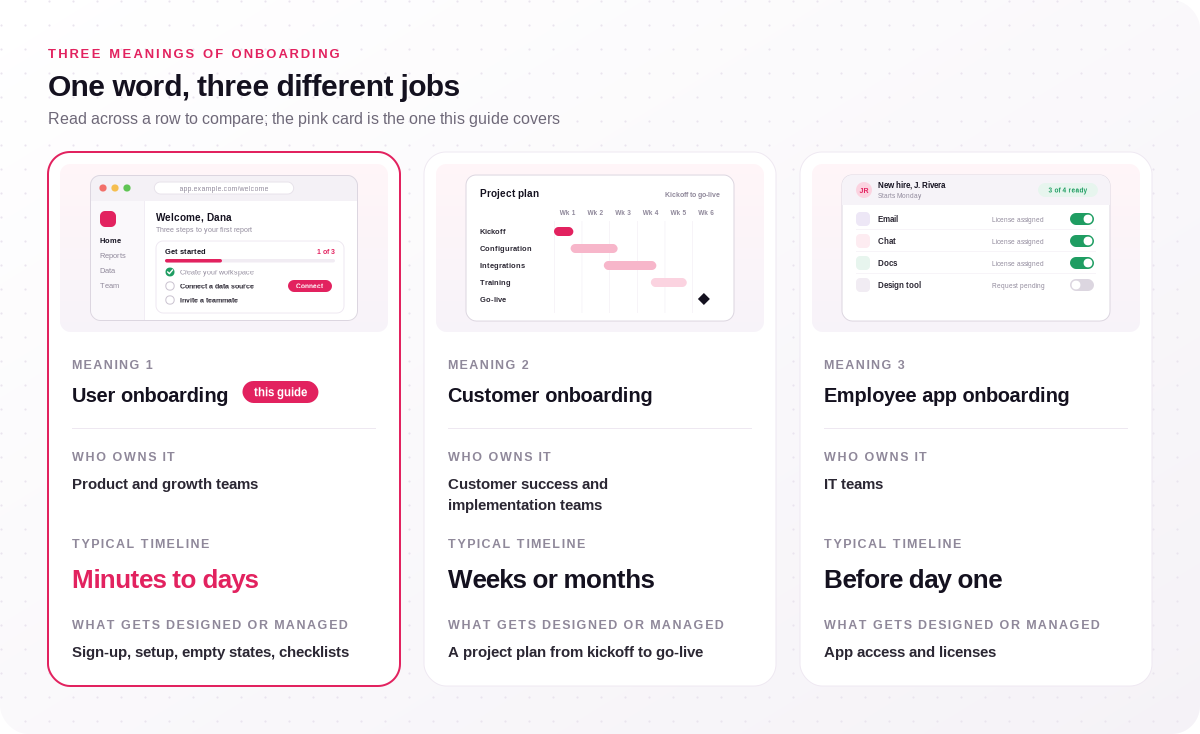
| Meaning | Who owns it | Typical timeline | What gets designed or managed |
|---|---|---|---|
| User onboarding (this guide) | Product and growth teams | Minutes to days | Sign-up, setup, empty states, checklists |
| Customer onboarding | Customer success and implementation teams | Weeks or months | A project plan from kickoff to go-live |
| Employee app onboarding | IT teams | Before day one | App access and licenses |
The admin setup screens of a business-to-business (B2B) account belong to the first job too, and a later section covers them.
What are the 4 C's and 5 C's of onboarding?
The 4 C's are compliance, clarification, culture and connection, a human resources framework for onboarding new employees, not a model for onboarding software users.
Talya Bauer's 2010 guideline for the Society for Human Resource Management (SHRM) Foundation is the source; it states that "Onboarding has four distinct levels, the Four C's." Coursera and Paycor both list check back as the fifth C, a follow-up meeting with the new hire. Clarification carries over to software, so put what the product expects next on the first screen after sign-up.
Where should SaaS onboarding end?
User onboarding should end at an activation event, one named product action per user role that shows a new account has reached first value.
A completed sign-up form or a finished guided tour proves nothing, so onboarding experiences that stop there miss the first meaningful outcome. Some guides call the finish line an activation milestone, tied to an outcome the user wanted.
Pick one event per user role. For an admin, it is often the first teammates invited or single sign-on (SSO) tested; for a member, the first core task done, such as a report shared. Our discovery step likewise sets 1 target metric per lifecycle stage.
Time-to-value is the median time from sign-up to that event; use the median because a few slow accounts distort the average. On a free trial, the event has to fit inside the trial window. Show the upgrade prompt at the moment of value or at a usage limit, not on a timer.
Before redesigning anything, write down the baseline: today's activation rate and median time-to-value. Appcues adds that users who have gone quiet need re-onboarding, and that each significant release asks existing customers to learn something new. Next, list every screen between sign-up and that event.
Which screens and stages make up a SaaS onboarding flow?
A SaaS onboarding flow has five stages, sign-up, setup, first value, first week and upgrade or team rollout, each holding only screens that lead toward the activation event.
These stages open the SaaS customer lifecycle, which our journey-mapping step charts from sign-up to renewal with its drop-off points, user roles and upgrade moments.
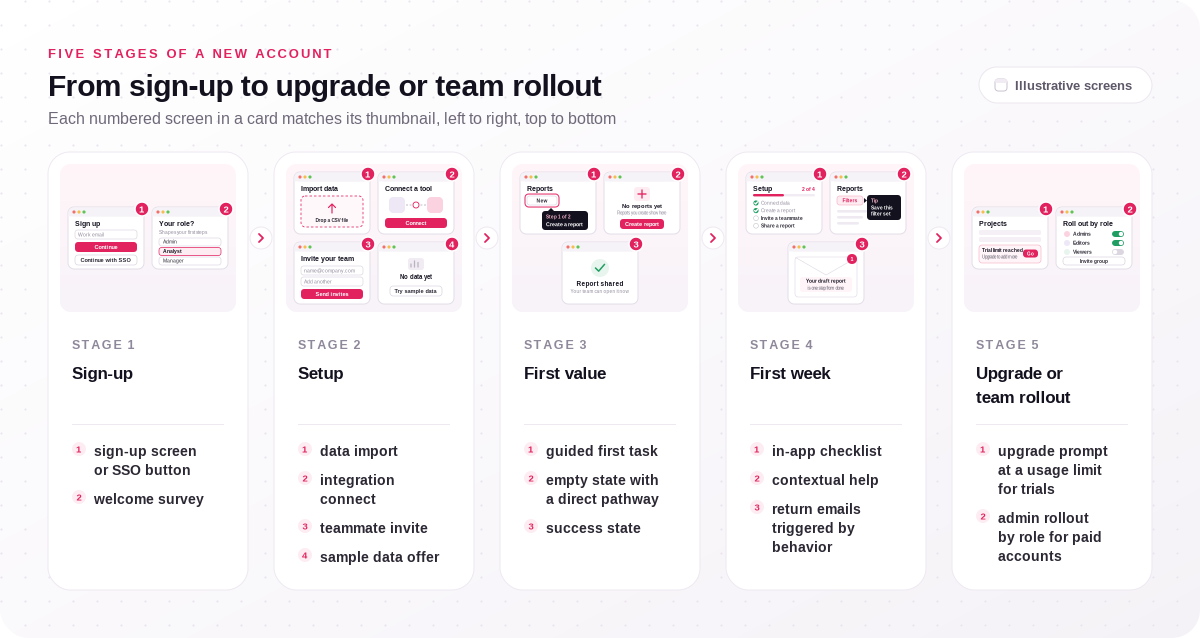
- Sign-up: sign-up screen or SSO button, welcome survey.
- Setup: data import, integration connect, teammate invite, sample data offer.
- First value: guided first task, empty state with a direct pathway, success state.
- First week: in-app checklist, contextual help, return emails triggered by behavior.
- Upgrade or team rollout: upgrade prompt at a usage limit for trials, admin rollout by role for paid accounts.
Across SaaS onboarding flows, each screen needs empty, loading, error and success states, and a brand-new account sees the empty and error versions first. Those states belong to the onboarding flows and activation checklists we design, not to a later polish pass.
What are the 5 stages of the onboarding process?
No standard five exist; for in-product onboarding, use five stages from sign-up to upgrade or team rollout, while implementation projects count phases from kickoff to go-live.
Vendor guides group the same screens differently, and Rocketlane's phases from the first section describe the customer project, not the product. Mark which screens your product has today in each of the five stages, and which stage has none.
How short can the sign-up and setup screens be?
Sign-up and setup in new-user onboarding can shrink to what the activation event needs; ask for everything else after the user reaches first value.
Keep the sign-up fields to an email address or an SSO button, plus a password only when the product needs one. A welcome screen can carry a one- or two-question welcome survey on role and goal, asked only when the answer changes the path. Setup should never end on a blank screen, so offer sample data or an editable template.
The Web Content Accessibility Guidelines (WCAG) cover login as well. WCAG 2.2, a World Wide Web Consortium (W3C) Recommendation dated 12 December 2024, puts Success Criterion 3.3.8, Accessible Authentication (Minimum), at Level AA. It says "A cognitive function test (such as remembering a password or solving a puzzle) is not required for any step in an authentication process" unless the step offers another method or a helping mechanism, or only asks the user to recognize objects or non-text content they provided. W3C's guidance names password managers and copy and paste among the ways to meet it, so never block either.
Success Criterion 3.3.7, Redundant Entry, at Level A, asks that information entered earlier in the same process be "auto-populated, or available for the user to select". So setup fills in the workspace name typed at sign-up instead of asking for it again. Our handover includes a WCAG 2.2 level AA checklist for every screen. Count the fields on each sign-up and setup screen, and strike every field the event does not use.
How do empty states and checklists lead new accounts to first value?
In product onboarding, empty states and an in-app checklist lead new accounts to first value by naming the next action on the open screen, not on a separate help page.
Nielsen Norman Group (NN/g) researcher Kate Kaplan notes that "empty states are quite common during onboarding and initial usage". Her 2021 article sets three guidelines for empty state content: communicate system status, give learning cues and provide direct pathways for key tasks.
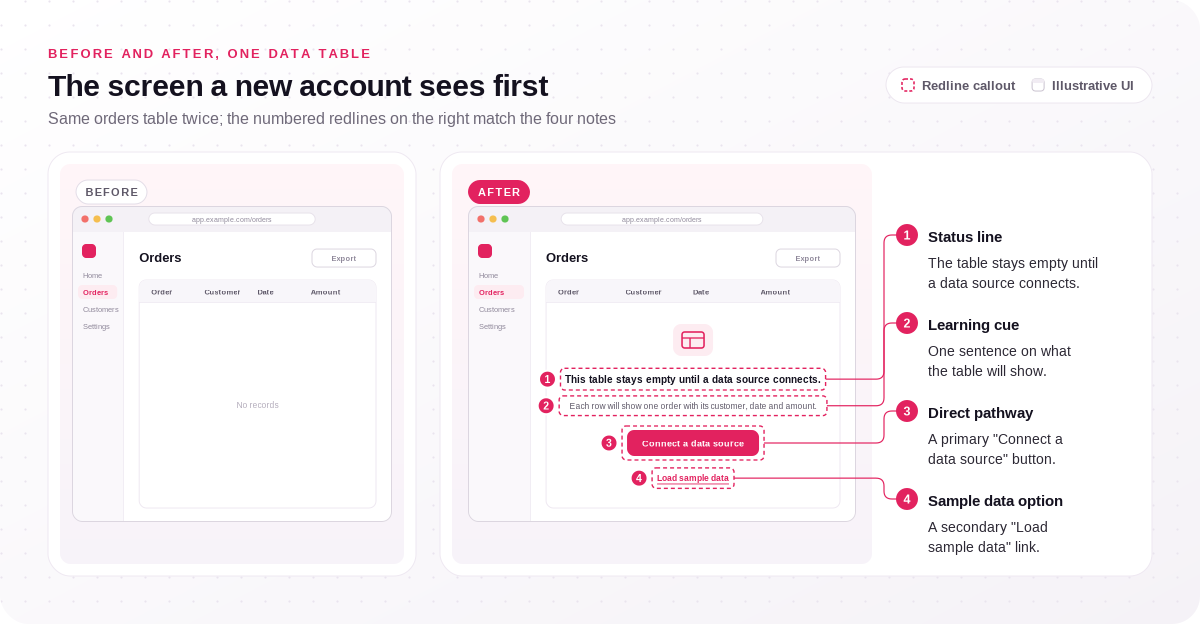
- Status line: the table stays empty until a data source connects.
- Learning cue: one sentence on what the table will show.
- Direct pathway: a primary "Connect a data source" button.
- Sample data option: a secondary "Load sample data" link.
NN/g's Loggly example avoids a blank screen with two pathways, external log sources or demo data. Our Vocable case study shows the idea, with templates that give Vocable writers a head start on articles, emails and press releases.
The in-app checklist holds the setup tasks a new account completes in week 1; our service page gives 3–5 tasks as an example checklist length. Tick each task when the product event happens, such as a data source connecting, not when a tooltip closes. Written down for your team, that list becomes a SaaS onboarding checklist. Open the product as a new account and screenshot every screen that shows nothing.
Product tours or contextual help, which teaches new users better?
In the onboarding flow, contextual help teaches better than an up-front product tour, which interrupts new users on their way to first value and is quickly forgotten.
NN/g's Page Laubheimer summed up the 2023 article: "Tutorials interrupt users, don't necessarily improve task performance, and are quickly forgotten. Contextual help signals can avoid these pitfalls but require unintrusive ways to activate." The cause is the paradox of the active user: people want to start right away.
Tips shown out of context at first login are push revelations; a pull revelation appears when a signal shows the user would benefit at that moment. Help timing is a per-tip choice, compared below.
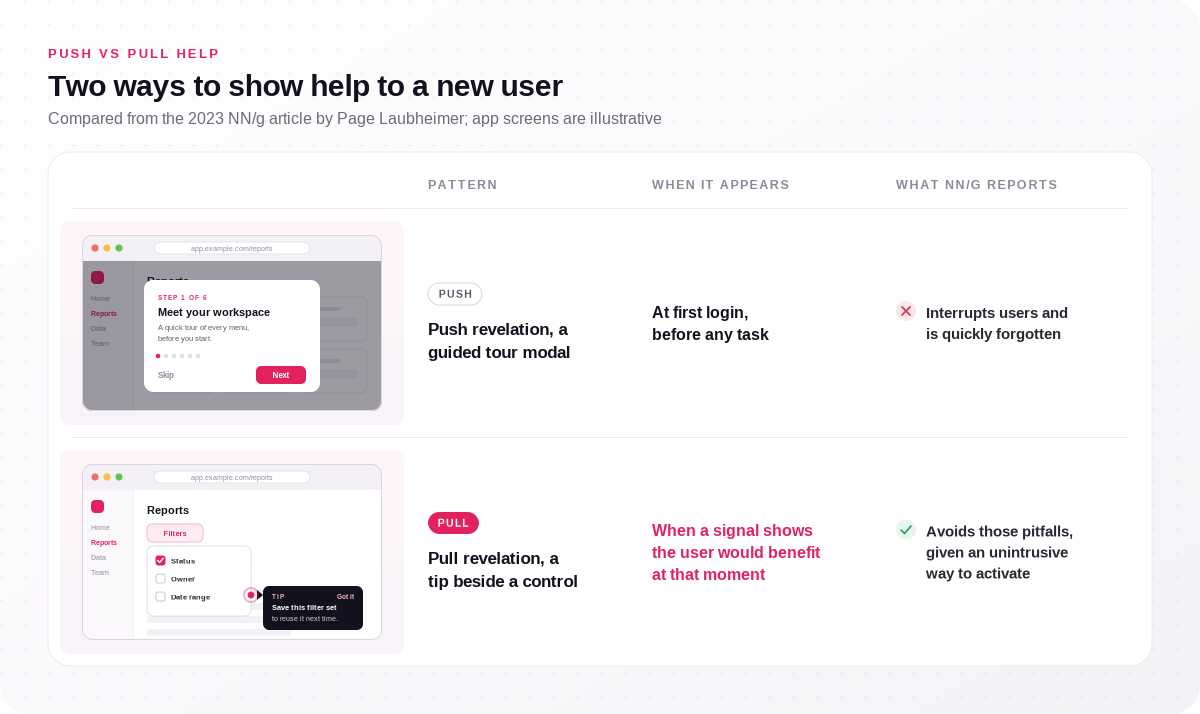
| Pattern | When it appears | What NN/g reports |
|---|---|---|
| Push revelation, a guided tour modal | At first login, before any task | Interrupts users and is quickly forgotten |
| Pull revelation, a tip beside a control | When a signal shows the user would benefit at that moment | Avoids those pitfalls, given an unintrusive way to activate |
The same article found guided walkthroughs useful for a novel interaction paradigm such as augmented reality (AR), and overused elsewhere. If you keep a product tour, make it one short, skippable path to the event, replayable from the help menu. Move every modal shown before the first task to the screen where its feature lives.
How does B2B SaaS onboarding change when an admin sets up the account?
B2B SaaS onboarding adds an admin path first: an admin configures the workspace, single sign-on and user provisioning before members start toward their own activation event.
Auth0 writes that "A fundamental choice in user onboarding is between self-service and administrator-led provisioning." In the admin model, an administrator from the customer's organization invites users into the right organization. With just-in-time provisioning, an account is created the first time a user signs in through the company's identity provider, such as Okta or Microsoft Entra ID.
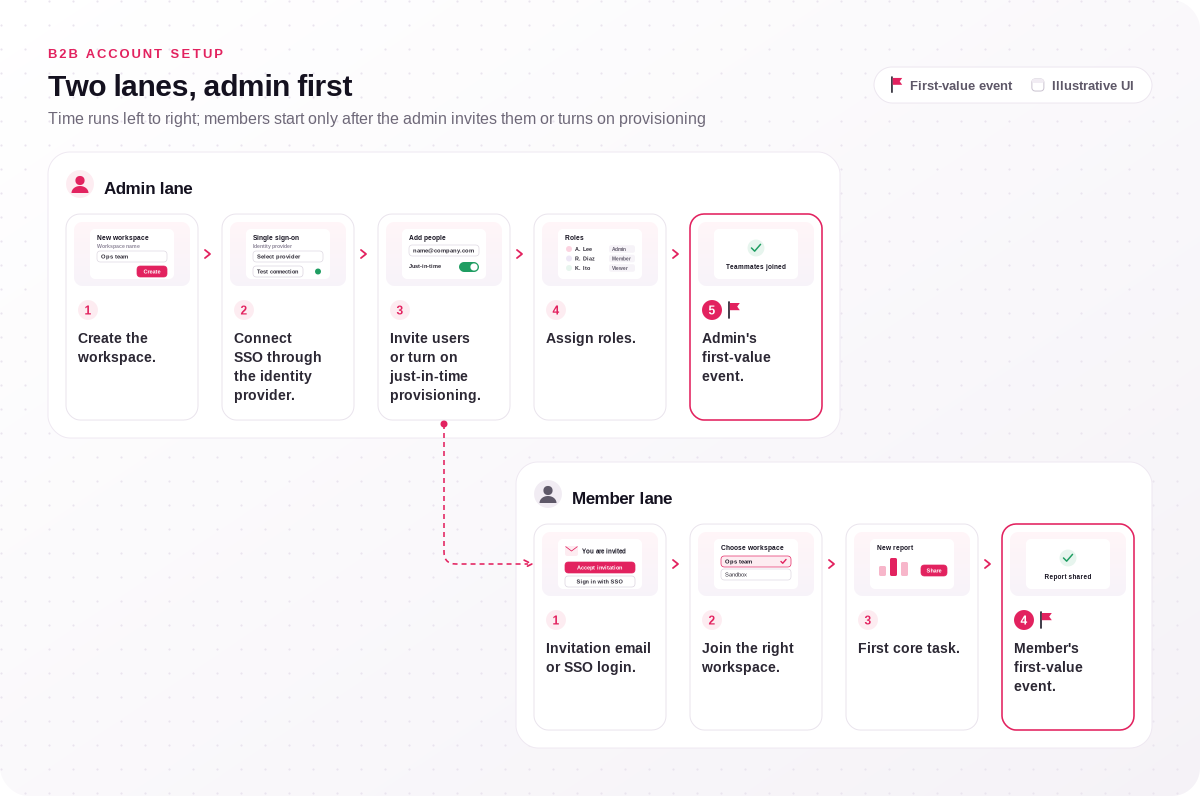
Admin lane
- Create the workspace.
- Connect SSO through the identity provider.
- Invite users or turn on just-in-time provisioning.
- Assign roles.
- Admin's first-value event.
Member lane
- Invitation email or SSO login.
- Join the right workspace.
- First core task.
- Member's first-value event.
Members should never land in an unconfigured workspace. Detailed SSO and provisioning setup screens, permission managers and audit logs are platform design, covered on our SaaS industry page.
Product Fruits names three types of onboarding model: white-glove or high-touch, self-service or low-touch, and hybrid, which needs clear rules on who gets a person. A product-led growth model relies on the self-service path to carry a free trial to a paid plan. Write the admin's event next to the member's before any screen is drawn.
Which metrics show that SaaS onboarding is working?
Activation rate and median time-to-value show whether user onboarding gets accounts to the activation event; completion rate, Day 7 and Day 30 retention and trial-to-paid conversion show where it breaks.
Each SaaS UX design project we run defines metrics with the Google HEART framework: happiness, engagement, adoption, retention and task success. Kerry Rodden, Hilary Hutchinson and Xin Fu described it at CHI 2010, the Conference on Human Factors in Computing Systems, with "a process for mapping product goals to metrics". The card puts each onboarding metric in one HEART category.
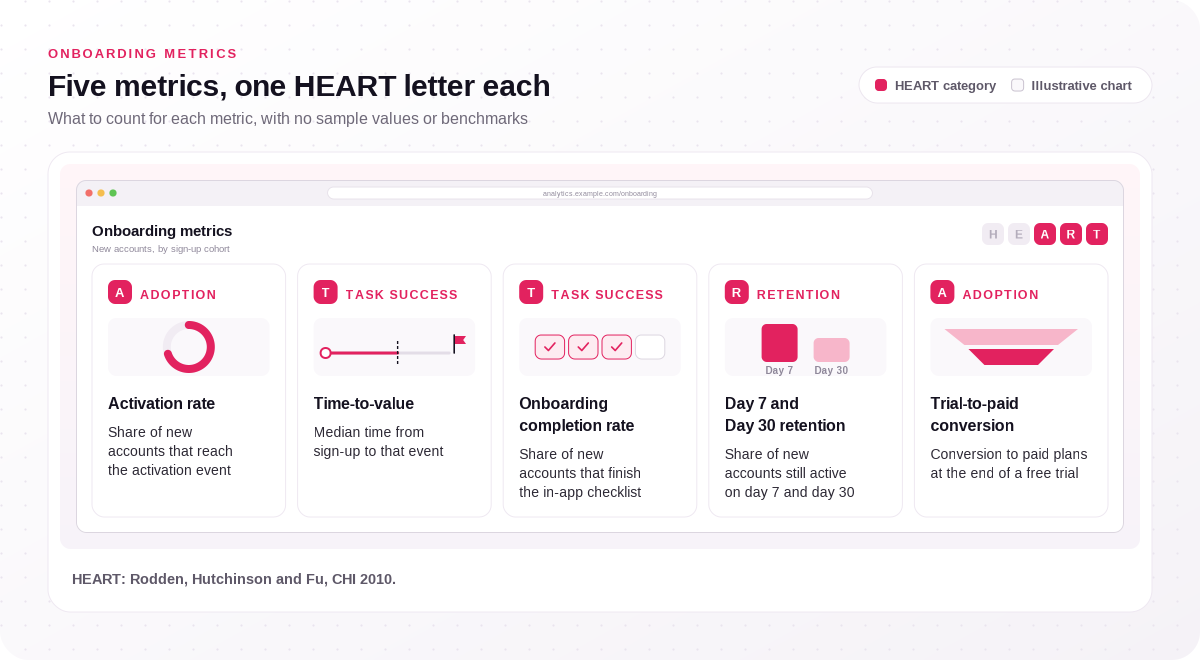
| Metric | Definition | HEART category |
|---|---|---|
| Activation rate | Share of new accounts that reach the activation event | Adoption |
| Time-to-value | Median time from sign-up to that event | Task success |
| Onboarding completion rate | Share of new accounts that finish the in-app checklist | Task success |
| Day 7 and Day 30 retention | Share of new accounts still active on day 7 and day 30 | Retention |
| Trial-to-paid conversion | Conversion to paid plans at the end of a free trial | Adoption |
HEART: Rodden, Hutchinson and Fu, CHI 2010.
Day 7 and Day 30 retention are early retention measures, and feature adoption after week 1 sits in the adoption category. Product analytics such as Amplitude, Mixpanel or Pendo supply the numbers; compare cohorts on a new flow against your baseline.
Customer onboarding teams add time to first value, churn rate in the first 90 days and three survey scores, all listed by Rocketlane: Customer Satisfaction Score, Customer Effort Score and Net Promoter Score. Read behavior first and scores second. When you cannot tell where accounts stall, a SaaS UX audit of sign-up and onboarding finds the step, and it costs $5,000–$15,000.
What is the 3 3 2 2 2 rule of SaaS?
The 3 3 2 2 2 rule is T2D3, a SaaS growth path where annual revenue triples twice and then doubles three times; it is not an onboarding metric.
Neeraj Agrawal of Battery Ventures wrote in March 2015 about "a mantra I call 'triple, triple, double, double, double', (T2D3 for short), referring to a company's annualized revenue growth." Onboarding reaches revenue through activation, retention and trial-to-paid conversion, so fix those rows first.
How do you test a SaaS onboarding flow before it ships?
Test the onboarding flow as a clickable prototype with people who have never used the product, and ask each to reach the activation event from sign-up without help.
We run two test rounds of five users each on the prototype in Maze, and each round ends with a System Usability Scale (SUS) score and a fix list. You can score the System Usability Scale with our calculator. Recruit admins and members separately, and only people new to the product; our redesign guide covers testing new trial users apart from existing customers. Watch where each person stalls, which empty state they misread, whether they skip the walkthrough and their time to the event.
TradeZella, a trading journal with no onboarding guide, came to us with "a steep learning curve for new users". We rebuilt the user flows around the features traders use most, and the visuals were tested with traders before launch.
When a usability test shows people stalling before first value, the fix often spans sign-up, blank screens, the in-product task list and the admin path. Our service page prices an onboarding and activation redesign for one user role with one testing round near $25,000. If you do not know where accounts stall, start with the audit above; if you do, describe that step when you book a free consultation.
Will AI replace SaaS products and their onboarding?
No; artificial intelligence (AI) assistants are being added to SaaS products, which changes how users reach first value rather than removing the product.
Appcues notes that many products now carry an AI assistant in a sidebar, and some work through an agent or a Model Context Protocol (MCP) connection. In its words, "Most SaaS companies sit in the middle": customers still use a traditional interface while AI features ship alongside it. So measure whether the user got the outcome, not how many steps they clicked, and add one AI task to the prototype test.
FAQs
What is the best SaaS onboarding software?
No single tool is best, because SaaS onboarding software comes in two kinds. GUIDEcx's comparison table lists customer onboarding platforms such as GUIDEcx, Rocketlane and OnRamp, and in-app tools such as Userflow, Appcues and Pendo for guided tours, tooltips, checklists and prompts. Choose by the kind you run; the tool displays the flow, and the design decides what it says.
What are the best practices for SaaS onboarding?
End at one event per role, and collect only what the first session uses. Design every blank screen, keep the in-app checklist to 3–5 tasks and show help at its task. In B2B accounts, set up the admin path first, then test the flow with new users before build.
How long should new-user onboarding take?
No fixed duration applies; set the target from the median time-to-value of each user role. On a free trial, keep that median well inside the trial window, and shorten it by removing every step the activation event does not need.
How many tasks belong in a SaaS onboarding checklist?
It holds three to five setup tasks that a new account completes in week 1, the example our service page gives. Pick the tasks that lead to the event, and move the rest to after first value.
Is a product tour the same as onboarding?
No. A product tour is one pattern inside user onboarding, which also covers sign-up, setup, blank screens, the task list and the first-week return path. Treat that walkthrough as optional and the event your team chose as required.