
Key takeaways
- Neither format wins outright: count the UI states and live data each component shows, and expect many products to ship both formats.
- Make the Rive vs Lottie decision per component and record it in the micro-interaction library.
- Interaction logic can now live in the file on both sides, but a plain Lottie JSON file still has none.
- Published speed and file-size figures are vendor claims or single-device tests, so have developers test both files on the oldest device you support.
- Design owns the file, timing table, state documentation and reduced-motion variant; engineering owns the runtime, inputs and device testing.
The Rive vs Lottie decision determines which animation file your developers receive for each micro-interaction, and how much of the behavior they still have to code. Take an illustrative favorite toggle with five user interface (UI) states: default, hover, pressed, on and disabled. Handed off as a plain Lottie file, it arrives as one timeline, and your developers write the code that switches between the five states. Handed off as a Rive file, the same toggle arrives with its states and transitions inside, and your developers load the file and connect its inputs.
Neither animation format wins outright. Lottie fits linear animations that play once or loop, Rive fits components with several UI states or live data, and many products ship both, so the choice is made per component. It is one line of the motion specifications that an interaction design agency hands to engineering, and interaction design settles it before any file is drawn.
Rive vs Lottie, what is the difference?
Rive and Lottie both hand developers a file instead of hand-coded motion: Lottie is an open format that plays a designed timeline, while a Rive file also carries a state machine.
Lottie is an open file format for vector animation. Hernan Torrisi created it in 2015 as an export format for After Effects, and it is now governed by the Lottie Animation Community, a project hosted by The Linux Foundation. Three names get mixed up here: the Lottie format is the file specification, LottieFiles is a company and platform that sells tools around the format, and the Airbnb players (lottie-web, lottie-ios and lottie-android) are libraries that draw a Lottie file on each platform.
Rive is three things under one name: the Rive Editor, where a designer draws and animates the graphic; the .riv file the editor exports; and the Rive runtime, the player library that draws that file inside an app.
Searches for Lottie vs Rive ask the same question in the opposite order. Before you compare features, list the components in your product that move, because a Rive vs Lottie comparison is applied to that list one row at a time.
Which micro-interactions suit Lottie, and which suit Rive?
Rive or Lottie is a per-component choice: play-once or looping micro-interactions suit a Lottie file, and those with several UI states or live values suit a Rive state machine.
Each entry in a micro-interaction library is defined by its trigger, rules, feedback and loops, and the format follows from the rules. Linear feedback, such as a success tick, has one trigger and one timeline. It belongs with the loaders, icons and marketing moments that Lottie has long served. Stateful controls, such as a toggle or pull-to-refresh, are interactive graphics that respond to user input.
Count the UI states each component must show, from the full set we define in Figma for every component, for example default, hover, focus, pressed, disabled, loading, empty and error. The more of them one graphic has to show, the more code a linear animation needs around it. User experience (UX) work for software as a service (SaaS) products shows the pattern: our SaaS UI UX design page notes that custom roles, field-level permissions and approval chains multiply the states each screen must show.
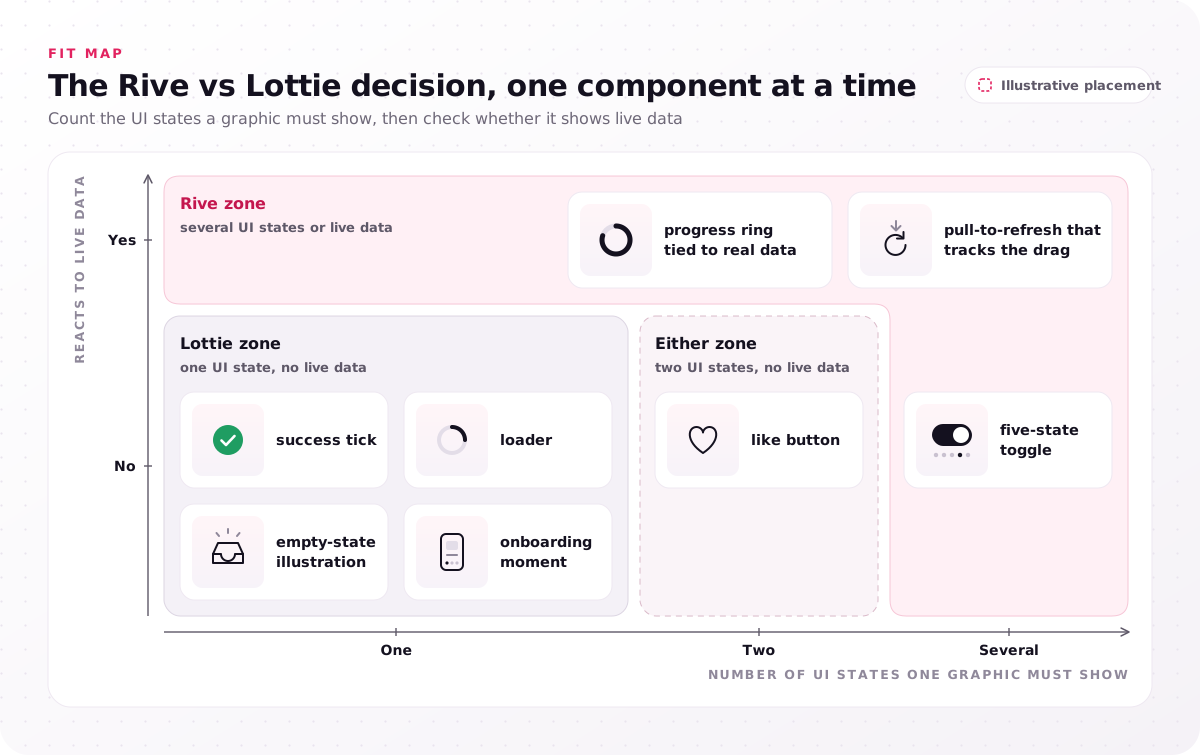
- Lottie zone (one UI state, no live data): success tick, loader, empty-state illustration, onboarding moment.
- Either zone (two UI states, no live data): like button.
- Rive zone (several UI states or live data): five-state toggle, pull-to-refresh that tracks the drag, progress ring tied to real data.
The placement is our reading, not a vendor rule, and the next section shows how a newer Lottie file type can also carry the logic for Rive-zone rows without live data. Add a format column to your own micro-interaction library and mark each row Lottie, Rive or either; the "either" rows are the ones the Rive vs Lottie question is really about.
How do state machines change the Rive vs Lottie decision?
A state machine moves interaction logic out of app code and into the animation file, and both sides of the Rive vs Lottie decision now offer one.
Interactivity is where older comparisons have aged. In the Rive Editor, a designer builds states, transitions and layers as a graph and previews clicks and hovers before export, as Rive's documentation describes; developers then connect inputs to that graph instead of rebuilding it.
Lottie files are written in JavaScript Object Notation (JSON), and a plain Lottie JSON file holds no logic, so every hover, press and disabled state is coded in the app. The dotLottie format changes that. LottieFiles' comparison and Rive's own comparison page agree that these files now carry state machines for clicks, hovers and other triggers, built visually in a browser editor or in code. So Lottie animations can react to clicks and hovers, and a table that limits Lottie to play, pause and loop is out of date.
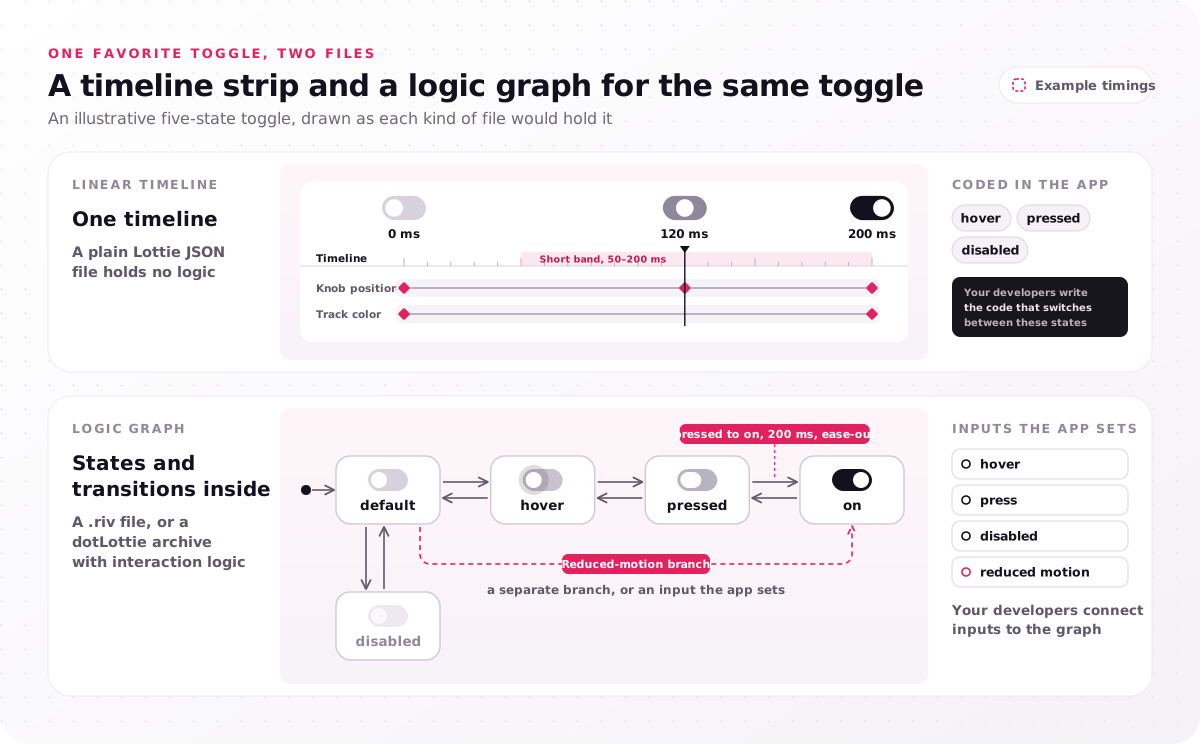
- Linear timeline (a plain Lottie file with no logic): one timeline with example keyframes at 0, 120 and 200 milliseconds; the hover, pressed and disabled states are coded in the app.
- Logic graph (a .riv file, or a dotLottie archive with interaction logic): the default, hover, pressed, on and disabled states and their transitions sit inside the file, with a reduced-motion branch; your developers connect inputs to the graph.
On maturity, the Lottie vendor itself calls Rive's version "mature, powerful, and precise" and its own "nearly as capable", so ask which triggers and transitions your components need before assuming the two are equal.
How does each format handle live data?
Rive handles live data through Data Binding, while Lottie's archive format covers a narrower set through themes and slots.
Rive's documentation describes view models whose bound values, such as text, colors, images and lists, are updated by app code while the app runs. On the Lottie side, theming swaps colors, text and some properties through slots, which is how that format handles light and dark variants. An illustrative case: a progress ring that follows a real order status needs bound data, while an icon that only changes color between themes needs a theme. Mark the components that show live values before anyone opens an editor.
How do the file formats and runtimes compare?
Rive ships one binary .riv file, while Lottie ships as text-based Lottie JSON or a compressed dotLottie archive, and each file format needs its own runtime before developer handoff is complete.
The table compares the three files by what each holds, who governs it, how it is authored and what plays it.
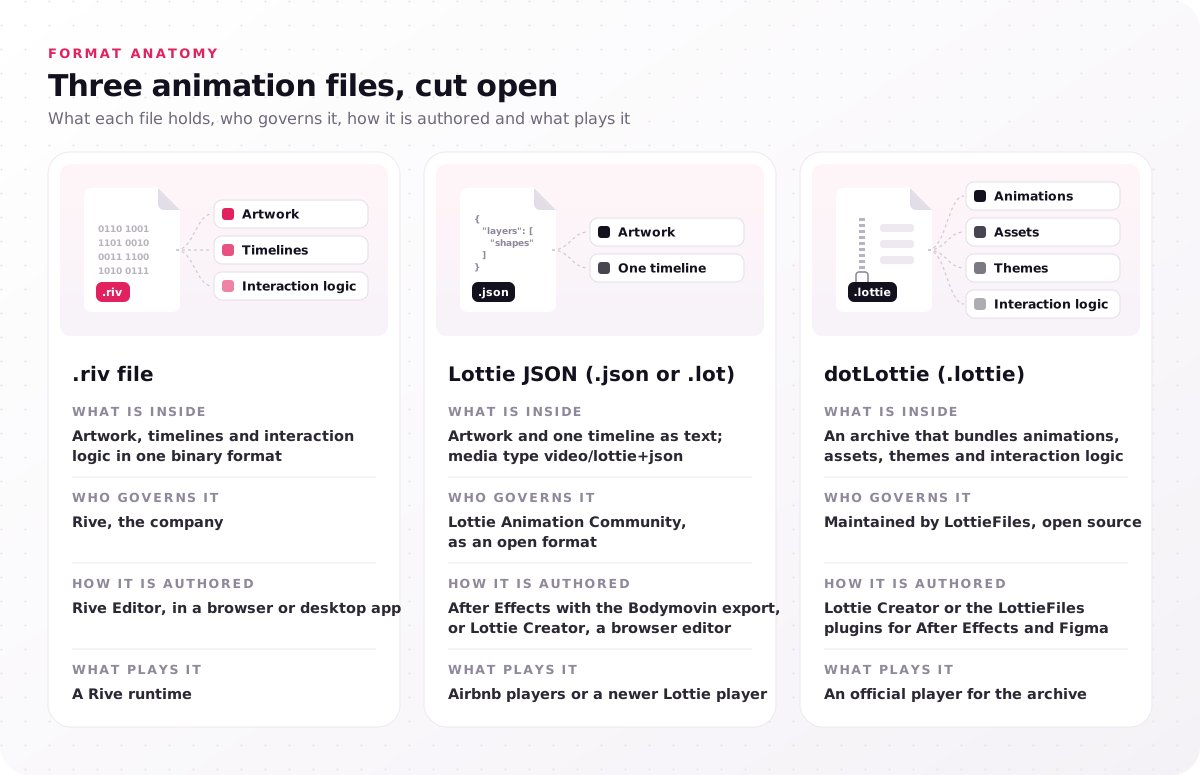
| File | What is inside | Who governs it | How it is authored | What plays it |
|---|---|---|---|---|
| .riv file | Artwork, timelines and interaction logic in one binary format | Rive, the company | Rive Editor, in a browser or desktop app | A Rive runtime |
| Lottie JSON (.json or .lot) | Artwork and one timeline as text; media type video/lottie+json | Lottie Animation Community, as an open format | After Effects with the Bodymovin export, or Lottie Creator, a browser editor | Airbnb players or a newer Lottie player |
| dotLottie (.lottie) | An archive that bundles animations, assets, themes and interaction logic | LottieFiles, which maintains it as an open-source format | Lottie Creator, or the LottieFiles plugins for After Effects and Figma | An official player for the archive |
Platform and runtime support is broad on both sides. Rive lists official runtimes for web, React, Apple platforms, Android, Flutter, React Native, C++ and C#, plus the game engines Unity and Unreal, and its documentation places the runtimes under the MIT License. The Airbnb players cover Android, iOS and web, and the official dotLottie players cover web, iOS, Android, React Native, Flutter and C/C++. Rive's comparison says that list holds no game engine, so check LottieFiles' current player list if Unity or Unreal is a target.
Rive's pitch is that one file holds design, motion and logic; the Lottie vendor counters that a Rive team still keeps an editable project plus a separately exported file. Rive's documentation adds a developer note: mark .riv files as binary in Git so line-ending conversion does not corrupt them.
Feature support still differs by runtime. Rive publishes a feature support table per runtime, and Airbnb's supported-features table shows gaps per platform, because each Airbnb player uses its platform's own renderer. Have your developers check both support tables before a design relies on a feature.
Is Rive faster and smaller than Lottie?
Yes on speed in one device test and on size by Rive's own figure, but neither settles the Rive vs Lottie question for your files at developer handoff.
The ledger sets each published claim about file size, frame rate in frames per second (FPS), memory use in megabytes (MB), rendering and theming beside who makes it and its caveat.
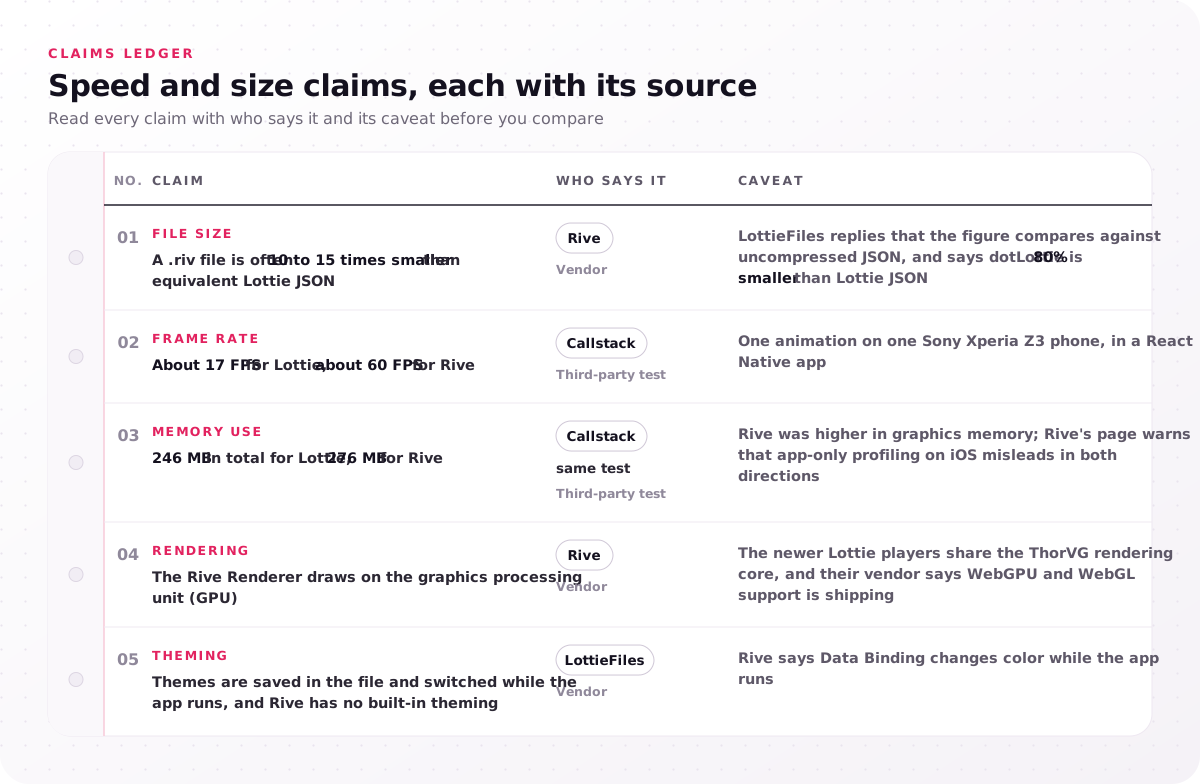
| Claim | Who says it | Caveat |
|---|---|---|
| File size: a .riv file is often 10 to 15 times smaller than equivalent Lottie JSON | Rive | LottieFiles replies that the figure compares against uncompressed JSON, and says dotLottie is 80% smaller than Lottie JSON |
| Frame rate: about 17 FPS for Lottie, about 60 FPS for Rive | Callstack | One animation on one Sony Xperia Z3 phone, in a React Native app |
| Memory use: 246 MB in total for Lottie, 276 MB for Rive | Callstack, same test | Rive was higher in graphics memory; Rive's page warns that app-only profiling on iOS misleads in both directions |
| Rendering: the Rive Renderer draws on the graphics processing unit (GPU) | Rive | The newer Lottie players share the ThorVG rendering core, and their vendor says WebGPU and WebGL support is shipping |
| Theming: themes are saved in the file and switched while the app runs, and Rive has no built-in theming | LottieFiles | Rive says Data Binding changes color while the app runs |
Callstack's benchmark is the one test on the list that neither vendor ran, although Callstack built the React Native wrapper for Rive's runtime as a client project. The file-size rows are each vendor's own comparison, and the rendering row names engines, the Rive Renderer and the ThorVG core, not measurements. None of the five rows predicts how your own files will weigh or run.
Visible feedback within 100 milliseconds (ms) of each tap or click is what makes a product feel instant, and users notice a late response long before anyone can tell which format drew it. Rive's own page says to test on the devices you ship to, so ask your developers to run both candidate files on the oldest device you support and report frame rate and memory use.
What does each format cost a product team?
Rive and Lottie files carry no runtime fee after developer handoff, so cost sits in editor seats and learning time; Rive lists $0–$120 per seat per month, billed yearly.
The price lines in a Rive vs Lottie comparison are short. Rive's pricing page, as of November 2026, lists a seat price for four plans, per seat per month when billed yearly; month-to-month billing costs more:
- Free, $0: exports play a Rive splash screen, with 3 collaborative files.
- Cadet, $9: up to 3 seats, no splash screen.
- Voyager, $32: up to 25 seats, with Libraries.
- Enterprise, $120: for companies with $10M or more in annual revenue.
Licensing is permissive on both sides. Rive's runtimes are MIT-licensed with no royalties. Lottie is an open format with a public specification, its newer players are MIT-licensed too, and LottieFiles sells paid plans for its platform, so the plan and license cost on that side depends on which tools the team adds.
The learning curve costs more than the seats. A team that already animates in After Effects keeps its habit with Lottie, while Rive means time in a new editor, as the Lottie vendor's own comparison also says. Check each format's community and learning resources, meaning its tutorials, forums and ready-made files, against the tools your motion designers already use. For workflow and collaboration, the vendor says its platform plugs into Figma.
Count the people who will author and edit files after launch, not every developer who loads one, then check each vendor's current terms before you budget.
What do design and engineering each own at developer handoff?
At developer handoff the design team owns the Rive or Lottie file, its timing table and the state documentation, and engineering owns the runtime, the inputs and device testing.
A timing table lists, for every transition, the trigger, the UI state, and the exact duration, easing curve and delay. An example row for the illustrative toggle reads "pressed to on, 200 ms, ease-out, no delay". That duration sits inside the Material Design 3 short band of 50–200 ms, the example our motion system gives for small feedback; its example for larger transitions is the medium band of 250–400 ms. Duration and easing values stored as tokens belong in the design system, and our design system services store motion values as tokens in the Design Tokens Community Group format.
Our side of the line is fixed: we deliver the file and timing table; your developers load it and connect its inputs. The developer motion specifications and state documentation in Storybook go to engineering together, and we then review the built interactions with your engineers. Timing is tested earlier, with users, in an interactive prototype built in Figma or ProtoPie.
A state machine changes the contract between the lanes: as Callstack notes from the developer's side, engineers fire named inputs instead of rebuilding the logic.
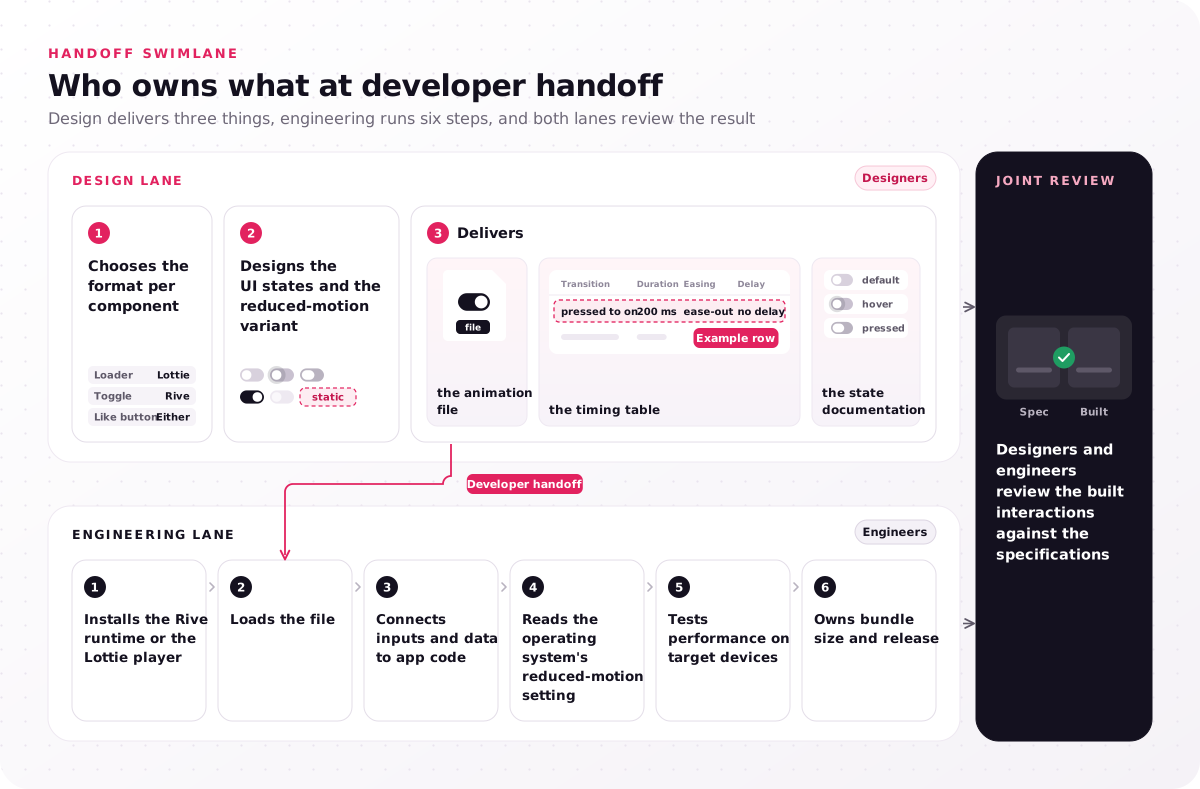
- Design lane: chooses the format per component, designs the UI states and the reduced-motion variant, delivers the animation file, the timing table and the state documentation.
- Engineering lane: installs the Rive runtime or the Lottie player, loads the file, connects inputs and data to app code, reads the operating system's reduced-motion setting, tests performance on target devices, and owns bundle size and release.
- Joint review: designers and engineers review the built interactions against the specifications.
A team with developers and no motion owner has the engineering lane covered and the design lane empty, whichever format a component uses. Nobody writes the timings, the state documentation or the reduced-motion variant that lets motion be switched off, as the Web Content Accessibility Guidelines (WCAG) ask. Put a name beside every line of both lanes before the first file is drawn.
How does reduced motion work in Rive and Lottie files?
Rive and Lottie files both need a reduced-motion variant designed before developer handoff, because WCAG 2.2 success criterion 2.3.3 asks that interaction-triggered motion can be disabled unless it is essential.
Success criterion 2.3.3, Animation from Interactions, is a Level AAA criterion, and the World Wide Web Consortium (W3C) names the prefers-reduced-motion media query as one technique for meeting it. Our practice is to give every non-essential animation a reduced-motion variant when the motion system is designed, not after launch.
The variant is delivered differently in each format:
- Linear Lottie file: a second, shorter file or a static end frame.
- File with a logic graph, in either format: a separate branch, or an input the app sets.
We specify the option for each component, and your developers read the operating system's setting and switch to the variant. Treat neither player as reading that setting for you until they have confirmed it for the version they install.
Restraint helps as much as the variant. In healthcare UI UX design, interruptive dialogs are reserved for drug–allergy and dose conflicts, and motion deserves the same rule: movement is kept for moments that need attention. Add a reduced-motion column beside each row's duration so no component reaches engineering without one.
Rive vs Lottie, which should your team pick?
Pick per component, not per product: the Rive vs Lottie decision rests on seven questions about UI states, live data, platforms, skills and developer handoff, and many products ship both.
The sheet asks the seven questions in order, with the format each answer points to.
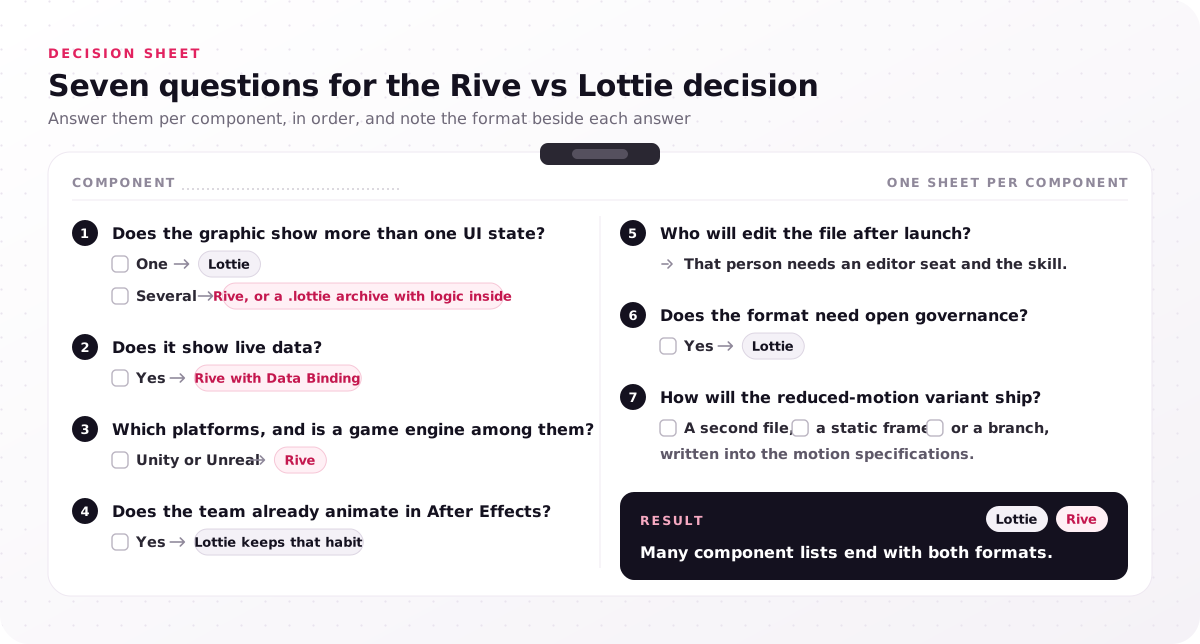
- Does the graphic show more than one UI state? One: Lottie. Several: Rive, or a .lottie archive with logic inside.
- Does it show live data? Yes: Rive with Data Binding.
- Which platforms, and is a game engine among them? Unity or Unreal: Rive.
- Does the team already animate in After Effects? Yes: Lottie keeps that habit.
- Who will edit the file after launch? That person needs an editor seat and the skill.
- Does the format need open governance? Yes: Lottie.
- How will the reduced-motion variant ship? A second file, a static frame or a branch, written into the motion specifications.
Result: many component lists end with both formats.
Both vendors say on their own sites that teams can use both: Lottie animations for the linear rows, Rive animations for the stateful ones. Switching a row later works only in part: each vendor documents an importer for the other's files, so budget time to rebuild the interaction logic afterward. Record the answer per row in the micro-interaction library, so the next component follows a written rule.
Whichever format each row gets, the design lane still needs an author. Our interaction design engagement fills it in 4–8 weeks, from the micro-interaction library, UI states and motion system to Lottie or Rive files with timing tables and a review of the built interactions with your engineers. That whole engagement, not the animation files alone, runs $25,000–$60,000, and the service page explains where an interaction design project lands in that range. If your component list is waiting on the Rive vs Lottie decision, book a free consultation and keep the list open: the call sorts the rows that need a state machine from the rows a short Lottie file covers, and a fixed-scope proposal comes after it.
FAQs
What is better than Lottie?
Nothing is better than Lottie across the board. Rive suits components with several UI states or live data, and dotLottie improves on plain Lottie JSON for bundled assets and interaction logic. A loader that plays one loop gains nothing from a move to another format, while the five-state toggle does, so judge "better" one component at a time.
Is Rive better than After Effects?
No. The two do different jobs: After Effects authors linear motion that reaches a product as a Lottie file through the Bodymovin export, while Rive is an editor, a file format and a set of runtimes in one. Compare Rive with that whole pipeline instead.
What are some alternatives to Rive?
The closest alternatives to Rive are dotLottie files with interaction logic built in Lottie Creator, Lottielab's interactive Lottie editor, and animation written in code. Each one trades Rive's single file for an open format or for more developer time.
Can AI make a Lottie animation?
Yes. Artificial intelligence (AI) features now sit in both editors: Lottie Creator's vendor describes a "Prompt to State Machines" feature that generates states and transitions from a plain-language description, and Rive lists an AI Agent in the Rive Editor. A designer still sets duration and easing, designs the reduced-motion variant and checks the result against the motion system.
Can you convert a Lottie file to Rive?
Yes, in part, and not as a round trip. Rive's asset documentation lists .lottie import on Enterprise plans, and Lottie Creator documents a Universal File Importer that accepts Rive files. Plan to rebuild the interaction logic after either import, and confirm the result with one test file first.
Is Lottie free to use?
Yes. Lottie is an open format with a public specification under the Lottie Animation Community, and its newer players are MIT-licensed. LottieFiles charges for its platform plans, and Rive charges per editor seat while keeping its runtimes MIT-licensed.
Should I use Rive or Lottie for app animations?
Use Lottie for app animations that play once or loop, and Rive for controls with several UI states or live data. Many apps end up with both, so decide per component and write the choice into the motion specifications.