Key takeaways
- Screen quality rarely separates the two options; platform coverage, test rounds and test-build review do.
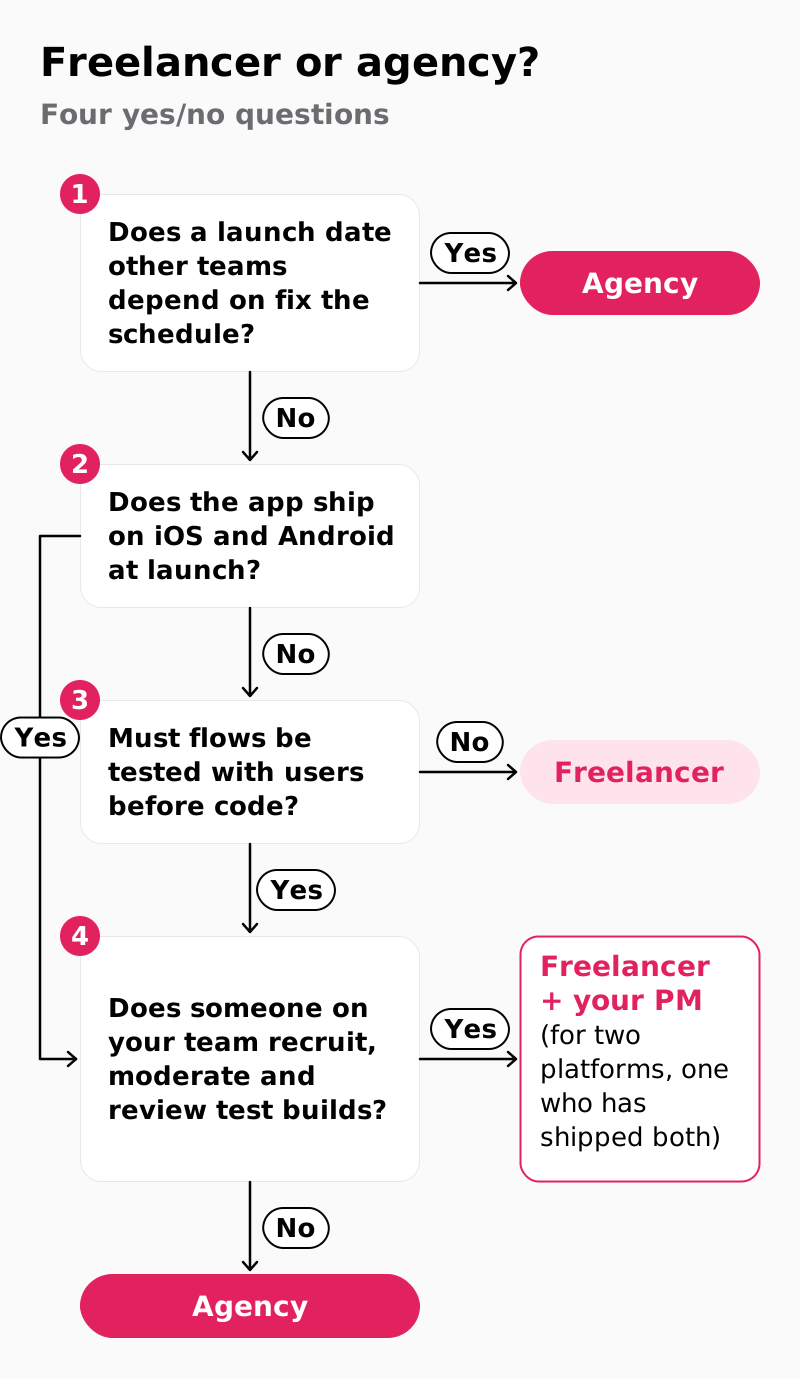
- The decision tree asks four questions in order: a launch date other teams depend on, iOS and Android at launch, user testing before code, and who in-house recruits, moderates and reviews test builds.
- An Android version is planned translation work: a navigation bar for the tab bar, bottom sheets for action sheets, 48×48 density-independent pixel (dp) touch targets.
- Get it in writing who recruits test participants and who reviews the first TestFlight and Google Play Console builds.
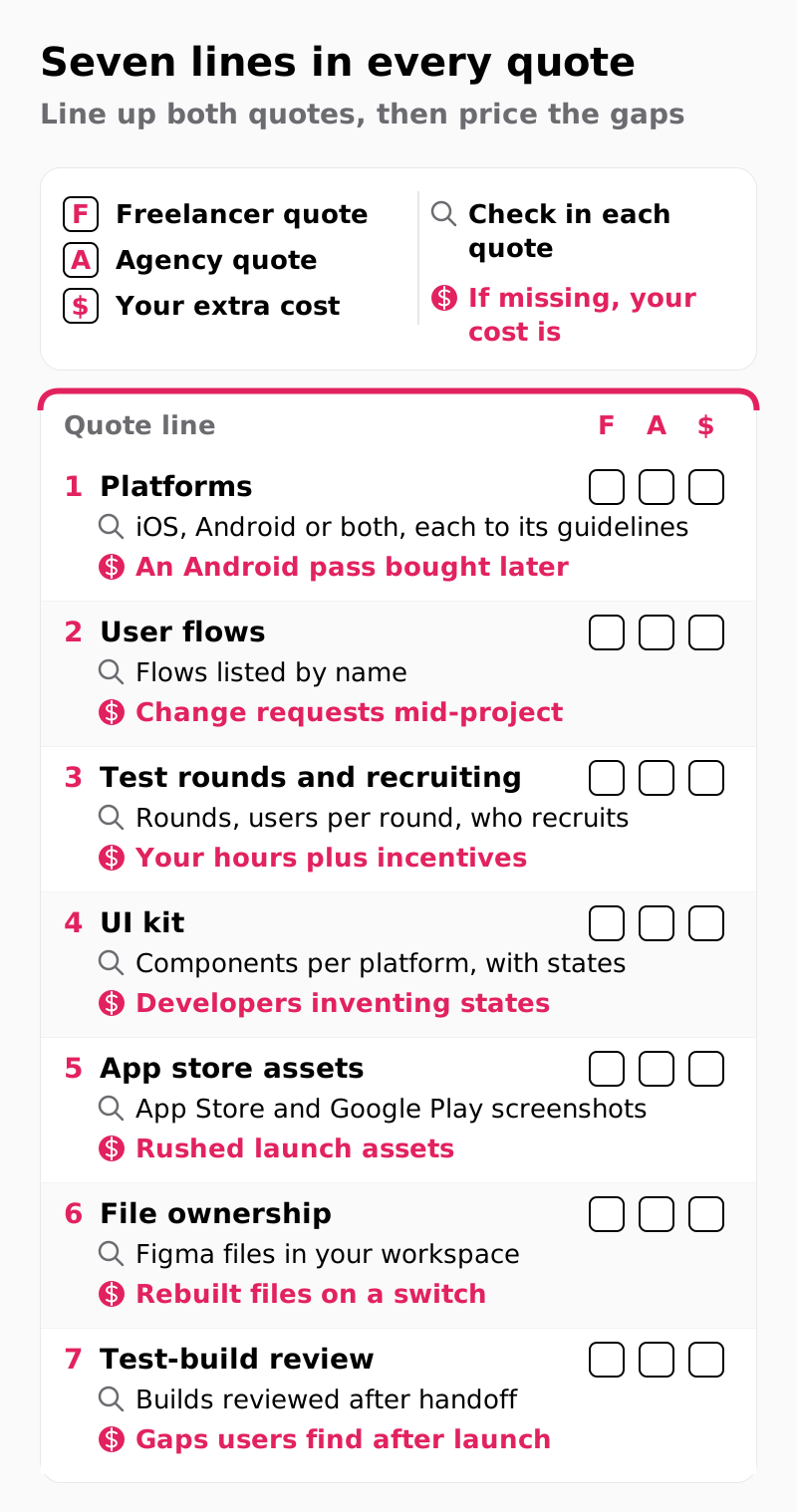
- Line up both quotes on the same seven lines and price the empty ones before you compare totals.
The mobile app design agency vs freelancer decision is usually framed as price against quality, and that framing is wrong: a strong freelance mobile app designer often draws screens as good as any agency's, and projects go wrong in the work around the screens. If a launch date other teams depend on cannot slip, pick an agency. Otherwise, choose a freelancer for a one-platform app whose flows need no user testing before code. For two platforms or flows that need testing, a freelancer works when someone on your team can recruit testers, moderate sessions and review builds; when nobody can, pick an agency.
Is a freelancer or an agency better for mobile app design?
Neither by default: the mobile app design agency vs freelancer question turns on how many platforms you ship, how many test rounds you need and who reviews the build.
Price against quality hides those three variables, plus a fourth: how fixed the launch date is. A freelancer who designs only iOS, runs no user tests and leaves after the Figma files go out has priced a different app from an agency quoting both platforms and test rounds.
Take an illustrative booking app for fitness studios. On iOS only, with a brand kit and a product manager (PM) who runs hallway tests, it fits one designer. On both stores, with a new onboarding flow tied to a marketing date, it outgrows one person.
For how we run user interface (UI) and user experience (UX) work on iOS and Android, see our mobile app UI UX design services. Write down your four answers before reading on, because the decision tree below turns on them.
What work sits inside a mobile app design project?
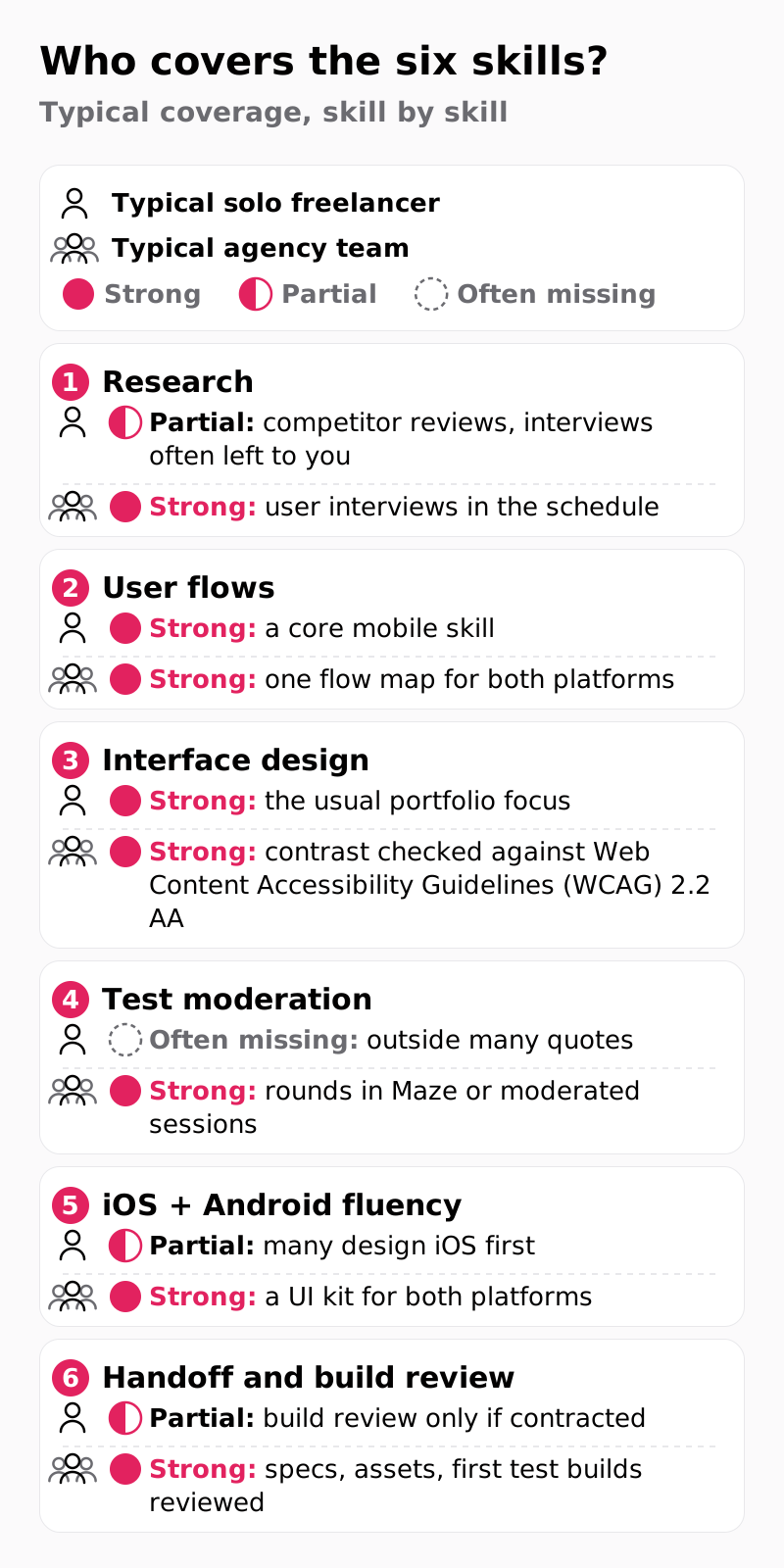
A mobile app design project needs six skills (research, user flows, interface design, test moderation, two-platform fluency and handoff), and few solo freelancers are equally strong in all six.
Take the illustrative fitness app again: with no user tests before code, the first people to try the new onboarding flow are testers of the first TestFlight and Google Play Console builds, after developers have coded it, so every fix becomes a code change. With partial Android fluency, the Android screens become a second purchase, which is line 1 of the quote comparison below.
Show as text
| Skill | Typical solo freelancer | Typical agency team |
|---|---|---|
| Research | Partial: competitor reviews, interviews often left to you | Strong: user interviews in the schedule |
| User flows | Strong: a core mobile skill | Strong: one flow map for both platforms |
| Interface design | Strong: the usual portfolio focus | Strong: contrast checked against Web Content Accessibility Guidelines (WCAG) 2.2 AA |
| Test moderation | Often missing: outside many quotes | Strong: rounds in Maze or moderated sessions |
| iOS + Android fluency | Partial: many design iOS first | Strong: a UI kit for both platforms |
| Handoff and build review | Partial: build review only if contracted | Strong: specs, assets, first test builds reviewed |
Some freelancers are excellent researchers, so send each candidate the six skills, ask which they cover, subcontract or leave to you, and ask how they check contrast against Web Content Accessibility Guidelines (WCAG) 2.2 AA.
Can one freelance designer cover both iOS and Android?
Yes, when they have shipped apps on both platforms and design each one to its own guidelines: Apple's Human Interface Guidelines (HIG) on iOS and Material Design 3 on Android.
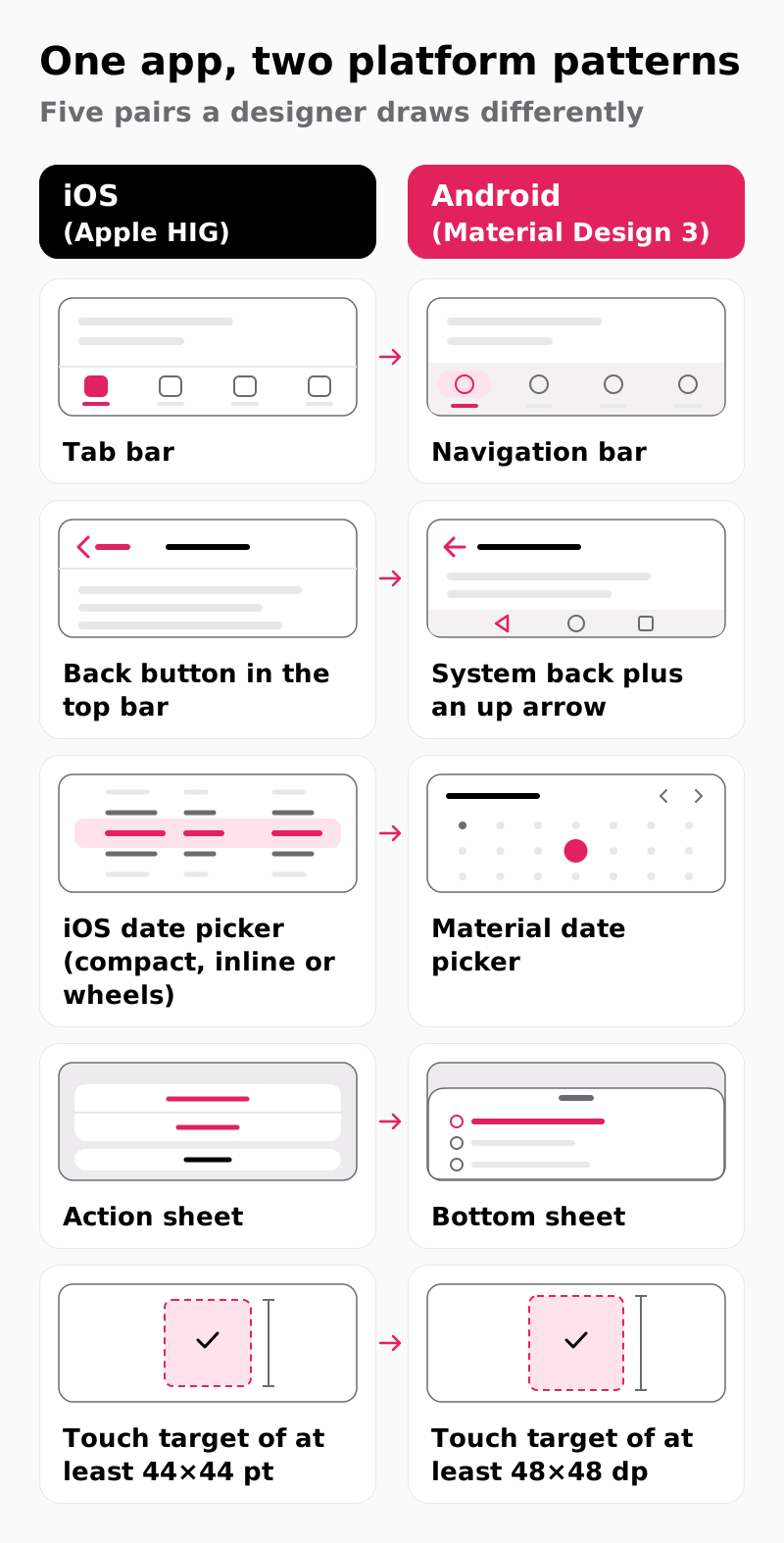
Google's official guide to translating iOS designs treats the Android version as planned work, not a reskin: navigation, sheets and back behavior each change, and Android's system back gesture can take the user out of the app.
Touch targets differ as well. Apple's design guidance asks for controls of at least 44×44 points (pt) so a finger can tap them accurately, and Android's accessibility guidance on touch target size asks for at least 48×48 density-independent pixels (dp).
Show as text
| iOS (Apple HIG) | Android (Material Design 3) |
|---|---|
| Tab bar | Navigation bar |
| Back button in the top bar | System back plus an up arrow |
| iOS date picker (compact, inline or wheels) | Material date picker |
| Action sheet | Bottom sheet |
| Touch target of at least 44×44 pt | Touch target of at least 48×48 dp |
If your app ships to the App Store only, our iOS app design services cover that case. For two platforms, ask a freelancer for the Android version of one iOS project in their portfolio: a fluent designer shows different navigation, while one who stretches iOS screens shows the same layout twice.
Who runs user testing when a freelancer designs your app?
Usually you do: many freelance quotes cover design hours, while recruiting participants, moderating sessions and writing up findings fall to you unless the quote names them.
Usability testing on a clickable prototype finds a broken flow before any code is written. In our engagements, the app prototype is tested with 5 users per round, in Maze or in moderated sessions, before developer handoff. Rounds of that size follow Jakob Nielsen's 2000 article on testing with five users, which argues for testing with no more than five users and running as many small tests as you can afford.
Ask any provider four questions:
- Who recruits participants? The source and who pays incentives, so no cost surfaces later.
- Who moderates? A named person and format, because an unnamed moderator usually means you.
- How many rounds are quoted? A number, so a failed onboarding test leads to a retest.
- What comes back after each round? Findings plus changed screens, because findings alone leave the fix undesigned.
If the first two answers are "you", budget your own hours now or choose a provider who owns them.
What happens at developer handoff and the first test build?
At handoff, the design has to reach developers as buildable specs, and someone has to check the first test builds against it.
Developers build in Swift, Kotlin, React Native or Flutter from specs that must state spacing, states and platform variants. The first builds then arrive through TestFlight, Apple's beta testing service, and Google Play Console's internal, closed or open testing tracks. Build review catches what files cannot: a touch target shrunk to the drawn icon, an iOS action sheet on Android, an empty state nobody coded.
In our five-step process, the last step hands over Figma files, specs and assets, then reviews the first TestFlight and Google Play Console builds.
Many freelance contracts end at file delivery. Write build review into the contract (how many builds, response time, who fixes gaps), and require the Figma files and UI kit, organized by platform, to live in your own workspace.
Same app, two plans: how do the timelines compare?
On the same scope, a solo freelancer does every task inside each phase alone, while a team splits the work, so calendar time differs even when hours look similar.
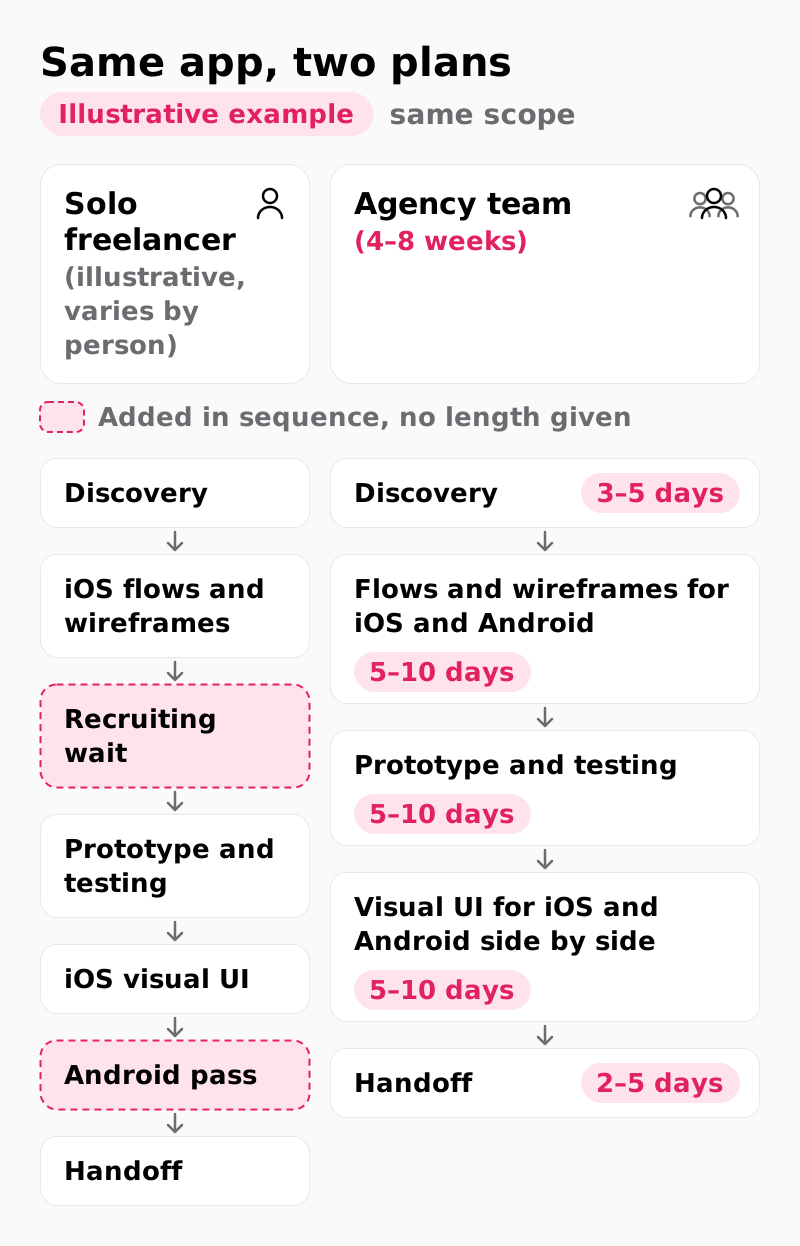
The agency track below shows our five published phases within 4–8 weeks. Inside those phases, our designers wireframe the iOS and Android screens in the same step and build one UI kit for both platforms, so Android is not a separate pass at the end. A solo designer often works through the platforms in sequence, so the illustrative left track adds a recruiting wait and an Android pass, with no length given because it varies by person.
Show as text
- Solo freelancer (illustrative, varies by person): discovery → iOS flows and wireframes → recruiting wait → prototype and testing → iOS visual UI → Android pass → handoff.
- Agency team (4–8 weeks): discovery (3–5 days) → flows and wireframes for iOS and Android (5–10 days) → prototype and testing (5–10 days) → visual UI for iOS and Android side by side (5–10 days) → handoff (2–5 days).
Continuity matters too: when a solo designer without a backup gets sick or signs a bigger client, the timeline pauses, while a team keeps one point of accountability without one point of failure. Ask a freelancer for a weekly plan that names recruiting and the Android pass, and set it beside these phases.
How do you test a mobile portfolio on your own phone?
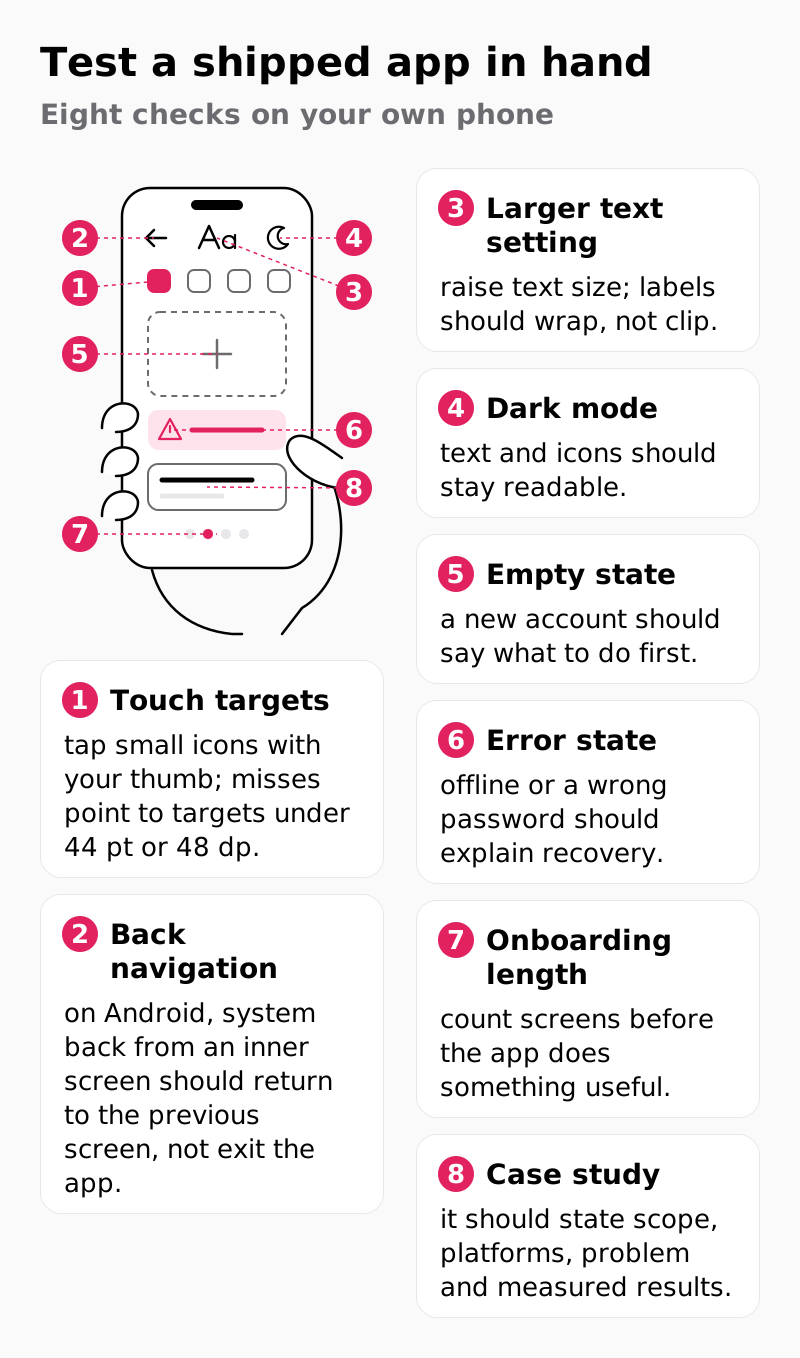
Install two or three of the designer's shipped apps from the App Store and Google Play, and give each one 20 minutes with the eight checks below.
An installed app shows whether the design survived development. Before you hire a mobile app designer, whether a freelancer or an agency, run these checks.
Show as text
- Touch targets: tap small icons with your thumb; misses point to targets under 44 pt or 48 dp.
- Back navigation: on Android, system back from an inner screen should return to the previous screen, not exit the app.
- Larger text setting: raise text size; labels should wrap, not clip.
- Dark mode: text and icons should stay readable.
- Empty state: a new account should say what to do first.
- Error state: offline or a wrong password should explain recovery.
- Onboarding length: count screens before the app does something useful.
- Case study: it should state scope, platforms, problem and measured results.
The first three checks matter most because screenshots hide platform fluency; concept shots that never shipped prove little.
Hold every case study, ours included, to scope plus results. The TradeZella web and mobile revamp names web and mobile app design in scope; after the revamp, the case study reports a 40% increase in user interaction and a 25% boost in user retention. The Anyday mobile wallet case study reports a 40% increase in employee satisfaction from immediate access to wages. Neither result belongs to design alone.
Install the apps before the first call, so the call is about what you found.
When should you hire a freelancer, and when an agency?
If your launch date can slip, hire a freelancer for a one-platform app with no flows to test, or when your PM runs testing and build review; otherwise, hire an agency.
Show as text
- Does a launch date other teams depend on fix the schedule? Yes → agency. No → question 2.
- Does the app ship on iOS and Android at launch? Yes → question 4. No → question 3.
- Must flows be tested with users before code? No → freelancer. Yes → question 4.
- Does someone on your team recruit, moderate and review test builds? Yes → freelancer + your PM (for two platforms, one who has shipped both). No → agency.
Freelancer situations (one platform with no flow to test, or a PM who reviews the builds):
- A UI refresh with a working design system, because the patterns exist and no new flow needs testing.
- One new flow, such as a referral screen, because one person can design it inside your UI kit.
- A clickable investor demo, because it never becomes a build, so build review waits.
Agency situations:
- A new app on both stores with no PM free to test, because two variants and two build sets outgrow one person.
- An onboarding rebuild after first-week retention fell, with nobody to moderate, because the flow needs testing before code.
- A launch tied to a campaign date, because a team keeps moving when one designer is out.
If the tree settles the mobile app design agency vs freelancer question in favor of an agency, your app fits the 4–8 week engagement we run, which ends with a review of your first test builds.
How do you compare a freelancer's quote with an agency's?
Put both quotes on the same seven lines and price whatever the freelancer leaves out, such as recruiting, moderation and Android variants, before you compare totals.
An hourly quote moves with every revision round, so convert it first: ask for estimated hours per quote line and a cap on revision rounds, multiply by the freelancer's own rate, and set that capped total beside the fixed-scope proposal. On Upwork, ask which contract the quote assumes: hourly contracts bill logged hours weekly, up to any weekly limit you set, while fixed-price contracts pay by milestones you fund before work starts.
Show as text
| Quote line | Check in each quote | If missing, your cost is |
|---|---|---|
| Platforms | iOS, Android or both, each to its guidelines | An Android pass bought later |
| User flows | Flows listed by name | Change requests mid-project |
| Test rounds and recruiting | Rounds, users per round, who recruits | Your hours plus incentives |
| UI kit | Components per platform, with states | Developers inventing states |
| App store assets | App Store and Google Play screenshots | Rushed launch assets |
| File ownership | Figma files in your workspace | Rebuilt files on a switch |
| Test-build review | Builds reviewed after handoff | Gaps users find after launch |
If your team can cover one or two empty lines, the freelancer quote holds up; with four, add your extra cost for each empty line to its total before you compare. Our proposals land between $25,000 and $60,000 for 4–8 weeks, and your count of flows, platforms, test rounds and UI kit components is what drives mobile app design pricing toward one end or the other.
Weighing a mobile app design agency against a freelancer usually ends with a quote that has blank lines, and a blank line is unfinished scope, not a flaw. Send us that quote or your flow list and judge our proposal against it line by line. Every project begins with a free consultation and a fixed-scope proposal.
FAQs
Should I hire a freelancer or an agency to design my app?
Start with the launch date: if other teams depend on it, hire an agency. If not, a freelancer suits a one-platform app with no flows to test before code; any other app needs either a PM who recruits, moderates and reviews test builds alongside the freelancer, or an agency. The decision tree shows each path.
Is a freelancer cheaper than an agency for mobile app design?
Yes, per hour in many cases, but not always per project. Freelance totals often leave out recruiting, moderation, Android variants and build review, so price those lines before comparing.
Can I start with a freelancer and switch to an agency later?
Yes. Ask for organized Figma files and a component library in your own workspace, so the next team inherits them. If the next team is ours and the work is a redesign, it starts with a review of the current app, app store reviews and analytics before any new screens are designed.
Do I need an in-house designer instead?
No, not for a first app project. A freelancer or agency starts faster, and an in-house designer pays off once design work runs release after release.
Should the same designer do the iOS and the Android version?
Yes, when they design each platform to its own guidelines from one shared user flow map. Otherwise the Android app becomes a stretched copy of the iOS app.
What should a mobile app design contract include?
It should name platforms, user flows, test rounds and who recruits, plus Figma files, a UI kit and app store assets. Add file ownership and the number of test builds reviewed, and have counsel check the legal terms.