Key takeaways
- MVP design starts with one hypothesis sentence: target user, job, one core action and the riskiest assumption.
- A feature cut list sorts each feature into keep, do by hand or later, leaving 3–5 user flows.
- Map every user flow with its empty, loading, error and first-run states before any high-fidelity UI.
- Test the clickable prototype with 5 users per round and record a System Usability Scale score; 68 is the published average.
- On our startup engagement, MVP design takes 4–8 weeks and $25,000–$60,000, with 2–4 founder hours per week.
A minimum viable product (MVP) rests on one sentence with four blanks, and until each blank holds an answer, working out how to design an MVP screen by screen is guesswork:
For [target user] who [job they struggle with], the MVP lets them [one core action], so we learn whether [riskiest assumption].
Here is how to design an MVP in 6 steps, in order: write the hypothesis, cut the feature list, map user flows with their states, draw wireframes and then user interface (UI) screens, test with 5 users and hand off to developers. Our user experience (UX) team runs that sequence as a 4–8 week engagement within UI UX design for startups.
What does MVP design cover, and what is an MVP not?
MVP design turns one product hypothesis into 3–5 tested core user flows, screens and a starter design system that developers can build.
Minimum viable product design is the slice of product design that covers the interface, user flows and screens of the smallest product that tests one value proposition.
Eric Ries's Lean Startup principles treat the MVP as the quickest way into the build-measure-learn feedback loop: put a product in front of customers, measure how they respond, then decide whether to pivot or persevere. The table compares the MVP with three artifacts founders often mistake for it.
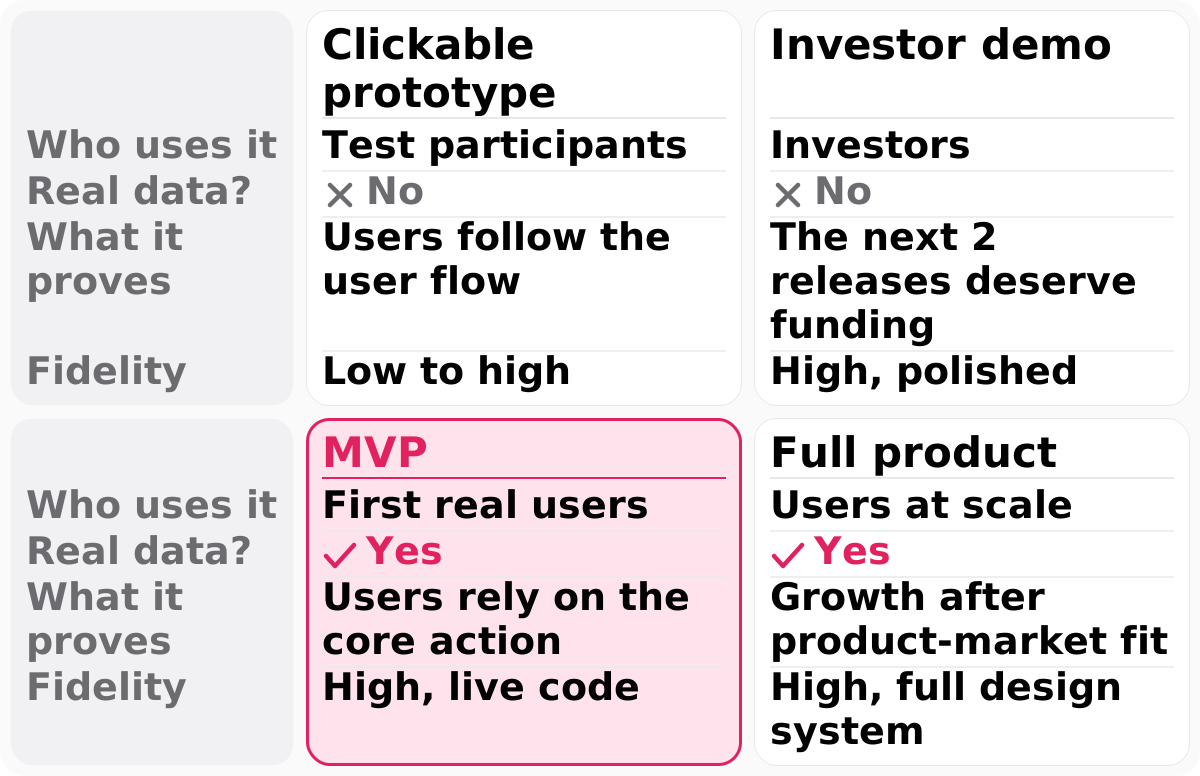
| Clickable prototype | Investor demo | MVP | Full product | |
|---|---|---|---|---|
| Who uses it | Test participants | Investors | First real users | Users at scale |
| Real data? | No | No | Yes | Yes |
| What it proves | Users follow the user flow | The next 2 releases deserve funding | Users rely on the core action | Growth after product-market fit |
| Fidelity | Low to high | High, polished | High, live code | High, full design system |
The investor demo is the usual mix-up: it is a clickable prototype of the next 2 releases a funding round pays for, while the MVP is the working product users rely on today. An MVP stops before product-market fit is proven. If your plan shows investor-demo polish on screens no user has tried, start at step 1.
Step 1: how do you turn the idea into one MVP hypothesis?
MVP design starts with one hypothesis sentence that names the startup's target user, their job, one core user flow and the riskiest assumption it tests.
Knowing how to design an MVP starts with what to leave out, and the hypothesis decides that. Here is the intro's sentence filled in for an illustrative startup, a scheduling tool for independent physiotherapists:
For independent physiotherapists who refill canceled slots by texting patients one by one, the MVP lets them publish open slots as a booking link, so we learn whether they will hand rebooking to patients instead of texting.
The sentence tests one value proposition, faster rebooking, and every later feature is judged against it.
Jobs to be Done fills the blanks with evidence: the method treats a product as something a person hires to make progress on a job, so each interview asks about the tool or workaround the user relies on today. We set the interview count at 5–8.
Then write one success signal, an activation event developers can track after launch. Activation rate is the share of early users who complete the core action in their first session; here, new sign-ups who publish a first open slot. Write your signal before you list a single feature.
Step 2: how do you build a feature cut list?
A feature cut list sorts a startup's MVP features into keep, do by hand or later, leaving 3–5 user flows such as sign-up, the core action and payment.
Three questions do the sorting. This is our working rule, not a published method:
- Does the core user flow break without it? If yes, keep it.
- Does it test the MVP hypothesis? If yes, keep it.
- Do first users still need it, and can a person deliver it by hand? If yes, do it by hand; if not, it waits.
The middle column is a concierge MVP in miniature. A concierge MVP delivers part of the service by hand, with a person from the startup doing work that software will do later, such as manual invoicing before automated billing.
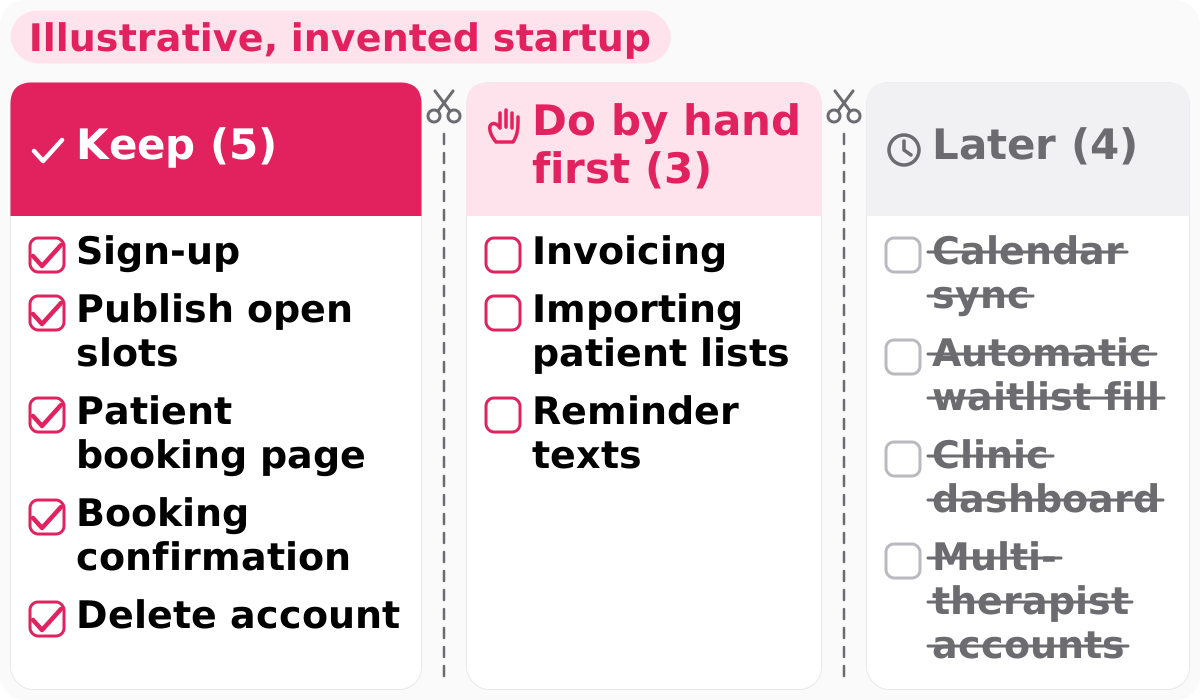
Illustrative, invented startup:
- Keep (5): sign-up, publish open slots, patient booking page, booking confirmation, delete account.
- Do by hand first (3): invoicing, importing patient lists, reminder texts.
- Later (4): calendar sync, automatic waitlist fill, clinic dashboard, multi-therapist accounts.
The flow count on our startup engagement is 3–5 MVP user flows; the example keeps three, plus account deletion in settings. Two items override the three questions:
- Data deletion on request, because the General Data Protection Regulation (GDPR) gives people in the European Union a right to erasure when you offer them your product, and the California Consumer Privacy Act (CCPA) gives California consumers a right to delete once a business passes its revenue or data thresholds.
- An in-app delete-account flow in any iOS app that offers account creation, because Apple App Store Review Guideline 5.1.1(v) requires it.
Founders defend every feature they wrote. On our startup engagement, the 5-day GV Design Sprint decides on 1 direction, and the user research step after it turns the interview findings into a prioritized feature list. Run the three questions on your own list first.
Step 3: how do you map each core user flow and its states?
Map each core user flow of the MVP from entry point to success state before designing a screen, then add the empty, loading, error and first-run states.
MVP UX design starts with the core user flow, not with the screens. To design UX for an MVP, draw each user flow in FigJam, Figma's whiteboard: a box per step, a diamond per decision, and the activation event from step 1 as the success state.
Empty states are the screens a user sees before any data exists, such as a schedule with no slots, so each one names the next action. Loading states cover waits, error states matter most in sign-up and payment, and the first-run state is the one-time onboarding that points at the core action.
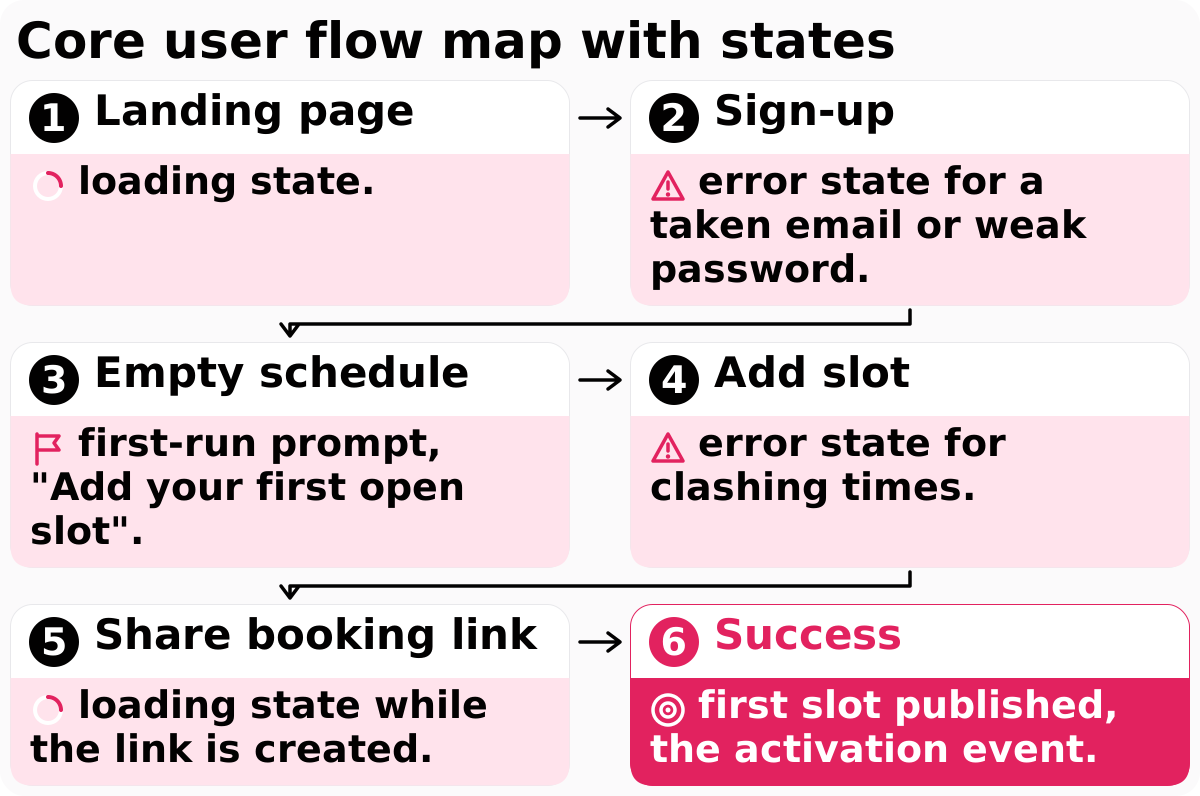
- Landing page: loading state.
- Sign-up: error state for a taken email or weak password.
- Empty schedule: first-run prompt, "Add your first open slot".
- Add slot: error state for clashing times.
- Share booking link: loading state while the link is created.
- Success: first slot published, the activation event.
Mapping before screens is how we worked on Vocable, an artificial intelligence (AI) content marketing platform we took from idea to MVP: we mapped the full creator journey and designed each screen around a problem we heard in stakeholder interviews.
Developers build every state you draw and guess at every state you skip, so list the states under each box before you open a design file.
How to design an MVP's screens: wireframes first, then UI
Step 4 designs the MVP's screens in two passes: low-fidelity wireframes for each user flow, then high-fidelity UI once interviews confirm the startup's problem.
Screen fidelity rises in two passes, so feedback lands on the user flow before the visuals.
Pass 1: low-fidelity wireframes
Low-fidelity wireframes are grey-box layouts with real copy for every screen and state on the flow map.
Real labels show whether a physiotherapist understands "Publish slot" before anyone styles the button. Wireframe the empty and error states too, not only the happy path.
Pass 2: MVP UI design and platform rules
MVP UI design starts once 5–8 interviews confirm the problem, and it applies each platform's touch target size and contrast ratio from the first screen.
That order fits pre-seed teams, who need problem interviews and a low-fidelity clickable prototype before polished UI; our startups UI UX design work sizes each design output to the funding stage. The Apple Human Interface Guidelines set a default control size for iOS, and Material Design 3 sets a minimum touch target size for Android. For the web, Web Content Accessibility Guidelines (WCAG) 2.2 Success Criterion 2.5.8 sets 24 by 24 Cascading Style Sheets (CSS) pixels at level AA, with exceptions such as enough spacing. Success Criterion 1.4.3 adds a contrast ratio of 4.5:1 for body text.
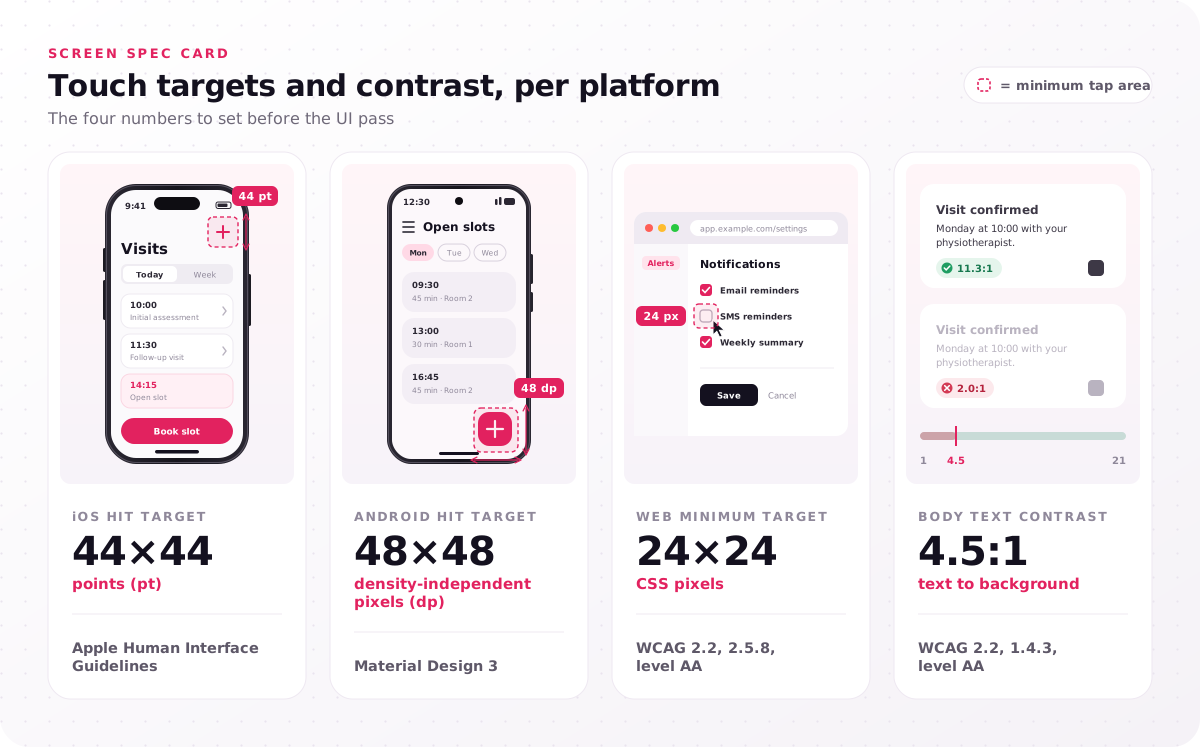
| Rule | Value | Source |
|---|---|---|
| iOS hit target | 44×44 points (pt) | Apple Human Interface Guidelines |
| Android hit target | 48×48 density-independent pixels (dp) | Material Design 3 |
| Web minimum target | 24×24 CSS pixels | WCAG 2.2, 2.5.8, level AA |
| Body text contrast | 4.5:1 | WCAG 2.2, 1.4.3, level AA |
The UI pass also produces a starter design system. Design tokens are named values for color, typography and spacing that designers and developers reference instead of hard-coded numbers. Ours pairs them with a component count of 20–30 core components, such as buttons, inputs and cards: a starter set, not a full design system.
MVPs save or lose engineering time here, so our startup engagement builds the starter design system inside the UI design and prototype step (5–12 days), not after launch. Ask whoever designs your screens which components exist before the first high-fidelity screen ships.
Step 5: how do you test the clickable prototype with 5 users?
Test the MVP's clickable prototype with 5 users before production code: give each the core user flow's task, watch where they stall and record a System Usability Scale score.
Usability testing here means watching target users try the design, not checking code. We set test participants at 5 users per round, following Jakob Nielsen's 2000 article: he estimated that 5 users uncover about 85% of usability problems, so a budget buys more in several small rounds.
The clickable Figma prototype runs unmoderated in Maze, which records each participant's path and misclicks; a moderated video session suits a user flow with many branches. Write tasks as goals and never name the button: "A patient canceled tomorrow at 10; make that time bookable" tests the core action, "Tap Publish slot" tests nothing.
The System Usability Scale (SUS) is a 10-item questionnaire scored from 0 to 100, and the score is not a percentage. MeasuringU's Jeff Sauro reports an average SUS score of 68 across 500 studies.
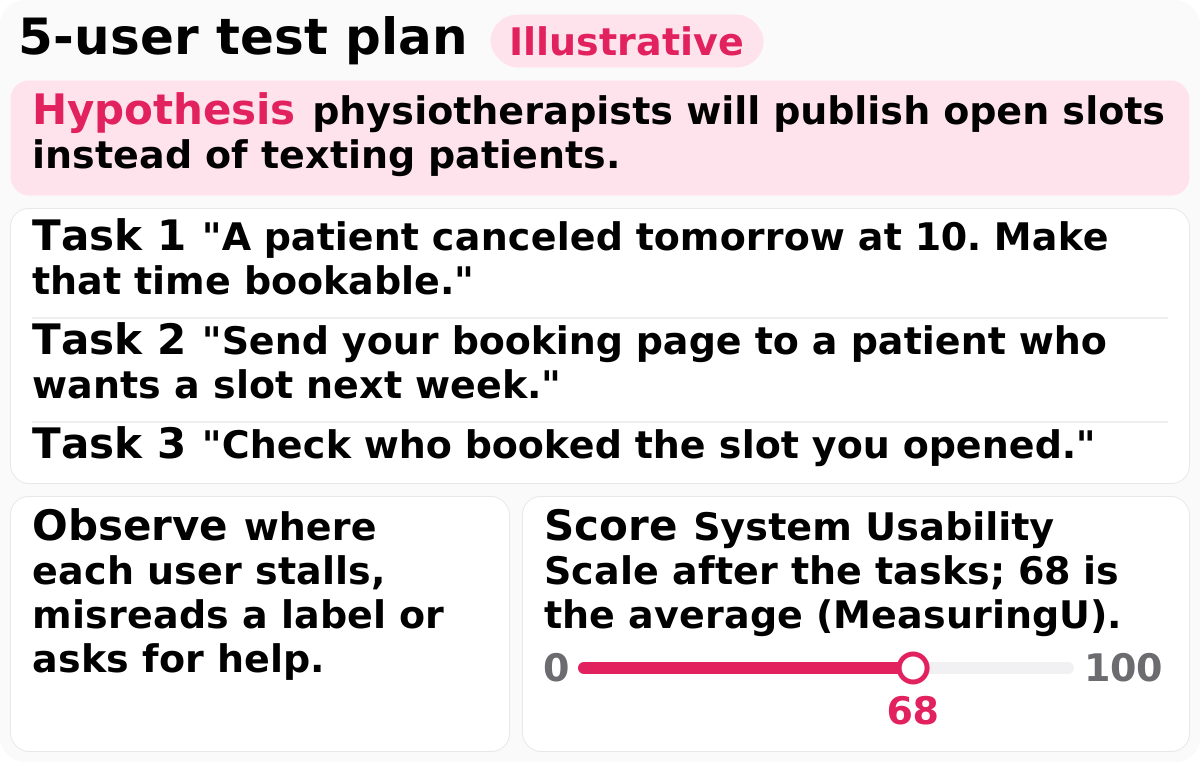
Illustrative:
- Hypothesis: physiotherapists will publish open slots instead of texting patients.
- Task 1: "A patient canceled tomorrow at 10. Make that time bookable."
- Task 2: "Send your booking page to a patient who wants a slot next week."
- Task 3: "Check who booked the slot you opened."
- Observe: where each user stalls, misreads a label or asks for help.
- Score: System Usability Scale after the tasks; 68 is the average (MeasuringU).
We treat 68 as one signal next to what users do, not as a pass mark on its own. After each round, pick one of three moves:
- Fix and retest when users stall on the same step or the score falls below 68, because changed screens need 5 new users to confirm the fix.
- Move to the developer handoff when users finish every task without help, the score is 68 or higher and no one says they would keep texting patients, because more rounds would polish rather than teach.
- Revisit the hypothesis when users finish the tasks but say they would keep texting patients, because the riskiest assumption failed, not the screens.
Teams without time to recruit and moderate can hand testing to our usability testing services, which include participant recruitment and moderated sessions. Either way, book your 5 participants before the UI pass ends.
Step 6: what should the MVP design hand to developers?
The MVP design hands developers annotated Figma files for every screen and state in the core user flows, plus tokens, components, the success-signal event and open questions.
The last part of how to design an MVP is the part many guides stop short of: what the developers receive. On our startup engagement, the developer handoff delivers annotated Figma files at the end of the testing and handover step. Figma Dev Mode is the developer-focused workspace for inspecting designs, measurements, variables and generated code snippets; it needs a Full or Dev seat on a Professional, Education, Organization, Government or Enterprise plan.
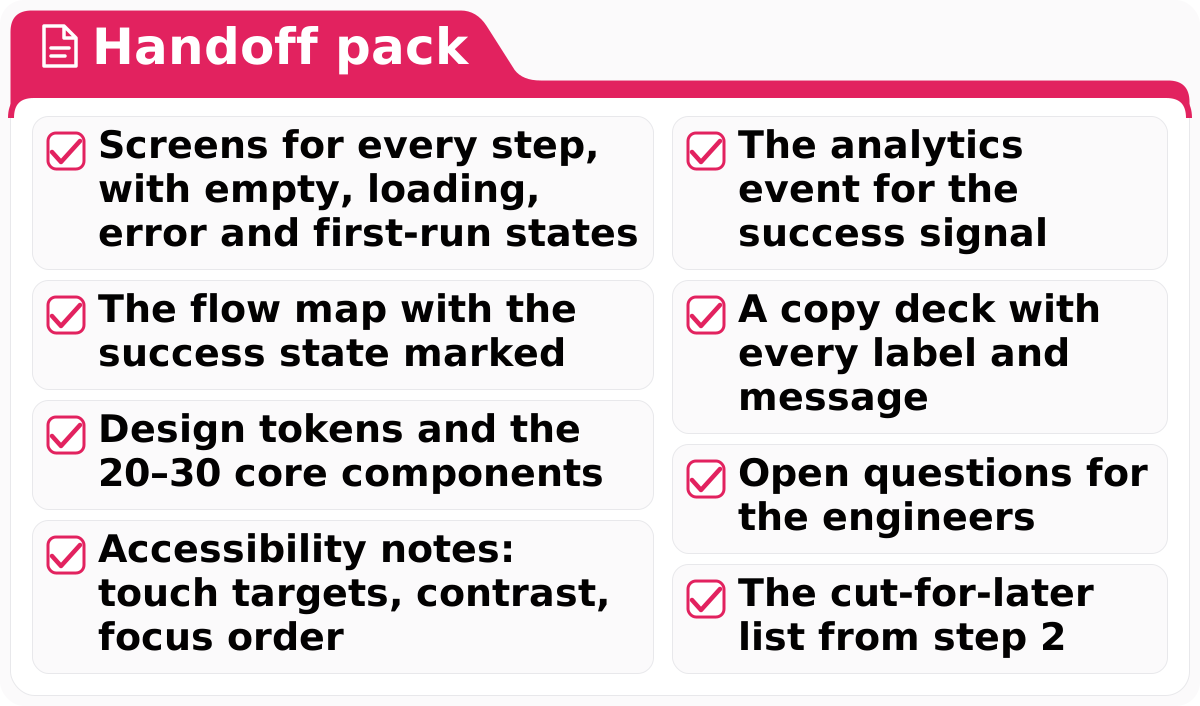
- Screens for every step, with empty, loading, error and first-run states
- The flow map with the success state marked
- Design tokens and the 20–30 core components
- Accessibility notes: touch targets, contrast, focus order
- The analytics event for the success signal
- A copy deck with every label and message
- Open questions for the engineers
- The cut-for-later list from step 2
Two lines are easy to drop. Without the analytics event, the launch cannot report the success signal from step 1; without the cut-for-later list, engineers rebuild features the test already deferred. Check your pack against all eight before the first engineering sprint.
How long does MVP design take, and what does a founder do?
MVP design takes 4–8 weeks, or 20–40 working days, on our startup engagement, and founders spend about 2–4 hours per week on reviews outside the design sprint week.
The engagement duration is the sum of five steps that map onto this guide's six:
- Design sprint (5 days): map, sketch, decide on 1 direction, prototype and test with 5 users; drafts step 1.
- User research (3–7 days): 5–8 Jobs to be Done interviews, 1 target persona and a prioritized feature list; firms up steps 1 and 2.
- MVP flows and wireframes (4–8 days): steps 3 and 4's first pass.
- UI design and prototype (5–12 days): high-fidelity screens, the starter design system and the clickable prototype.
- Testing and handover (3–8 days): steps 5 and 6, with the SUS score recorded.
Founder time follows a fixed rhythm: 2 review sessions of 45 minutes per week, plus answers in Figma comments within 1 working day. The remote design sprint asks more, 2–3 hours per day for its 5 days.
The engagement price is $25,000–$60,000, set by the number of MVP flows, the number of platforms, the depth of user research and the scope of the starter design system; the hub shows what a 4–8 week MVP design engagement costs.
Our case study traces Nitro League from idea to MVP launch plan: the racing game's work began with product discovery and stakeholder interviews, and the user flows were mapped from those. Block the founder review slots in your calendar before the design sprint starts.
Which MVP design mistakes cause the most rework?
In our practice, the MVP design mistakes that cause the most startup rework are screens before the core user flow, polish before testing, missing states and component-free handoffs.
Six mistakes undo MVP designs, each tied to the step that prevents it:
- Screens before the flow map, because each user flow change then rewrites finished screens (step 3).
- Polished UI before a usability test, because the polish is thrown away when users stall (steps 4 and 5).
- No empty or error states, because developers invent them under deadline (step 3).
- Every platform at once, because each platform adds screens to design and test before the core job is proven (step 2).
- No success signal, so the launch shows usage but cannot confirm the hypothesis (step 1).
- Screens without tokens or components, because engineers then build a new button per screen (step 6).
If your plan shows one of these, return to the step in parentheses before any code is written.
If you would rather not work out how to design an MVP alone, send us your feature list as it stands today, long or short. Every project begins with a free consultation and a fixed-scope proposal; in the consultation we sort your list into keep, do by hand and later, and size the 3–5 MVP flows that set the proposal's scope.
FAQs
Can you design an MVP without a designer?
Yes, for the first steps of how to design an MVP: founders can write the hypothesis, cut the feature list and sketch user flows in FigJam. A designer pays off before high-fidelity UI, where states, platform rules and the 5-user test decide what developers build.
How many screens does an MVP need?
Count user flows, not screens: an MVP needs 3–5 user flows, such as sign-up, the core action and payment. Each user flow then needs its empty, loading, error and success states, so the screen total follows from the flow map.
Should you design the MVP for web or mobile first?
Design first for the platform where the target user does the core job; in the illustrative example, physiotherapists who manage their schedule on a clinic computer point to web. A second platform adds screens to design and test, so it raises the price of the engagement.
Does a no-code MVP still need UX design?
Yes. No-code tools change who builds the product, not the user flows, states and usability test the user meets. An untested user flow confuses users whether it runs on no-code or custom code.
How much does MVP design cost?
Our MVP design work costs $25,000–$60,000 as a 4–8 week startup engagement. The number of MVP flows and platforms, the depth of user research and the scope of the starter design system decide where a project lands.